
[ez-toc]
Security companies have already started moving away from paper logs, spreadsheets, phone calls, and disconnected systems. But simply replacing paper with digital tools isn’t enough anymore.
The next challenge is connecting security operations.
A guard may use one system for time tracking, another for incident reports, and a messaging app to communicate with supervisors. Meanwhile, managers may rely on spreadsheets to manage information and clients may still wait for end-of-day or end-of-week reports.
The result is a business that is technically digital but still operationally disconnected.
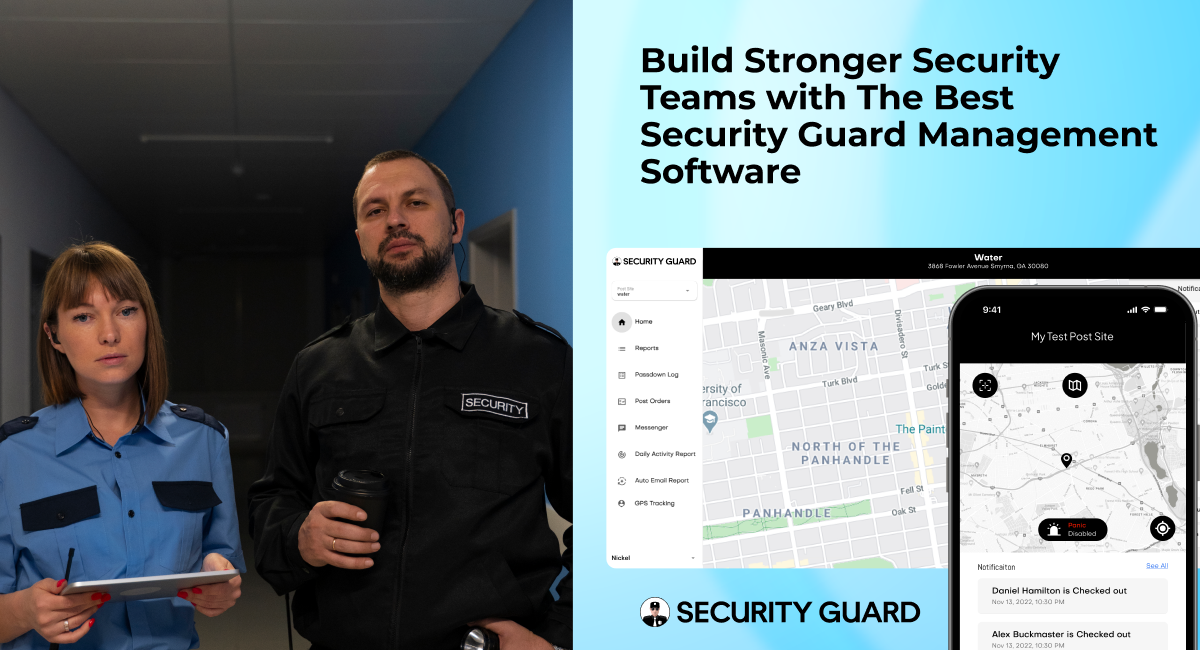
A modern security guard app can bring these processes together, giving guards, supervisors, managers, and clients access to the information they need from a centralized platform.
This shift matters because today’s security companies need more than digital paperwork. They need real-time visibility, better communication, stronger accountability, and connected operations.
The Security Industry Is Moving Beyond Paper
For years, security companies relied on paper reports, printed post orders, handwritten time sheets, phone calls, and spreadsheets to manage daily operations.
These processes can work when a company has only a few guards and one or two locations.
As the business grows, however, the weaknesses become harder to ignore.
Paper reports can be:
- Lost or damaged
- Difficult to organize
- Delayed before reaching supervisors
- Difficult to search
- Time-consuming to review
- Difficult to share with clients
The same problem exists when important information is scattered across phone calls, text messages, emails, spreadsheets, and separate software systems.
Digital transformation initially focused on replacing these manual processes. But the next stage is about connecting the information created by those processes.
Trackforce describes this as moving beyond the first wave of digital transformation, where companies digitized individual processes but often continued to operate with disconnected systems and data silos.
That is where a connected security guard app becomes valuable.
What Is a Connected Security Guard App?
A connected security guard app is more than a mobile application for submitting reports.
It acts as a central operational layer connecting field officers with supervisors and management.
Depending on the platform, it can bring together:
- Guard communication
- Incident reporting
- GPS tracking
- Time and attendance
- Guard tours
- Post orders
- Passdown logs
- Emergency alerts
- Team management
- Client reporting
- Multi-site visibility
Instead of information being trapped in separate systems, the organization can create a more consistent flow of information from the field to management.
For example:
Guard starts shift → checks in → receives post orders → performs patrol → reports an incident → supervisor receives the report → manager reviews activity → client receives documented information.
That connected workflow is far more useful than simply digitizing one task at a time.
Why Security Companies Need Connected Operations
Technology adoption in the security industry is no longer simply about eliminating paperwork.
Clients increasingly expect transparency, faster communication, and evidence that contracted services are being delivered. At the same time, security companies need to manage increasingly complex operations without continuously adding administrative work.
TacDesk highlights several consequences of remaining dependent on outdated processes, including operational inefficiency, competitive disadvantage, talent challenges, and limited access to useful operational data.
A connected security operation addresses these challenges in several ways.
1. Real-Time Communication Between Guards and Supervisors
Security operations can change quickly.
A guard may discover suspicious activity, need assistance, receive a new instruction, or encounter a change at the property.
When communication depends entirely on phone calls or scattered text messages, important information can become difficult to track.
A security guard app can centralize communication through:
- In-app messaging
- Push notifications
- Team announcements
- Shift updates
- Emergency alerts
- Site-specific communication
Supervisors can communicate with individual guards or larger teams without relying on multiple communication channels.
This creates a more reliable operational record while helping teams respond faster.
2. Faster and More Reliable Incident Reporting
Incident reporting is one of the most important responsibilities of a security officer.
Yet traditional reporting often means completing paperwork after an incident or at the end of a shift.
This creates opportunities for delays, missing information, and inconsistent documentation.
A mobile security guard app allows officers to document incidents directly from the field.
Reports can include:
- Photos
- Videos
- GPS information
- Time stamps
- Digital signatures
- Notes
- Custom report fields
- Supporting attachments
Instead of information sitting on a desk until someone reviews it, supervisors can receive the report shortly after it is submitted.
This improves both internal response and client communication.
3. GPS Tracking Creates Better Operational Visibility
A supervisor managing several sites cannot physically be everywhere at once.
GPS tracking provides another way to understand what is happening in the field.
Depending on the platform, supervisors can use GPS information to:
- Monitor guard locations
- Verify site presence
- Review movement history
- Support patrol verification
- Improve dispatch decisions
- Coordinate emergency response
The purpose isn’t simply to put guards on a map.
The real value is connecting location information with other operational data.
For example, if an incident occurs at 10:30 PM, managers can have additional context about the guard assigned to that location and the activity taking place around the time of the incident.
That creates a stronger operational record than a standalone paper report.
4. Digital Post Orders Keep Guards Updated
Post orders are essential for consistent security operations.
They tell guards what they are expected to do at a specific location and may include:
- Patrol instructions
- Emergency procedures
- Access requirements
- Contact information
- Client-specific rules
- Site responsibilities
- Reporting requirements
The problem with paper post orders is simple: they can become outdated.
A supervisor may update an instruction, but an officer could still be working from an older printed document.
Digital post orders allow updated instructions to be distributed through the app, giving guards access to current information from their mobile devices.
This helps reduce communication gaps and keeps procedures more consistent across locations.
5. Digital Time Tracking Improves Accountability
Time and attendance are closely connected to security operations.
A missed check-in can indicate:
- A late arrival
- A coverage problem
- A scheduling issue
- A communication gap
- A potential payroll discrepancy
Digital check-in and check-out creates a more reliable record than handwritten timesheets.
It can also help management:
- Verify attendance
- Maintain accurate shift records
- Reduce manual data entry
- Improve payroll preparation
- Identify coverage issues
- Compare scheduled and actual hours
The benefit isn’t simply saving administrative time.
Accurate time information gives managers better visibility into the workforce.
6. Digital Passdown Logs Improve Shift Handoffs
Security doesn’t stop when one shift ends.
Important information needs to move from one officer to the next.
A guard finishing a shift may need to communicate:
- An unresolved incident
- Equipment problems
- Visitor information
- Maintenance concerns
- Suspicious activity
- Special instructions
- Site observations
If that information is passed verbally, important details can be forgotten.
Digital passdown logs create a documented handoff between shifts.
The incoming officer can review the information before beginning the shift instead of relying entirely on a verbal conversation.
This improves continuity, especially for 24/7 security operations.
The Problem With Using Too Many Disconnected Tools
One of the biggest mistakes security companies can make is assuming that adding more software automatically makes operations more efficient.
It doesn’t.
Consider an operation where:
- Scheduling happens in one platform
- Time tracking happens somewhere else
- Incident reports are submitted through email
- Guards communicate through text messages
- Patrol activity is recorded separately
- Client reports are manually assembled
- Management uses spreadsheets for analysis
Every individual process may technically be digital.
But the overall operation is still fragmented.
This is the digital silo problem.
Trackforce identifies disconnected systems and manual workarounds as signs that digital transformation has stalled.
The goal should therefore not be to digitize every task independently.
The goal should be to connect the workflows that depend on each other.
What a Connected Security Operation Looks Like
Imagine a guard beginning a night shift at a commercial property.
Instead of starting with a paper folder and a phone, the guard opens the security guard app.
Step 1: The guard checks in
The system records the start of the shift.
Step 2: The guard reviews post orders
The latest site instructions are available directly through the mobile application.
Step 3: The guard begins the patrol
GPS and patrol tools provide visibility into field activity.
Step 4: The guard discovers an issue
The officer documents the incident from the mobile device and attaches photos.
Step 5: The supervisor receives the report
Management can review the information without waiting for the end of the shift.
Step 6: The team communicates
If additional action is required, the supervisor can communicate with the guard through the platform.
Step 7: The next shift receives the information
The incident and relevant instructions can become part of the digital passdown.
Step 8: The client receives documentation
The security company can provide professional reporting that demonstrates what happened and how the team responded.
Each individual feature is useful.
But the real value comes from how those features work together.
8 Benefits of a Connected Security Guard App
1. Better Operational Efficiency
Managers spend less time collecting information from multiple systems.
Instead of switching between spreadsheets, emails, messaging apps, paper reports, and separate dashboards, more information can be managed from one platform.
2. Stronger Guard Accountability
Digital records can provide evidence of:
- Check-ins
- Reports
- Patrol activity
- Site activity
- Communications
- Time records
This gives supervisors a clearer picture of field operations.
3. Faster Response to Incidents
Real-time communication, digital reporting, GPS visibility, and emergency alerts can help supervisors identify and respond to problems more quickly.
4. Better Client Transparency
Clients want more than a statement saying that a guard was on site.
They increasingly want evidence and visibility.
Digital reports, patrol records, incident documentation, and other operational information can help security companies demonstrate the value of their services.
5. Less Administrative Work
Digitizing repetitive processes reduces the amount of time spent:
- Entering data
- Organizing paperwork
- Searching for reports
- Preparing documentation
- Confirming attendance
- Following up with guards
This allows managers to spend more time on clients, quality control, and business growth.
6. Better Shift Continuity
Digital passdown information reduces the risk of important information being lost between shifts.
7. More Consistent Service Across Multiple Sites
A centralized system makes it easier to standardize processes across different properties.
Whether a company manages five sites or fifty, supervisors can use the same operational framework.
8. Better Data for Management Decisions
Digital operations create data.
That data can eventually help managers identify patterns such as:
- Repeated incidents
- Missed patrols
- Coverage gaps
- Attendance problems
- Frequent site issues
- Response trends
This allows management to move from simply reacting to problems toward identifying recurring operational issues.
What Should You Look for in a Security Guard App?
Not every security guard app provides the same level of operational connectivity.
Before choosing software, security companies should evaluate whether the platform supports the entire workflow rather than just one feature.
Mobile Incident Reporting
Can guards create reports directly from the field?
GPS Guard Tracking
Can supervisors view guard locations and review historical activity?
Guard Tour Management
Can the system verify patrol activity and checkpoints?
Digital Post Orders
Can managers update site instructions without replacing paper documents?
Time and Attendance
Can guards check in and out digitally?
Real-Time Notifications
Can supervisors quickly communicate important information to the team?
Passdown Logs
Can information move from one shift to the next?
Emergency Alerts
Can guards quickly request assistance when a serious incident occurs?
Client Reporting
Can the company provide clients with professional documentation?
Multi-Site Management
Can supervisors manage multiple properties from a centralized platform?
Ease of Use
Perhaps most importantly, will guards actually use it?
Trackforce notes that clunky mobile applications can contribute to poor adoption, while TacDesk emphasizes the importance of simple, mobile-first tools for frontline workers.
A powerful platform that guards avoid using is not a successful technology investment.
How to Start Connecting Your Security Operations
You don’t need to digitize everything at once.
A practical approach is to identify the biggest operational gaps first.
1. Audit your current processes
Look at where your team still relies on:
- Paper
- Spreadsheets
- Phone calls
- Email chains
- Manual data entry
- Separate systems
Ask where information gets lost or delayed.
2. Identify disconnected workflows
Look for processes that depend on each other but currently operate separately.
For example:
Scheduling → Time Tracking → Payroll
or:
Guard Activity → Incident Reporting → Client Reporting
These are good candidates for integration.
3. Prioritize frontline usability
The technology needs to work for the people actually using it in the field.
Choose tools that are mobile-friendly, intuitive, and easy to learn.
4. Give your team a reason to adopt it
Technology adoption is not only a software problem.
Guards and supervisors need to understand how the system makes their jobs easier.
Less paperwork, faster reporting, easier communication, and better access to information are tangible benefits for frontline teams.
5. Measure the results
After implementation, monitor improvements such as:
- Report submission time
- Administrative hours
- Missed check-ins
- Patrol completion
- Response times
- Client reporting time
- Data accuracy
The goal is to demonstrate measurable operational improvement.
The Future of Security Operations Is Connected
The security industry is moving beyond the question of whether companies should adopt technology.
The more important question is now:
Are your systems connected enough to actually improve the way your operation works?
Digitizing a paper report is useful.
Digitizing a time sheet is useful.
Adding GPS tracking is useful.
But when these capabilities work together, the value becomes much greater.
A connected security guard app can give guards the tools they need in the field, supervisors the visibility they need to manage operations, and clients the transparency they need to trust the service they’re receiving.
That is the next stage of digital transformation for security companies.
It isn’t about replacing people with technology.
It’s about giving your people better information, better communication, and better tools to do their jobs.
Build a More Connected Security Operation
Security Guard App brings essential security operations together in one platform, including GPS tracking, reporting, time tracking, passdown logs, post orders, messaging, and panic alerts.
Instead of managing disconnected tools and manual processes, security companies can create a more centralized workflow for managing guards and client sites.
If your security operation still depends heavily on paper, spreadsheets, phone calls, and disconnected systems, now is a good time to evaluate where technology can create the biggest operational improvement.
The future of security management isn’t just digital. It’s connected.
Leave A Comment