
Every security shift generates important information. Guards complete patrols, check access points, observe suspicious activity, respond to incidents, and communicate updates to supervisors.
But when reports are handwritten, submitted late, or scattered across emails and messaging apps, important details can be missed.
For security company owners and operations managers, the challenge is not simply collecting reports. It’s making sure those reports are accurate, available when needed, and useful for managing security operations.
That’s where security guard reporting software makes a difference.
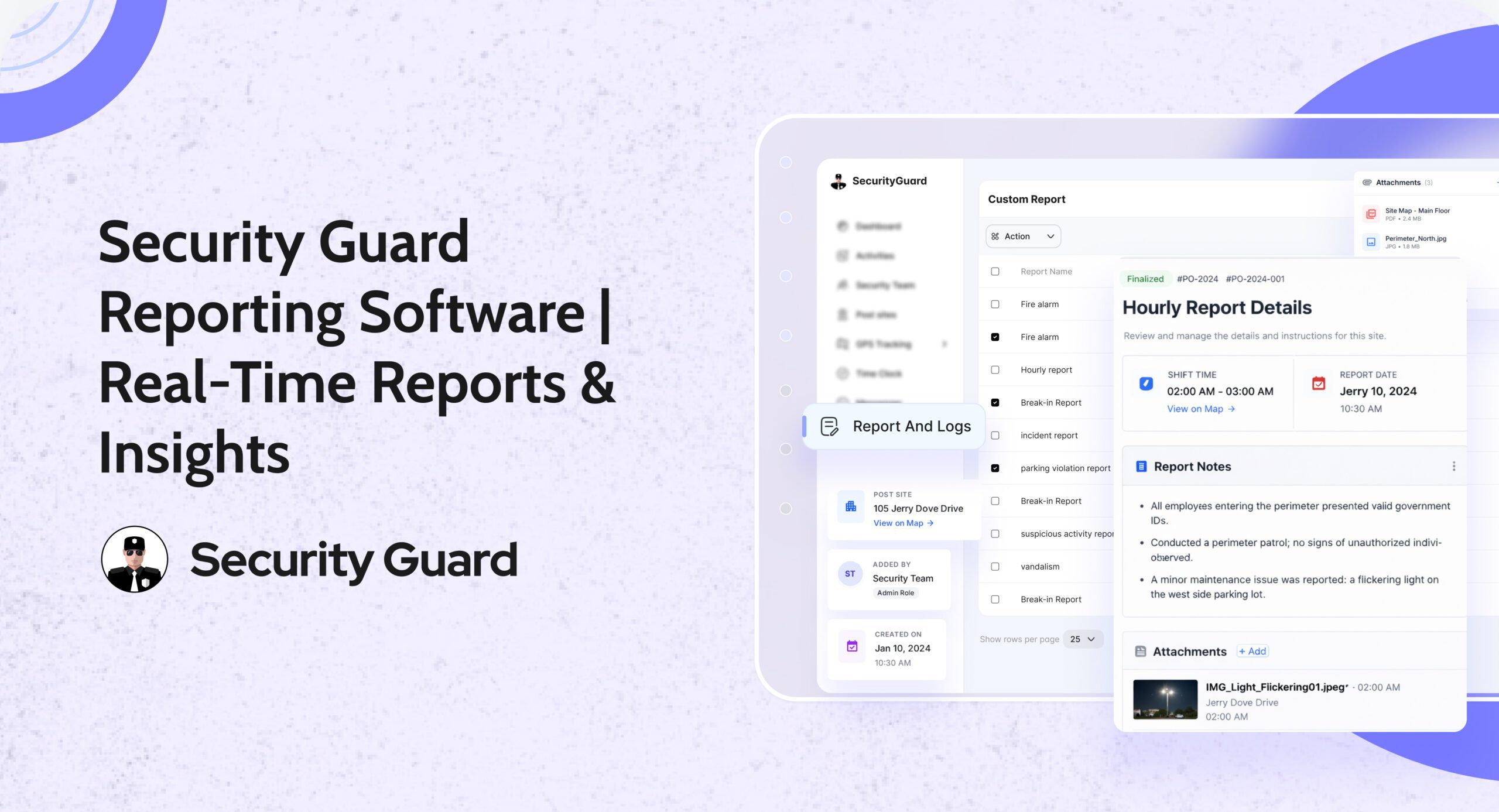
With Security Guard App, guards can create and submit reports directly from the field, attach supporting evidence, and share information with supervisors. Management can review activity, maintain organized records, and provide clients with clearer documentation of services delivered.
Instead of waiting until the end of a shift to understand what happened, supervisors can stay informed as reports are submitted.
What Is Security Guard Reporting Software?
Security guard reporting software is a digital system that allows security officers to document incidents, patrol activities, observations, and other site-related information using a mobile app or web platform.
Unlike traditional paper-based reporting, digital reports can be submitted while guards are still on duty.
A security guard reporting app can help teams:
- Create and submit reports from the field.
- Document incidents with notes, photos, and videos.
- Record GPS and timestamp information.
- Use customized reporting templates.
- Share important updates with supervisors.
- Store reports in a centralized system.
- Organize and deliver reports to clients.
Security Guard App’s Reporting feature brings these functions together, helping security companies maintain consistent reporting across multiple guards and client locations.
Why Traditional Security Guard Reporting Creates Problems
Many security companies still rely on paper logs, handwritten incident reports, spreadsheets, or email attachments.
These methods may work for smaller operations, but they become harder to manage as the number of guards and sites increases.
Consider a security officer who discovers a damaged access gate during an overnight patrol.
The guard makes a handwritten note, continues the patrol, and submits the report at the end of the shift.
By the time the supervisor reviews the information, several hours may have passed.
If the gate requires immediate attention, that reporting delay could affect the site’s security.
Other common challenges include:
- Missing or incomplete incident details.
- Reports submitted hours after an event.
- Unclear handwriting or inconsistent formats.
- Lost or damaged paper records.
- Limited supporting photos or evidence.
- Difficulty locating historical reports.
- Delays in communicating information to clients.
- Additional administrative work for supervisors.
Digital reporting helps reduce these gaps by allowing guards to document information closer to when events occur.
7 Benefits of Security Guard Reporting Software
1. Real-Time Reporting Gives Supervisors Better Visibility
Security supervisors should not have to wait until the next morning to discover that something important happened overnight.
With real-time security guard reporting, officers can submit information from their assigned locations while on duty.
Security Guard App allows guards to create reports through the mobile app, making submitted information available for supervisors to review.
For example, if a guard discovers an unauthorized entry attempt at a warehouse, they can document the incident and submit a report from the field.
The supervisor can then review the available details and determine whether additional action is required.
The benefit: Faster access to relevant information and less dependence on end-of-shift paperwork.
2. Photos, Videos, and Notes Create Clearer Incident Records
A report stating “damage found near the entrance” may not provide enough detail.
What was damaged? Where was the damage located? How serious was it?
Security Guard App allows guards to attach multimedia files to reports, helping them provide more context about incidents and observations.
For example, a guard documenting a broken window can include:
- The location of the window.
- The time the damage was discovered.
- A description of the condition.
- Photos showing the damage.
- Actions taken and people notified.
This information helps supervisors understand the situation without relying entirely on verbal explanations.
It also provides a more useful record when clients request clarification or an incident requires further investigation.
3. GPS and Timestamps Improve Report Accountability
Accurate security reporting depends on knowing when and where an event was documented.
Security Guard App supports GPS time-stamped reports, giving supervisors additional context about report submissions.
Rather than relying only on a manually written time, management can review digital reporting information associated with field activity.
This is particularly useful for security companies managing guards across multiple properties.
For example, if a supervisor receives reports from three different sites, location and time information can help organize and review those records.
GPS timestamps do not independently prove that every described event occurred, but they provide useful supporting context for the reporting process.
For more information about location-based guard oversight, read our guide to real-time security guard tracking systems.
4. Custom Reporting Templates Keep Information Consistent
Every security site has different reporting requirements.
A residential property may need visitor-related reports, while a warehouse may require documentation of access violations, equipment issues, and perimeter checks.
Using the same generic form for every situation can result in missing details or unnecessary fields.
Security Guard App supports customizable reporting templates, allowing companies to create reports that better match each site’s requirements.
Managers can standardize the information guards need to provide without forcing every client location into the same reporting process.
For example, an incident report template might request:
- Incident type.
- Site and location.
- Date and time.
- People involved, where appropriate.
- Description of observations.
- Actions taken.
- Supervisor notification.
- Supporting photos or files.
The benefit: More consistent documentation and less time spent requesting missing information.
5. Automated Report Delivery Reduces Manual Follow-Ups
Preparing and distributing reports manually can consume a significant part of a supervisor’s day.
Managers may need to collect reports, organize documents, prepare PDFs, and email updates to clients.
Security Guard App supports automated report delivery, allowing administrators to select reports and configure immediate, daily, or weekly email delivery.
The platform also supports customizable Daily Activity Report (DAR) emails and PDF sharing.
This helps security companies establish more predictable reporting workflows.
For example, a client who requires a daily activity summary can receive scheduled reporting rather than depending entirely on a supervisor to prepare and send each update manually.
Read our article on delivering live security updates to clients to learn how better information sharing supports client relationships.
6. Centralized Records Make Reports Easier to Review
Security companies need access to historical information for incident reviews, client questions, and operational follow-ups.
When reports are stored in physical folders or scattered email threads, retrieving a specific record can become time-consuming.
Security Guard App stores digital reports in the cloud and provides a centralized reporting workflow.
Supervisors can review submitted reports, process information, and share reports when needed.
This is particularly valuable for companies managing several client properties.
Instead of searching through separate paper logs for each site, management can work with a more organized reporting system.
7. Reporting Data Helps Identify Recurring Security Issues
A single incident report explains what happened at a specific time.
Multiple reports reviewed together can reveal operational patterns.
For example, a warehouse may have repeated unauthorized access attempts near the same entrance, or a residential property may experience recurring parking-related incidents.
Reviewing historical reports can help managers identify these patterns and discuss appropriate corrective action with clients.
Security Guard App supports custom incident reports and historical reporting information, giving management a clearer basis for reviewing recurring activity.
The objective is not simply to collect more reports.
It is to turn recorded field activity into information that helps supervisors make better decisions.
How Security Guard Reporting Works in Security Guard App
Security Guard App is designed to make field reporting straightforward for guards while giving supervisors access to the information they need.
Step 1: Select the Report Type
The guard opens the mobile app and selects the appropriate report or template.
This might be a routine activity report, a guard tour report, or an incident report.
Step 2: Record the Details
The guard enters relevant information about the activity or incident.
Depending on the report, this may include observations, the location, the time, and actions taken.
Step 3: Add Supporting Evidence
Photos, videos, and other supported files can provide useful context.
For incidents involving damaged property, access concerns, or unusual activity, supporting media can help supervisors understand the report.
Step 4: Submit the Report
The guard submits the report directly through the app.
Management can review the information through the reporting workflow rather than waiting for handwritten paperwork.
Step 5: Review and Share
Supervisors can review and process reports. Security Guard App also supports configurable approval workflows and sharing reports through email.
Reports can be delivered to clients or other authorized recipients according to the company’s reporting procedures.
What Should Security Guards Include in an Incident Report?
Even with the right software, report quality depends on the information the guard records.
A useful incident report should answer six basic questions:
What happened? Describe the event clearly and factually.
Where did it happen? Identify the site and specific location.
When did it happen? Record the incident time and, when different, the time it was discovered.
Who was involved? Document relevant individuals or witnesses according to company policy.
What action was taken? Explain the guard’s response, including notifications or requests for assistance.
What still needs attention? Identify unresolved issues or recommended follow-up.
Guards should focus on observable facts, avoid speculation, and document important details while they are still fresh.
A clear report helps the supervisor understand both the incident and the response.
Daily Activity Reports vs. Incident Reports
Security companies commonly use two types of reports, each serving a different purpose.
Daily Activity Reports (DARs)
A Daily Activity Report documents routine shift activity, including patrols, site checks, observations, and other assigned duties.
It creates a chronological record of what happened during the shift.
Security Incident Reports
An incident report documents a specific event that may require investigation, management attention, or client follow-up.
Examples include unauthorized access, property damage, safety concerns, or suspicious activity.
Both report types matter. Daily activity reports demonstrate routine service delivery, while incident reports provide focused documentation when something unusual happens.
For a more detailed explanation, read our guide to security guard daily activity reports.
How Reporting Supports Better Shift Handovers
Reporting is also important when one guard finishes a shift and another takes over.
An incident may be resolved, partially resolved, or still require attention when the next guard arrives.
If information is not communicated properly, the incoming guard may be unaware of a damaged gate, pending maintenance request, or special site instruction.
Security Guard App connects reporting with other operational tools, including digital passdown logs.
Passdown logs help communicate important updates between shifts, while incident reports maintain more detailed records of specific events.
Together, these workflows help maintain continuity between guards and supervisors.
Learn more about improving security shift handovers with passdown logs.
What Should You Look for in Security Guard Reporting Software?
Not every reporting system is designed for security operations.
When evaluating security guard reporting software, consider whether it supports the day-to-day needs of guards, supervisors, and clients.
Look for the ability to:
- Submit reports from a mobile device.
- Create custom reports for different client sites.
- Attach photos and supporting media.
- Include time and location context.
- Review reports from a central dashboard.
- Manage report approval workflows.
- Share reports with authorized recipients.
- Schedule recurring report delivery.
- Retrieve historical reporting information.
Usability matters just as much as the number of features.
Guards should be able to document important information without navigating an unnecessarily complicated process.
Supervisors should be able to find and review reports without spending time collecting files from multiple sources.
Why Choose Security Guard App for Security Reporting?
Security Guard App Reporting combines mobile reporting with the wider guard management workflow.
Its reporting capabilities include:
- Real-time guard tour and incident reports.
- Photos, videos, and other multimedia attachments.
- GPS time-stamped reporting.
- Custom report templates.
- Centralized report review.
- Report approval options.
- Automated email delivery.
- Daily Activity Reports.
- Historical incident information.
- PDF report sharing.
Security companies can also use reporting alongside GPS tracking, time tracking, post orders, messaging, and passdown logs.
This makes it easier to connect the information guards document with the wider operation.
Instead of managing reporting as a separate administrative task, supervisors can use it as part of everyday security oversight.
Frequently Asked Questions
What is security guard reporting software?
Security guard reporting software allows officers to document incidents, daily activities, patrol observations, and other site information digitally. Reports can be submitted from the field and reviewed by supervisors.
Can guards submit incident reports from their phones?
Yes. Security Guard App supports mobile reporting, allowing guards to create and submit reports while working at their assigned locations.
Can security reports include photos and videos?
Yes. Security Guard App supports multimedia attachments so guards can provide additional evidence and context in their reports.
Can security companies customize report templates?
Yes. Security Guard App allows businesses to create custom reporting templates according to different operational and client requirements.
Can security reports be automatically emailed to clients?
Yes. Security Guard App supports automated report delivery, including immediate, daily, and weekly email scheduling.
What is the difference between a DAR and an incident report?
A Daily Activity Report records routine shift activities and observations. An incident report documents a specific event, including what happened, where it occurred, and how the guard responded.
How does reporting software improve accountability?
Digital reporting creates more organized records of guard activity. Timestamps, GPS information, supporting media, and centralized review give supervisors additional information for evaluating reports.
Final Thoughts: Better Reporting, Clearer Security Operations
Security reporting should do more than create paperwork.
It should help guards document important details, supervisors understand what is happening, and clients receive reliable information about their properties.
With digital reports, supporting evidence, customizable templates, and automated delivery, security companies can build a more consistent reporting process.
Security Guard App brings these tools together so teams can document incidents, review activity, and maintain clearer records across multiple sites.
Document every incident. Review every report. Keep every site informed.
Explore Security Guard App Reporting to see how it can support your security operations.
Leave A Comment