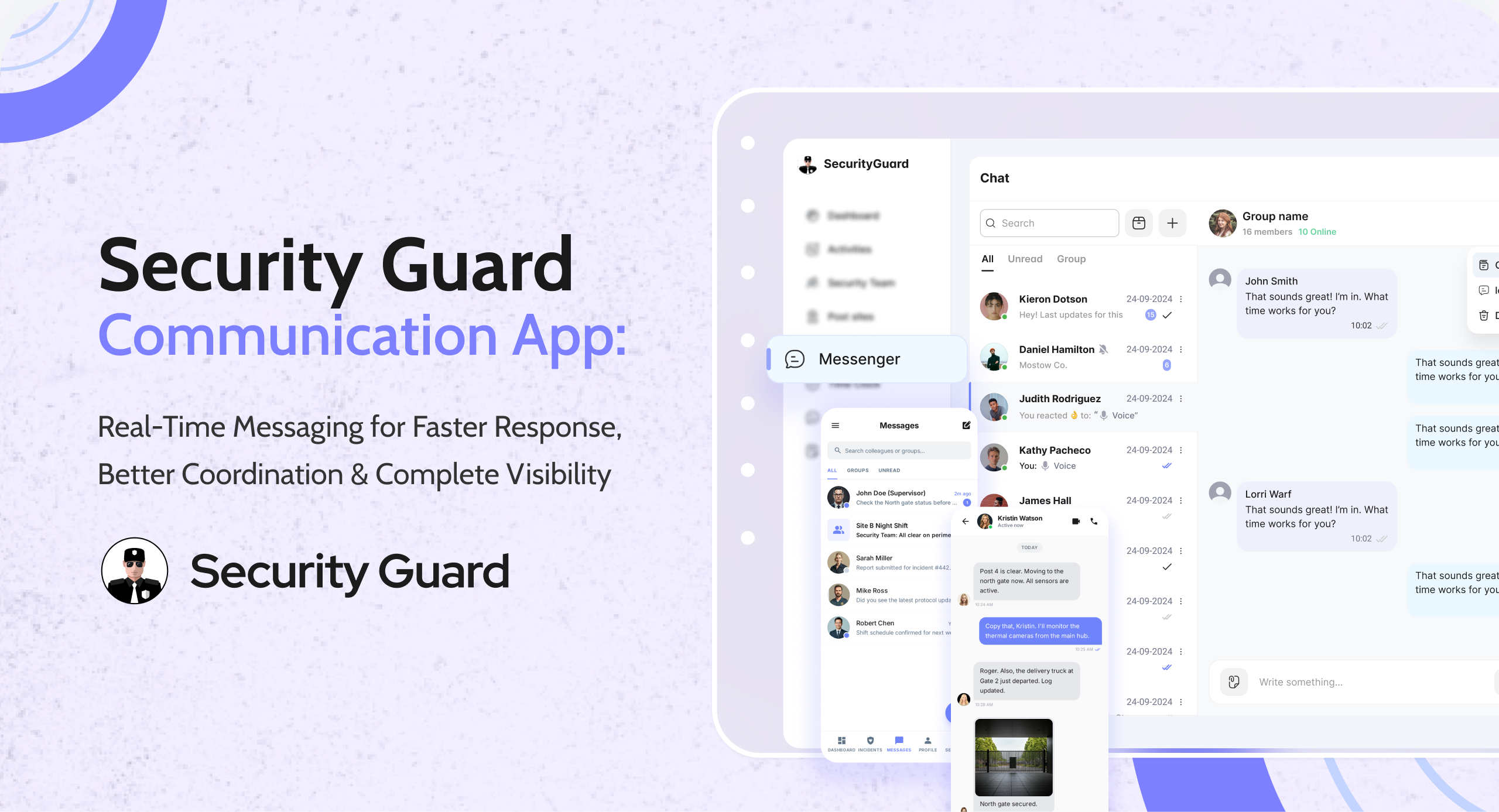
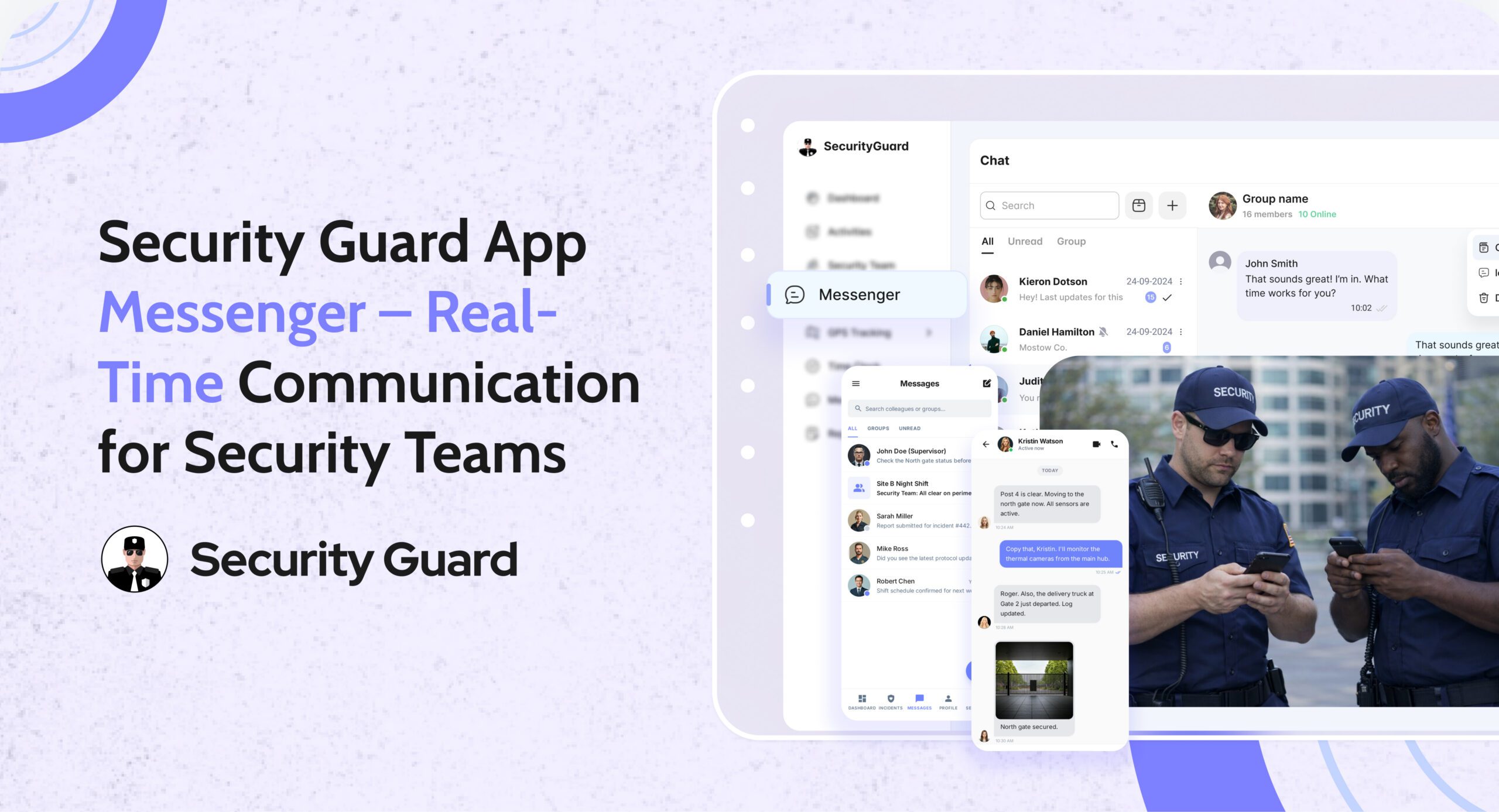
Security Guard App Messenger – Real-time communication to improve security response and operations.

Communication is the backbone of every strong security operation. When guards, supervisors, and clients are not aligned, small issues can turn into major incidents. Missed messages, unclear instructions, and scattered communication channels can break accountability and reduce efficiency.

To solve this, the Security Guard App Messenger provides a centralized, secure, and real-time communication system built specifically for security operations. It removes the need for WhatsApp, SMS, or personal messaging apps — giving companies a professional and trackable way to stay connected.

🔍 What Is the Security Guard App Messenger?

The Messenger is a built-in chat system inside the Security Guard App that connects guards, supervisors, clients, and management through instant messages, media sharing, and real-time alerts.

It is designed for:

  • Faster decision-making
  • Clear communication
  • Centralized record keeping
  • Seamless coordination across multiple guard posts

👉 Learn about more operational tools inside the app:
Explore the Security Team Management Feature

⭐ Key Features of the Security Guard App Messenger

1. Real-Time One-to-One & Group Messaging

Communication is instant — no delays.
Guards can message supervisors directly, or send updates to group channels for specific post sites.

Benefits:

  • Faster issue escalation
  • Better coordination between shifts
  • No need for external messaging apps

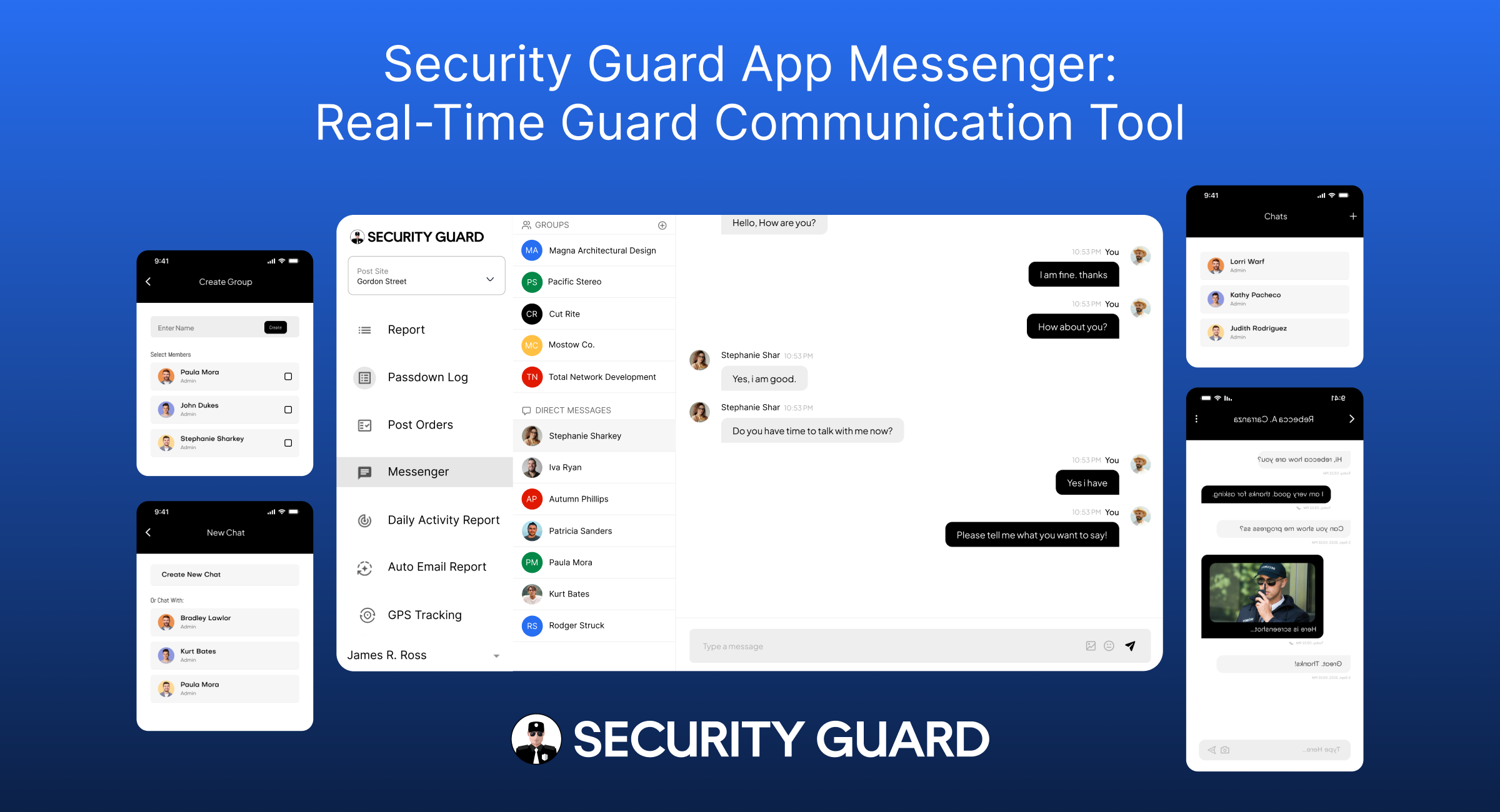
2. Create Custom Groups for Specific Sites or Teams

The app allows managers to create chat groups such as:

  • “Night Shift – Mall Security”
  • “Warehouse Patrol Team”
  • “Event Security Team – Gate A”

Each team only sees messages relevant to them.

👉 Want to learn how guards are tracked during shifts?
Check out the GPS Tracking Feature

3. Share Photos, Videos, Documents & Voice Notes

The Messenger supports multimedia for clearer reporting:

  • Incident photos
  • Video proof
  • Shift instructions
  • Voice updates
  • Documents or PDFs

This ensures nothing gets misunderstood.

4. Secure, Encrypted & Professional Communication

Unlike WhatsApp or personal chat platforms:

  • Messages are stored securely
  • Chats are tied to work accounts, not personal numbers
  • All conversations remain confidential
  • Compliance and accountability are built-in
    👉 Related Feature:
    Learn About the Reporting Module
    Perfect for incident reports, daily logs, and more.

5. Message Notifications & Instant Alerts

Guards receive:

  • Push notifications for new messages
  • Alerts for urgent updates
  • Instructions for upcoming tasks or emergencies

Supervisors can also send broadcast messages during critical situations.

6. Centralized Chat History for Accountability

Every message is logged with:

  • Time
  • Sender identity
  • Multimedia attachments

This is extremely helpful for:

  • Incident investigations
  • Shift handovers
  • Client transparency
  • Internal audits

This ensures all communication is traceable and professional.

👉 See how passdowns enhance shift transitions:
Visit the Passdown Logs Feature

🎯 Who Needs the Security Guard App Messenger?

This feature benefits a wide range of security operations:

✔ Security Guard Companies

Managing guards across multiple sites becomes easier with centralized communication.

✔ Corporate Security Teams

Large office buildings, hospitals, and campuses can keep guards connected 24/7.

✔ Event Security Firms

Instant messaging allows quick decisions during crowd management.

✔ Logistics, Warehousing & Manufacturing

Guards can report vehicle arrivals, departures, and security checks instantly.

✔ Residential Communities & Gated Societies

Supervisors and guards stay aligned on visitor alerts, incidents, and emergencies.

👉 To learn how companies assign guards to sites:
Explore the Sites & Post Assignments Feature

⚙️ How the Messenger Works (Step-by-Step Workflow)

Step 1: Manager Sets Up Teams & Assigns Guards

  • Guards join automatically based on site assignments
  • Supervisors gain admin control over groups

Step 2: Guards Exchange Real-Time Messages

They can:

  • Raise alerts
  • Ask questions
  • Send photos/videos of incidents
  • Receive instructions

Step 3: Managers Monitor Everything

From the dashboard, managers can:

  • View active chats
  • Respond to guards
  • Track communication history

Step 4: All Messages Are Logged for Accountability

This helps with:

  • Incident verification
  • Performance analysis
  • Client proof of work

👉 Learn how the Time Clock ensures accurate guard hours:
Visit the Time Clock Feature

🚀 Why Security Companies Trust This Communication System

1. Professional & Trackable Communication

No more using personal apps that mix work with private messages.

2. Better Guard Accountability

Every message is locked into your security management ecosystem.

3. Faster Incident Response

Supervisors act immediately based on real-time updates.

4. Enhanced Client Transparency

Clients appreciate organized communication records.

5. No More Miscommunication

Clear, time-stamped messages reduce mistakes during shifts.

👉 See how panic alerts improve emergency response:
Explore Panic Alert Feature

📌 Conclusion

The Security Guard App Messenger is more than a chat tool — it’s a powerful communication system crafted specifically for the security industry. By centralizing communication, improving response times, and adding accountability, it becomes an essential tool for any modern security team.

If your security operation wants to improve productivity, reduce confusion, and enhance client trust, the Messenger feature is a game changer.


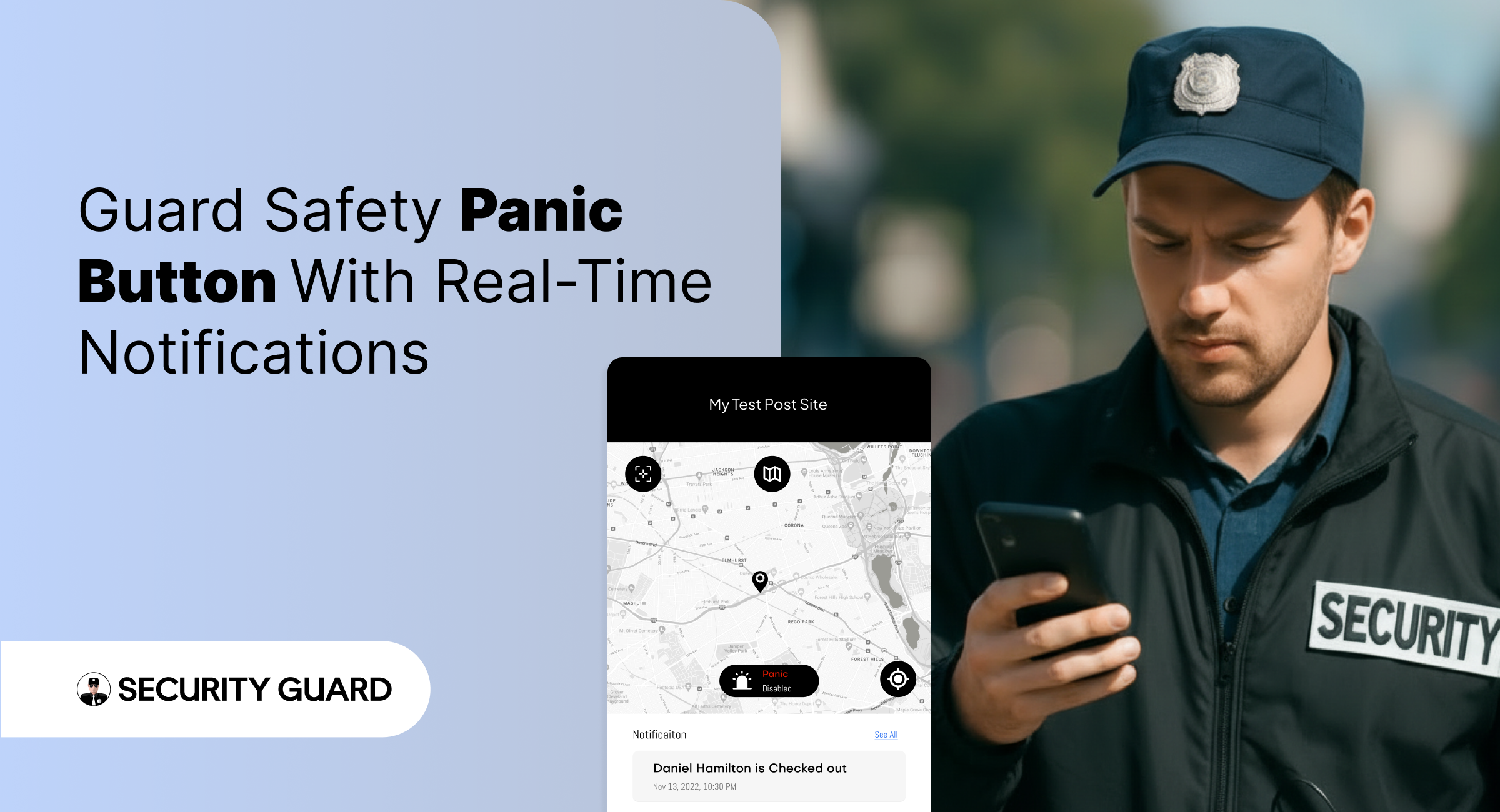
Panic Alert — Instant Emergency Response for Security Guards

In high-risk security environments, emergencies can unfold in seconds. Whether a guard encounters aggression, a medical emergency, or an unexpected threat, the difference between safety and danger often comes down to how fast help arrives.
That’s exactly why the Security Guard App includes a powerful, real-time Panic Alert feature — designed to deliver immediate support when it matters most.

With instant alert triggers, GPS-based location tracking, and supervisor notifications, the Panic Alert system ensures that no guard is ever left alone during a critical moment.

✅ What Is the Panic Alert Feature?

The Panic Alert is a one-tap emergency button built directly into the Security Guard App.
With a single tap, guards can send immediate distress signals to supervisors, site managers, or control room staff.

Each alert includes:

  • Live GPS location of the guard
  • Time-stamped emergency notification
  • Complete device and shift details
  • Instant push and dashboard alerts

This helps supervisors respond rapidly and dispatch backup to the exact location.

✅ Why Panic Alerts Are Essential for Modern Security Teams

Security guards often work alone, in isolated zones, or during late-night hours. In such situations, emergencies escalate quickly. The Panic Alert feature gives guards a reliable safety line while improving organizational response.

Key Benefits:

🔒 1. Immediate Emergency Activation

No complicated menus. No delays. One tap sends a high-priority alert that can’t be missed.

📍 2. Accurate Real-Time Location Tracking

Supervisors receive the guard’s exact GPS location, helping them reach the scene faster.

📢 3. Instant Multi-Channel Notifications

Alerts appear instantly on:Supervisor dashboard

  • Push notifications
  • Email (optional)
  • Activity logs

No emergency alert goes unnoticed.

⏱️ 4. Faster Response & Enhanced Safety

The faster supervisors respond, the safer your team remains — especially in high-risk areas.

📝 5. Automatic Logging for Incident Reports

Every Panic Alert is stored with:

  • Date
  • Time
  • Location
  • Guard information

This helps maintain transparency, accountability, and accurate reporting for clients.

✅ How Panic Alerts Work Inside Security Guard App

  1. Guard taps the Panic Alert button.
  2. The system instantly sends a distress signal to all supervisors.
  3. Supervisors see the alert and GPS location on the real-time dashboard.
  4. Support teams can contact or dispatch help immediately.
  5. The situation is recorded for reporting and review.

It’s simple, fast, and built to save lives.

✅ Seamless Integration With Other Security Guard App Features

The Panic Alert is even more powerful when combined with other modules:

  • GPS Tracking: See exactly where the guard is during an emergency.
  • Incident Reporting: Convert the event into a documented report instantly.
  • Messaging Tool: Communicate with guards during emergencies.
  • Shift Log & Passdown Logs: Share emergency details with the next shift.

Read more about our real-time tracking system here:
👉 GPS Tracking for Security Guards
(https://www.securityguard.app/gps-tracking)

Explore how teams stay connected using real-time messaging:
👉 Real-Time Team Messaging for Security Companies
(https://blog.securityguard.app/boost-team-coordination-with-real-time-messaging-software/)

Internal links improve SEO and navigation for readers.

✅ Who Benefits From Panic Alert?

The feature is ideal for:

  • Security guarding companies
  • Lone worker teams
  • Retail & mall security
  • Hotel & resort security
  • Corporate offices
  • Residential communities
  • Factory & warehouse environments

Wherever guards operate, the Panic Alert offers an added layer of protection.

✅ Conclusion: Stronger Safety, Faster Response

Emergencies shouldn’t turn into crises. With the Panic Alert feature, guards get immediate support, supervisors gain full visibility, and organizations operate with greater confidence and compliance.


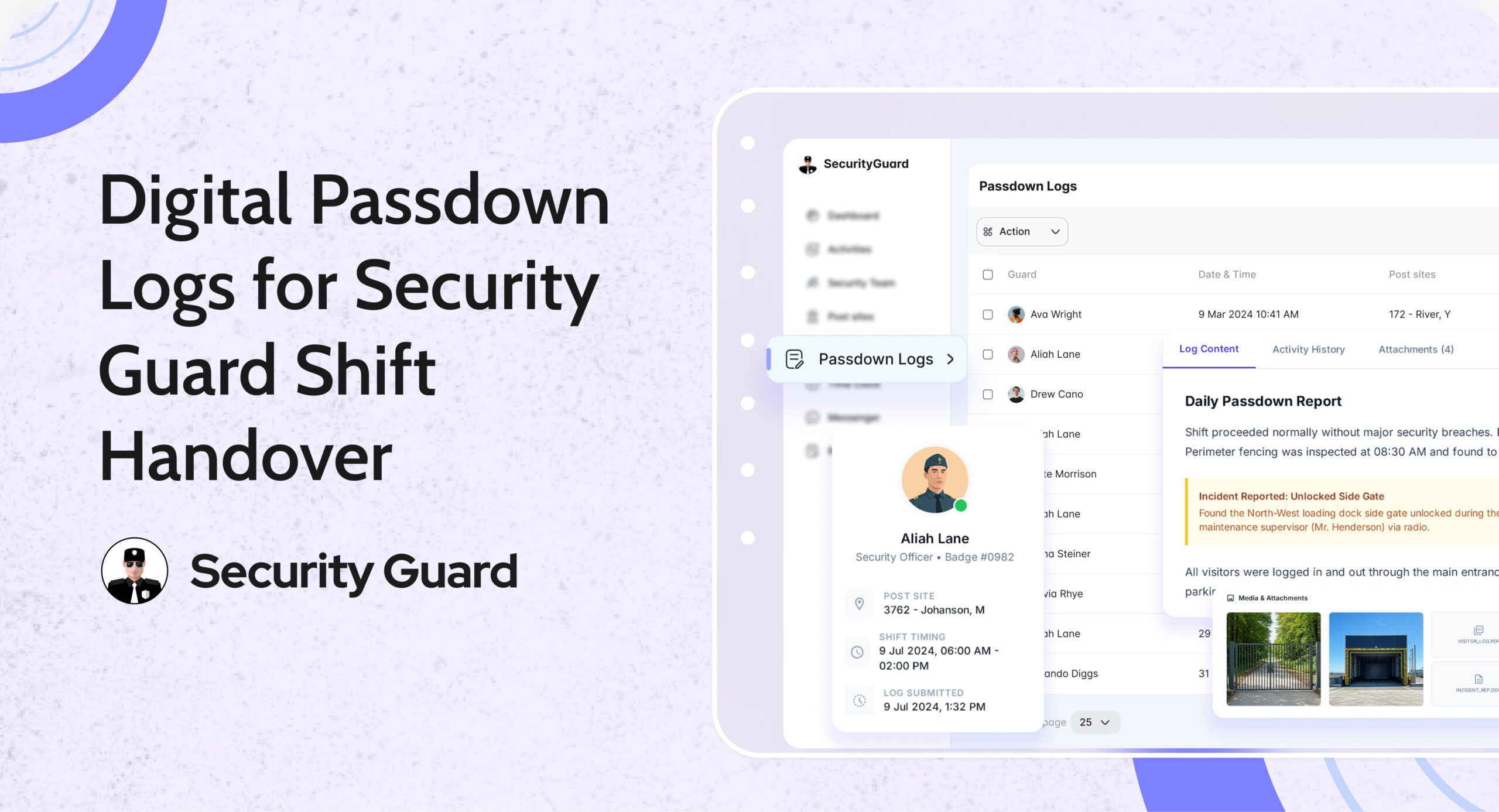
Digital Security Guard Passdown Logs for Seamless Shift Handoffs

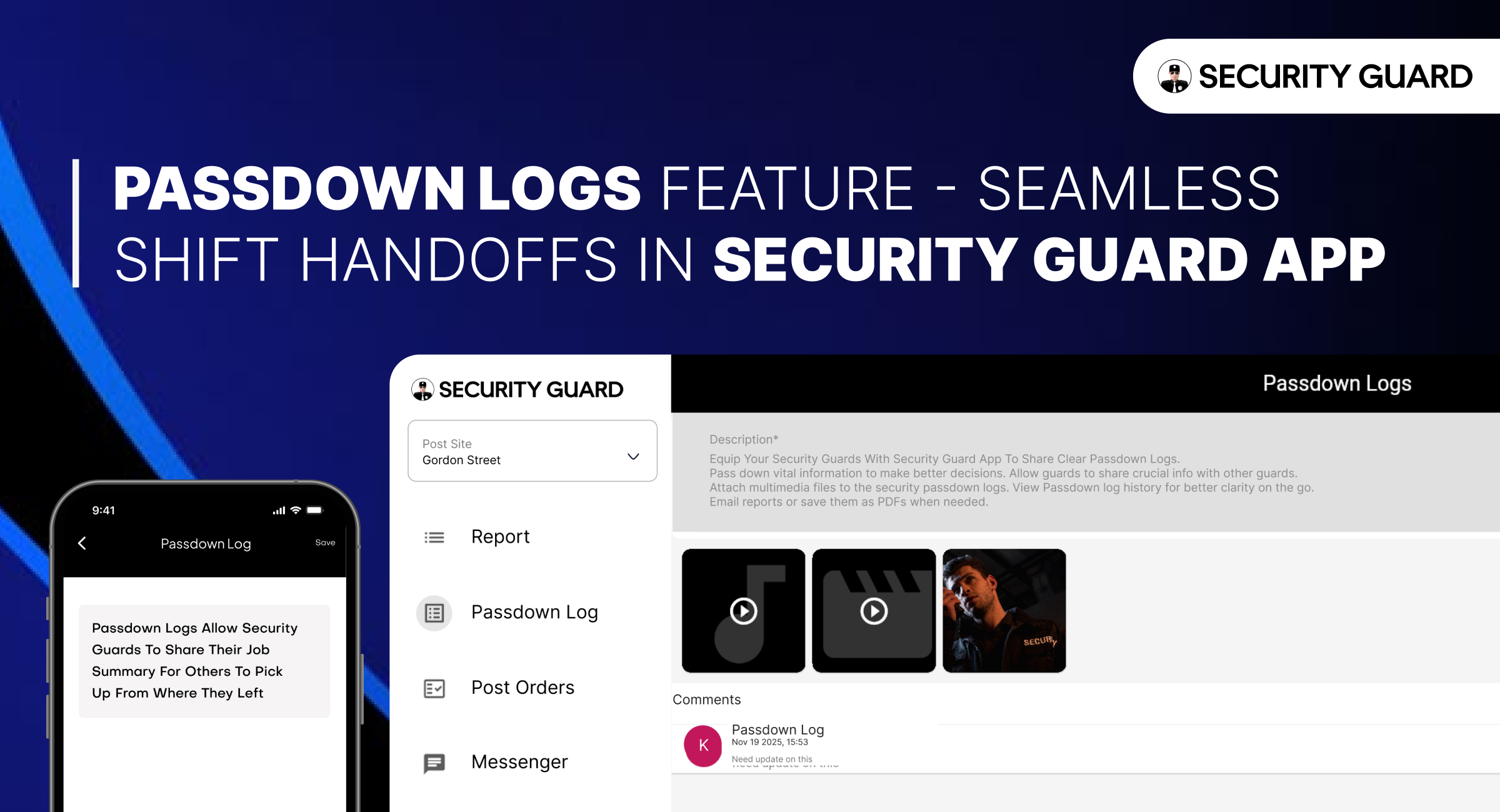
In every security operation, communication between shifts determines how smoothly a site runs. When guards end their duty without properly passing on information, critical updates get lost. Paper logs, chat messages, and verbal notes create confusion — and that’s where Security Guard App’s Passdown Logs make all the difference.

This feature transforms the way guards exchange shift information, making transitions faster, clearer, and fully traceable for supervisors and clients alike.

With the Passdown Logs feature, every security shift begins where the last one ended — ensuring no detail is ever missed.

Smarter Patrols Start with Smarter Tracking

Before exploring Passdown Logs, it’s important to understand how digital tracking supports modern guard operations.
Using tools like GPS Tracking and Incident Reporting, the Security Guard App already offers real-time visibility, accountability, and transparency.

Passdown Logs add the final layer of operational efficiency — by connecting shifts through structured, searchable, and documented updates.

What Are Passdown Logs?

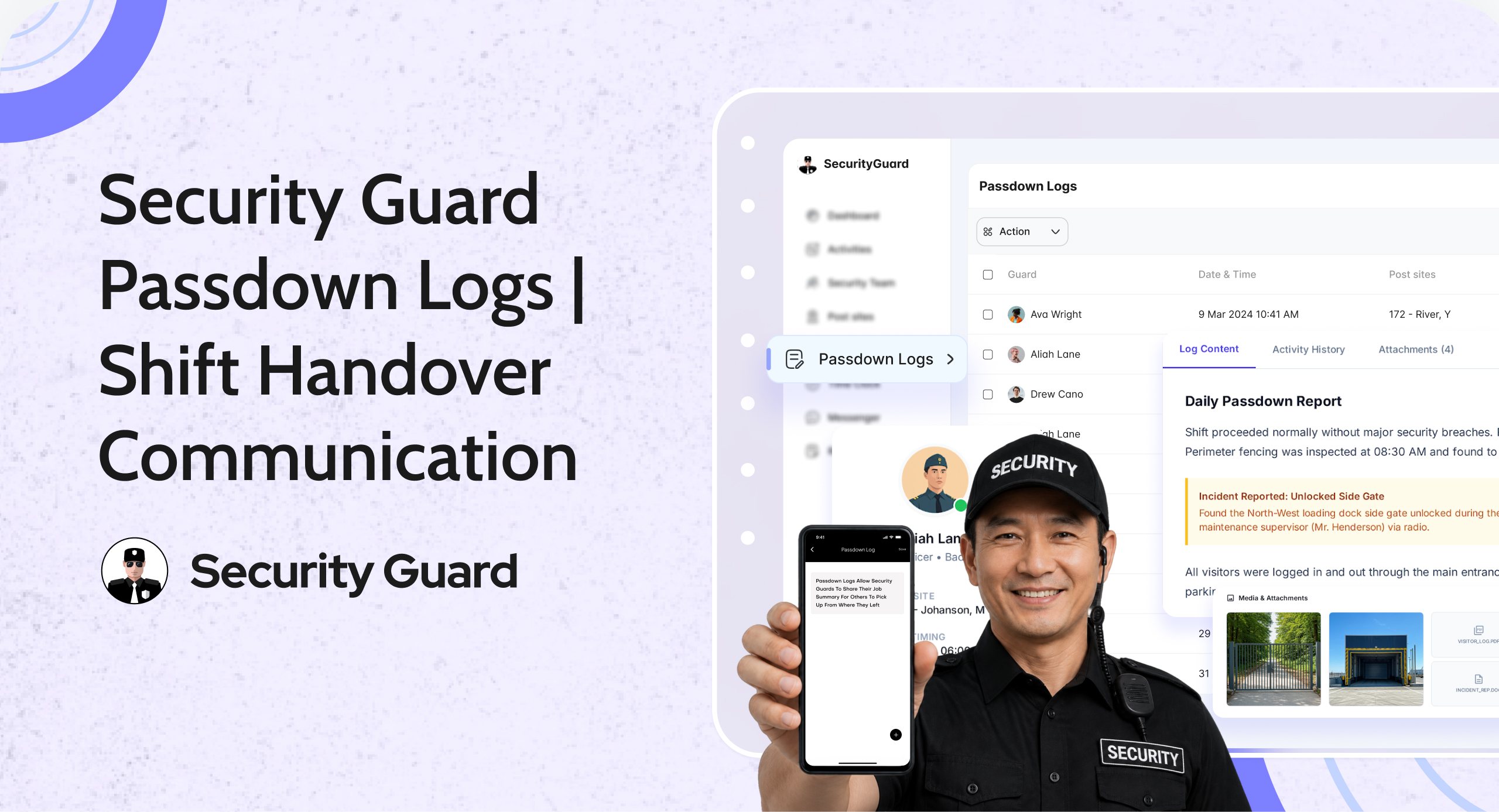
Passdown Logs are secure, digital shift summaries created within the app. Guards record key details before ending their duty — from site updates to unresolved issues — and the next guard can instantly review them.

Each entry is:

  • Timestamped for accuracy
  • Linked to site and guard profiles
  • Enhanced with photos, videos, or files
  • Stored for future reference and audits

This eliminates paper-based confusion and ensures a clear communication chain between shifts.

Key Benefits of Using Security Guard Passdown Logs

1. Seamless Shift Transitions

Incoming guards can immediately view all previous updates, notes, and incidents from the last shift. This reduces confusion and strengthens site security continuity.

2. Real-Time Multimedia Sharing

Guards can attach photos, videos, or PDFs to their logs — perfect for showing equipment status, documenting maintenance needs, or reporting incidents.

3. Complete Visibility for Supervisors

Supervisors and managers can access passdown logs anytime, ensuring accountability and smooth coordination across sites.

4. Searchable & Exportable Records

Need to audit or share details with a client? Logs can be filtered by date, site, or guard, and exported as PDF or email reports instantly.

5. Boost Team Communication

When combined with the Real-Time Messaging feature, guards can discuss open tasks or updates directly in the app — minimizing delays and confusion.

How Passdown Logs Improve Client Trust

Clients rely on security providers for reliability and transparency. With Passdown Logs:

  • Every shift handoff is documented.
  • Every issue is traceable.
  • Every report can be shared with proof.

This builds trust and demonstrates professionalism — especially when paired with GPS tracking, time logs, and incident reporting.

Integrating Passdown Logs with Other App Features

The Security Guard App is an all-in-one operations platform. Passdown Logs work seamlessly with:

Together, they create a connected, efficient, and accountable security management ecosystem.

Why Security Companies Love Passdown Logs

Security companies using Security Guard App report:

  • 40% faster shift handoffs
  • 60% fewer communication errors
  • 100% improvement in report accuracy

With mobile access and secure cloud storage, your guards can log details anytime, anywhere — ensuring operations never miss a beat.

Conclusion: Make Every Shift Handoff Count

Efficient shift handovers are the foundation of strong security operations. The Passdown Logs feature in Security Guard App ensures every detail is passed, every record is saved, and every client stays informed.

No more lost notebooks or missed updates — just a digital, transparent, and professional workflow your entire team can rely on.

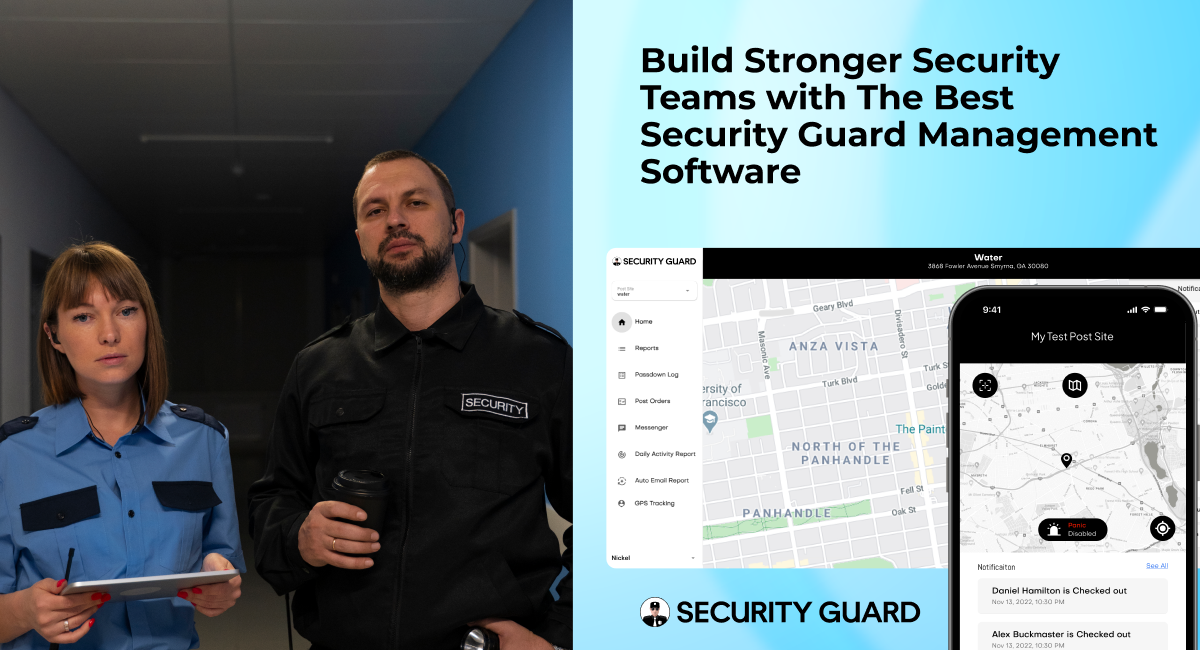
Build Stronger Security Teams With Security Guard App: Empowering Collaboration and Accountability

The success of any security operation depends on one thing above all — teamwork. From guards on patrol to supervisors in the office and clients expecting real-time transparency, every member of the security ecosystem must stay connected and informed.

That’s exactly what the Security Team feature of Security Guard App is designed to do. It brings guards, managers, and clients together on one seamless platform — transforming how security teams operate, communicate, and deliver services in the field.

The Need For Connected Security Teams

Traditional security operations often struggle with fragmented communication and disorganized reporting. Guards rely on phone calls or paper logs, supervisors juggle spreadsheets, and clients wait for delayed updates.

This outdated process leads to inefficiencies, miscommunication, and a lack of accountability.

Modern security operations, however, demand real-time collaboration. Every action — from a guard’s check-in to a client’s site report — must flow smoothly through a connected system. And that’s where Security Guard App’s Security Team feature makes a lasting impact.

What Is The Security Team Feature?

The Security Team feature inside Security Guard App allows companies to build and manage teams of guards, clients, and supervisors with ease. It centralizes team creation, communication, and reporting — giving every stakeholder instant access to the data and people they need.

Here’s what you can do with it:

  • Create and organize teams by site, client, or project
  • Invite team members using phone numbers or unique codes
  • Assign roles and responsibilities directly from the dashboard
  • Enable real-time messaging for fast communication
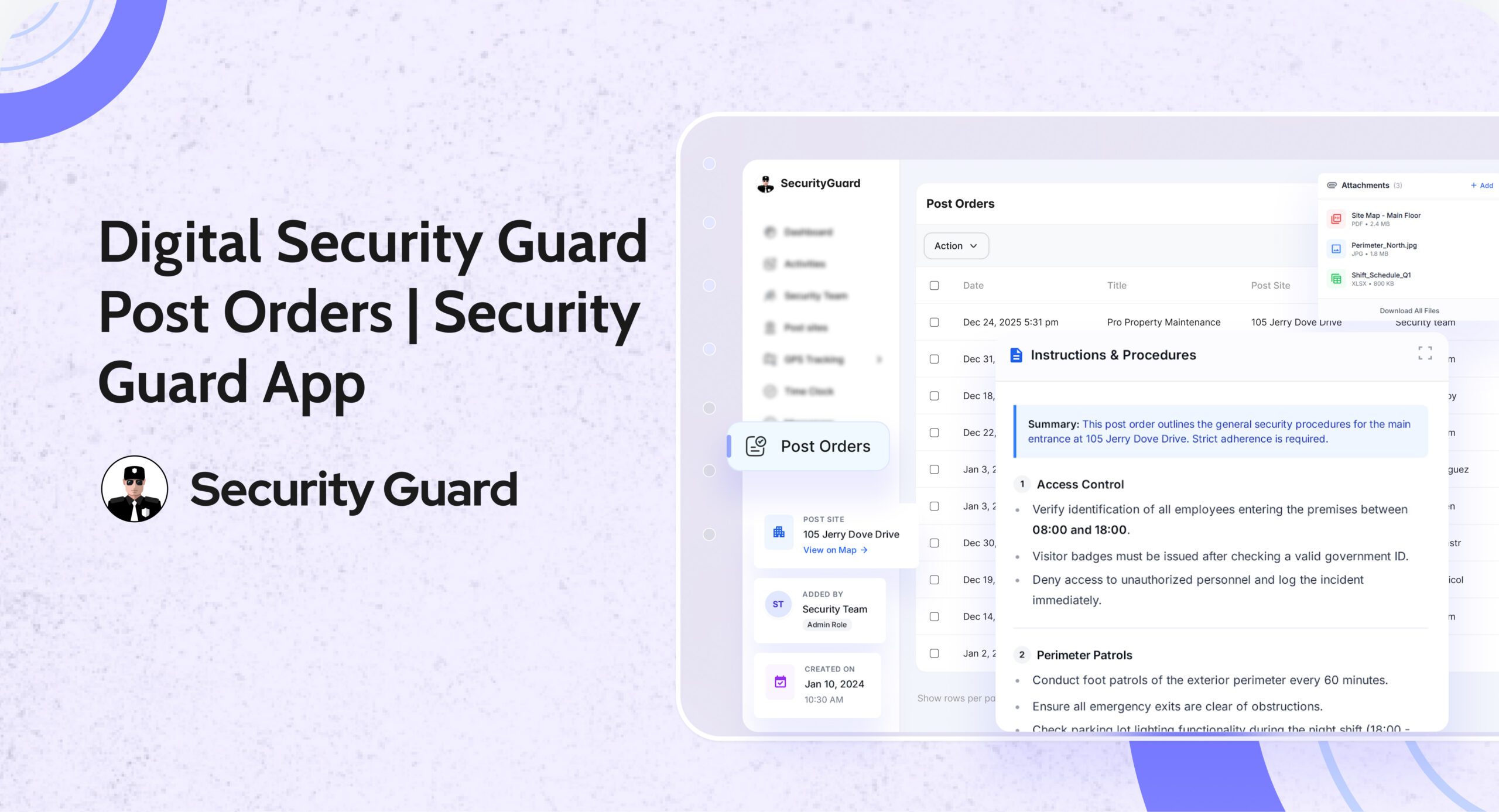
  • Share post orders, reports, and updates instantly
  • Provide client access to view relevant reports, schedules, and incidents

This means no more confusion about who’s responsible for what, no missed updates, and no paper trails that slow things down.

How The Security Team Feature Transforms Operations

1. Centralized Team Management

With the Security Team dashboard, supervisors can view, add, or remove members, assign shifts, and link guards to specific posts. It’s a one-stop control panel for managing large or distributed security teams.

👉 Explore this feature: Security Team Overview

2. Improved Communication And Coordination

Miscommunication is one of the biggest challenges in security operations. The Security Team feature includes built-in chat, pass-down logs, and post orders, ensuring guards always know their duties and supervisors stay informed about site updates in real-time.

👉 Learn more: Security Features of Security Guard App

3. Transparent Client Collaboration

Clients are an essential part of every security team. With client access portals, Security Guard App enables them to see guard reports, shift details, and incident updates instantly — reducing the need for calls or emails and building long-term trust.

👉 Client features: Explore Client Portal

4. Real-Time Performance Monitoring

Supervisors can track guard check-ins, GPS locations, and activity logs in real-time. This enhances accountability and ensures every post is covered, every report is completed, and every incident is addressed promptly.

5. Scalability for Growing Companies

Whether you manage 10 guards or 1,000, the Security Team feature scales with your business. It allows you to create multiple teams, manage several sites, and onboard new members quickly — without disrupting ongoing operations.

Benefits for Every Stakeholder

For Security Companies

  • Simplified guard deployment and management
  • Enhanced communication across teams and clients
  • Better visibility into daily operations
  • Reduced administrative workload

For Security Guards

  • Clear post orders and handovers
  • Instant communication with supervisors and teammates
  • Easy access to schedules and site details
  • Less paperwork, more productivity

For Clients

  • 24/7 visibility into security performance
  • Access to reports, incidents, and check-ins in real-time
  • Confidence in transparency and accountability

Why Choose Security Guard App?

The Security Guard App is an all-in-one security guard management software designed to simplify every aspect of security operations — from scheduling and reporting to communication and analytics.

Its Security Team feature reflects the app’s mission: to help security companies build stronger teams, deliver better service, and operate more efficiently than ever before.

Final Thoughts

In today’s fast-paced security environment, effective teamwork defines success. The Security Team feature of Security Guard App ensures your entire workforce — guards, supervisors, and clients — operates in sync, every step of the way.

If you’re ready to elevate your security operations, it’s time to experience what a connected team can achieve.

Security Guard App Aiding Security Companies In Providing Efficient Security Services

The Power Of Real-Time Reporting For Security Guard Companies

In the realm of security guard companies, success hinges on timely and accurate reporting. Dive into how the Security Guard App amplifies this process, allowing companies to craft custom reports tailored to their unique needs. Explore the advantages of accessing real-time guard tour reports, promoting transparent communication, and contributing to increased profitability.

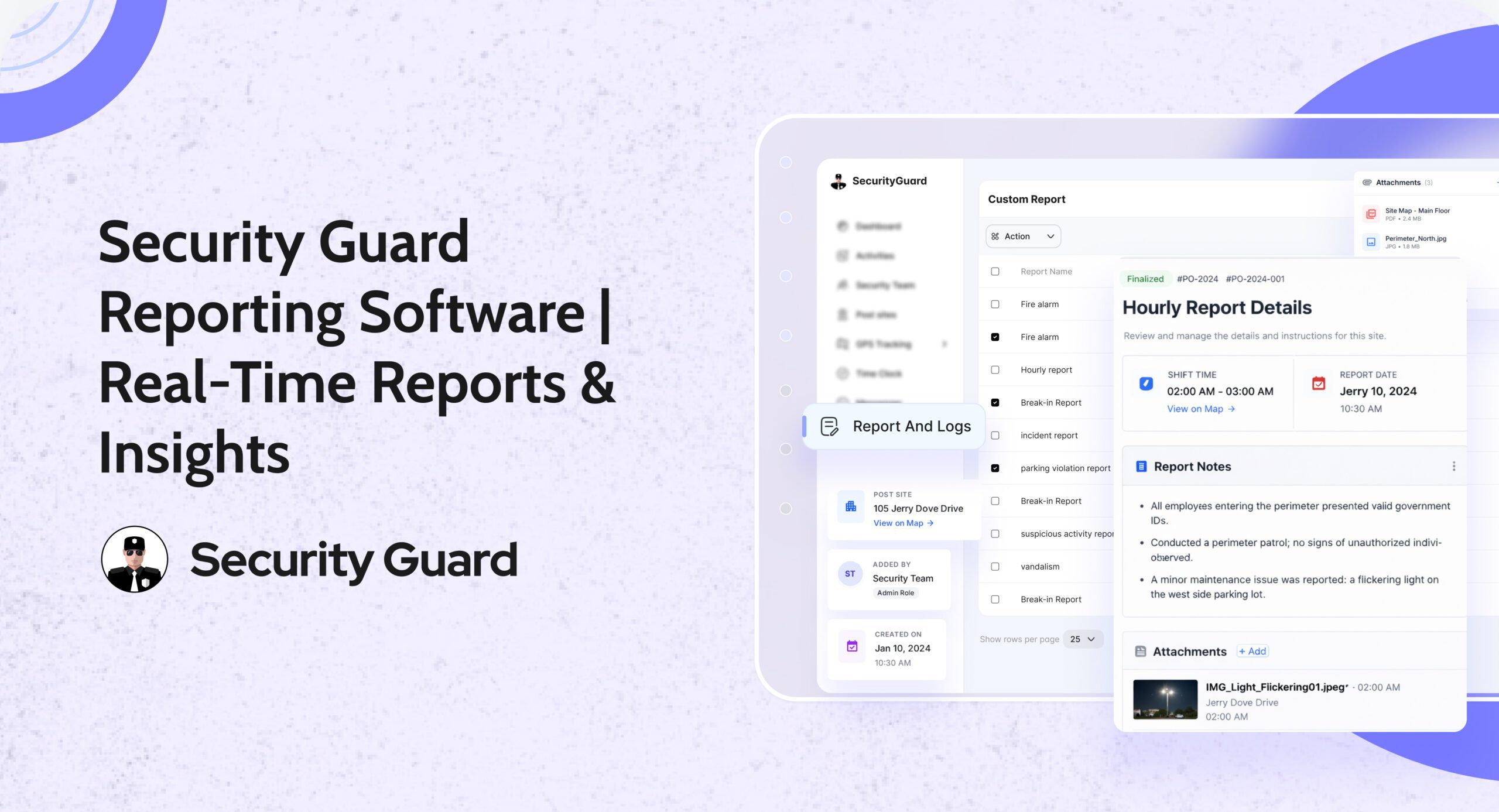
Custom Incident Reports

Uncover the strategic use of custom incident reports within the Security Guard App. Explore how these tailored reports help security guard companies address specific challenges effectively. By attaching multimedia files, these reports not only document incidents comprehensively but also serve as valuable tools for risk management.

GPS Tracking

Delve into the revolutionary impact of GPS tracking on-field visibility and on-site management for security guard companies. Learn how the app’s GPS capabilities enable precise location selection for post sites and provide live or past GPS locations for effective team supervision. Understand the role of GPS stamps in client notifications, fostering enhanced trust and satisfaction.

Live Connection

Explore how the Live Connection feature of the Security Guard App strengthens relationships between security guard companies and their clients. The seamless sharing of critical data in real-time, organized reports, and incident alerts creates a valuable communication channel. Witness how this feature contributes not only to client satisfaction but also to operational excellence.

Real-Time Chat

Uncover the heartbeat of seamless operations – the real-time chat feature in the Security Guard App. Tailored for security teams, this functionality optimizes communication through individual, group, and site-specific chats. From file sharing to video and audio notes, the app fosters efficient collaboration among security teams, ensuring a unified approach to security.

Empower Your Security Business: Sign Up Today

Cap off the blog by emphasizing the immediate benefits for security guard companies. Invite them to sign up for free and embark on a transformative journey towards operational excellence, client satisfaction, and increased profitability. The Security Guard App awaits – revolutionize your security business today!

Transform Your Security Operations Now! Sign Up for Free and Harness the Full Potential of the All-In-One Security Guard App for Your Security Guard Company.

How To Enhance The Effectiveness Of Your Security Guard Services

Security guard services are a crucial aspect of maintaining safety and order in various settings, including businesses, schools, and public events. However, simply hiring security guards is not enough to ensure the effectiveness of your security team. There are various strategies you can implement to enhance the effectiveness of your security guard services.

Proper Training

It is essential to ensure that your security guards are properly trained in a variety of areas, including first aid, conflict resolution, and emergency response. Providing ongoing training and development opportunities can help security guards stay up-to-date on the latest security techniques and protocols, which can improve their effectiveness in handling various situations.

Clear Communication

Establishing clear lines of communication between your security guards and management is crucial for ensuring that everyone is on the same page. This can include regular meetings and debriefings, as well as providing your guards with a messenger built within the app as that of the Security Guard App to stay in contact with each other and management.

Use Of Technology

Incorporating technology into your security operations can enhance the effectiveness of your guards. This can include the use of security cameras, alarms, and other surveillance systems to help guards monitor and protect a larger area. Additionally, providing your guards with access to real-time information and communication tools such as the security guard mobile app can help them report and respond more quickly and effectively to any incidents or emergencies.

Collaboration With Other Agencies

Working with local law enforcement and other security agencies can help to improve the overall security of the organization your security guard company is working for. This can include sharing intelligence, coordinating response efforts, and leveraging the expertise and resources of other agencies when and as needed.

Comprehensive Security Plan

Developing a comprehensive security plan that outlines the roles and responsibilities of your security team, as well as procedures for handling various situations, can help to improve the effectiveness of your security guards. This plan should be regularly reviewed and updated to ensure that it remains relevant and effective.

Hiring The Right Personnel

It’s important to carefully screen potential hires to ensure that they are a good fit for the company and the role of a security guard. This can include conducting interviews, reference checks, and evaluating relevant security guard skills and experience. You can also specifically look for candidates who have prior military or law enforcement experience, as well as those who have strong communication and problem-solving skills.

Security Guard App

Conducting Thorough Background Checks

Thorough background checks can help to ensure that your security team is trustworthy and reliable. This can include checking criminal records, employment history, and other relevant information. As a security guard company, you may conduct a background check on a potential hire to ensure that they have no prior criminal convictions or negative employment history.

Providing Adequate Equipment And Resources

Ensuring that your security team has the necessary equipment and resources is essential for their safety and effectiveness. This can include providing uniforms, badges, powerful Security Guard App to check in and out on the client site, report, and communicate with other team members in real-time, and other necessary items.

Establishing A Code Of Conduct

A code of conduct can help to ensure that your security team is professional and adheres to the highest standards of conduct. This can include guidelines for behavior, appearance, and interactions with clients and the public. As a security guard company, you may establish a code of conduct that requires guards to be punctual, respectful, and attentive to their duties at all times.

Providing Ongoing Support

Ongoing support and resources can help to improve the effectiveness and morale of your security team. This can include providing access to training and development opportunities, as well as offering support for physical and mental well-being.

Conducting Regular Performance Evaluations

Regular performance evaluations can help to identify areas for improvement and provide feedback on the job performance of your security team. This can be done through regular check-ins, performance evaluations, and feedback from clients and management.

By implementing these strategies and examples, as a security guard company you can ensure you have competent, professional, and well-equipped team that is able to effectively protect its clients and maintain safety and order while enhancing your security guard services by several folds.

Retain Your Top-Performing Security Guards With These Strategies [Infographic]

When clients hire a dedicated security guard company, they expect high-quality security guard services that are customized to the unique needs of their business. While doing so, they take several factors into consideration, crucial for ensuring the security of their business. But the real question here is that what are you doing to make your security guard services stand out from the rest? Are you getting the right security guards on your team? How are you retaining your top-performing security guards?

Here are our top tips for every security guard company to start improving their security guard services effectively by retaining their top-performing security guards:

Security Guard Company

For more detailed strategies on how to retain your best working security guardclick the link now.

Get Started With The Security Guard Mobile App Now!

Delivering high-quality security guard services is essential. The real task is working on improving security guard services to make them extraordinary. To do just that and more, try Security Guard App to help streamline your security guard operations effortlessly.

It’s a powerful app that makes the job of security guards easy. Security Guard App is an all-in-one solution they need. This top-rated app is built to set you apart from your competition.

Download it now on your Android and iOS devices. It’s available on both App Store and Play Store! For more information about the security guard mobile app, head to our website securityguard.app.

Quick Benefits Of Hiring Security Guard Services – Part 1

More and more businesses are now hiring security guard services with trusted security guard companies as a way to protect themselves. While a lot of them are still investing in their in-house security to build a stronger team that seems logical and affordable. Though contrary to this popular belief, outsourcing security guard services is a more efficient and cost-effective solution. Here’s why:

Complete Risk Assessment

One of the most crucial benefits of hiring security guard services from a reliable security guard company is the complete risk assessment that they do. It enables chalking out a custom security program covering all the necessary areas without leaving any loopholes.

Trained Security Guards

Providing regular training to the security guards is the toughest aspect of building your internal security team. But when you hire a dedicated security services company, training the guards becomes the least of your worries. You get knowledgeable security guards with years of experience in the field that stay updated on the latest security developments to offer the finest services.

24/7 Security Services

When you hire or outsource a dedicated security guard company to secure your business, you sign a contract with the company that will offer security guard services 24/7. They’ll respond to all your security demands at any given time and go above and beyond what an internal security team might not be able to do with limited resources.

Security Guard App

Quick Response Time

The time taken to respond to an emergency on a client site is critical. Which is why you want your security guard team to quickly implement emergency procedures and keep you updated via the security guard mobile app’s reporting system and live messenger. This will thus increase the chances of resolving the crises and reduce damage, injury, and theft on the property.

Flexibility To Adapt

With the changing times, it is imperative that the security requirements of your business are going to change too. Outsourcing a decimated security guard company will give you the flexibility to adapt to those changing security needs. You can easily request more guards or reduce with a simple request and pay for only what your position necessitates. 

Hiring security guard services from a reliable security guard company is the most practical and flexible option available today. To know more about such benefits, stay tuned in for part 2 of this blog.

Streamline The Reporting Process With Security Guard App

Security guards play a key role in the management and oversight of commercial properties. Whether they are employed to protect a single building or to oversee multiple properties, their critical expertise helps create a safer, more secure environment for all tenants. In order to deliver the best security services, however, it is essential that security guards are able to communicate, collaborate, and effectively report incidents.
Reporting data is tremendously valuable for a security guard company. But, without a streamlined process to capture, store, and analyze data, it can be overwhelming. You can simplify this process by leveraging the Security Guard App.

It allows security guards to create and share interactive data visualizations to enable collaboration and decision-making. They can instantly update when an incident occurs, so managers always have current and accurate data at their fingertips. Security guard managers can process information more efficiently so they can spend less time analyzing the data and more time making decisions.

Also, automating reports will drastically cut down on the amount of time and effort it takes to generate these reports. By streamlining the entire process, you can increase productivity, reduce errors, and ensure that your reports are accurate.

Watch this video to learn more about how Security Guard App can help you streamline your reporting:

Security guards are tasked with ensuring the safety of individuals, property, and assets, and that requires a large range of attributes, from strong physical protection to corresponding IT functions. Keeping track of all those details can be tough, so streamlining reporting can lessen the workload on your officers, increase overall security, and even improve your bottom line. Contact us to find out more about how Security Guard App can help.

Security Guard Mobile App: For Security Guards On The Go

The past few years due to the pandemic have been rough for all businesses alike. Security guard industry was no different. Security guard companies had to face their fair share of challenges. Keeping all that in mind, we put all our effort into developing a security guard mobile app and an intuitive web app for you that requires minimum training, offers customized reporting, improves team communication, enhances incident management, and helps do so much more.

Why Invest In Security Guard Mobile App?

Security guard mobile app –  a user-friendly interface that requires minimal training is all about improving the performance of your security guards on site and enhancing client experience. 

Using it, you can start building your security guard team, deploy, as well as manage them and your security guard operations hassle-free. It further enables the security guards to quickly check-in/out of post sites. To facilitate focussed reporting, security guard mobile app allows creating custom reports to concentrate on what’s critical and communicate with the team in real-time.

You receive live notifications to deal with last-minute changes while conducting a full-scale security operation and gain real-time insights into all the on-site activities via GPS tracking. There’s so much more to the security guard mobile app. Watch the video below to know more.

Get Started With The Security Guard Mobile App Now!

If you are looking for a powerful mobile app for your security guards to make their job easy, security guard mobile app is the all-in-one solution you need. It’s a top-rated app that’s designed to set you apart from your competition.

Download it now on your Android and iOS devices. It’s available on both App Store and Play Store! For more information about the security guard mobile app, head to our website securityguard.app.