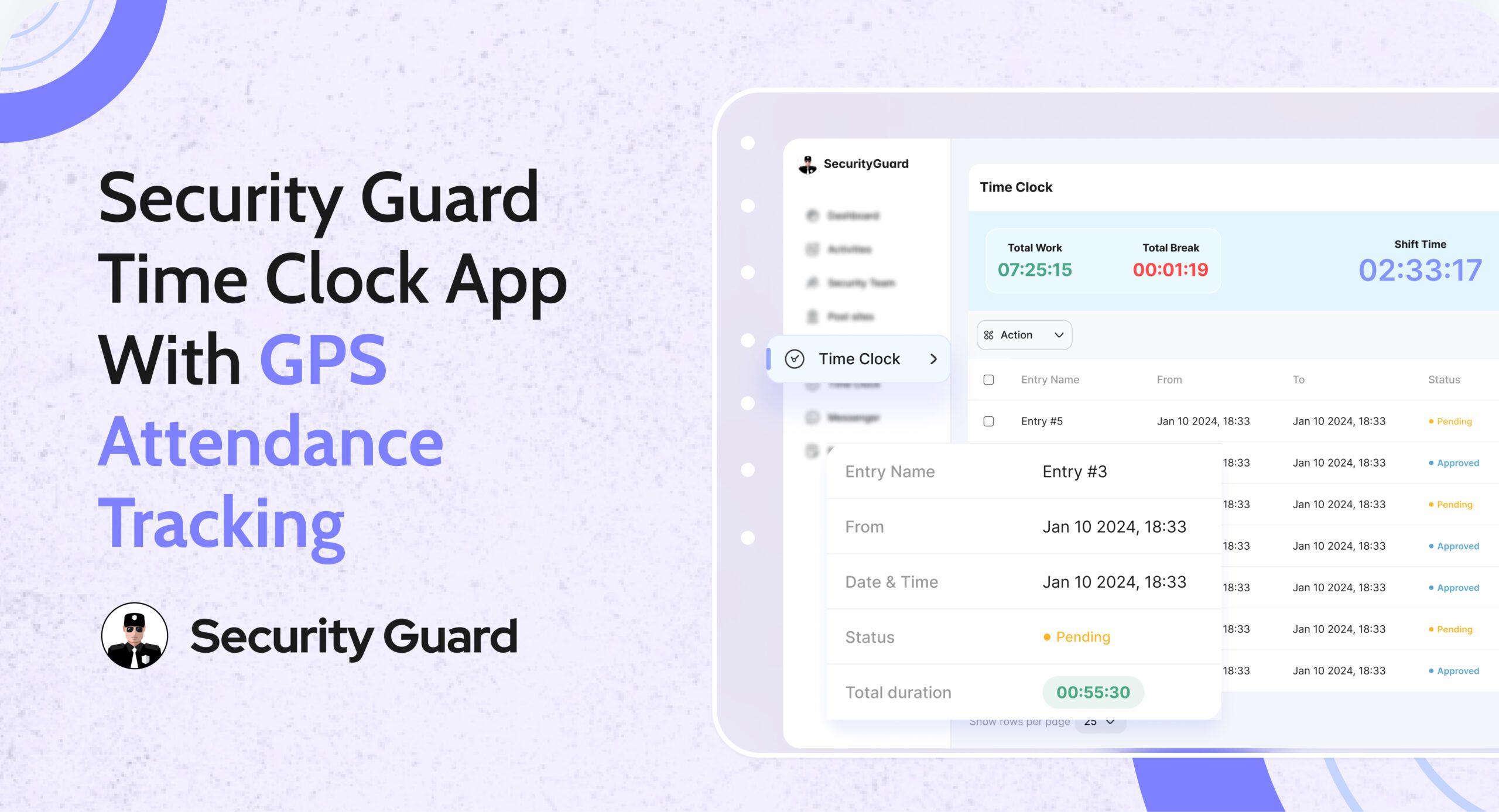
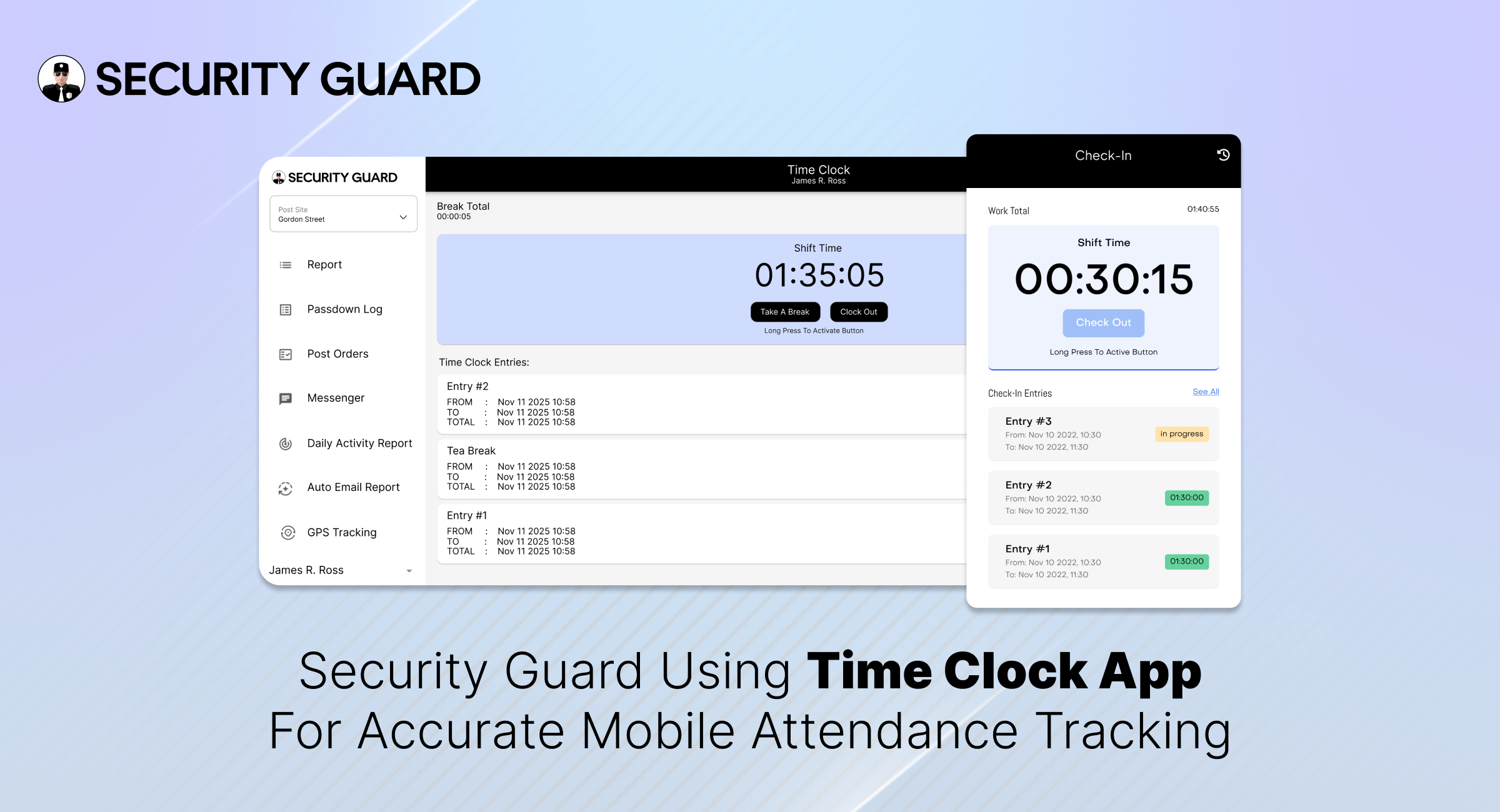
Real-Time Workforce Tracking: Security Guard Time Clock App

Managing guard attendance manually leads to errors, disputes, and wasted admin time. Paper registers, spreadsheets, and delayed shift updates make it difficult for operations managers to know who is actually on duty. A security guard time clock app eliminates these challenges by giving teams real-time, verified attendance data.

The Security Guard App Time Clock is built specifically for security companies that need accuracy, accountability, and visibility across every shift—without manual follow-ups.

Why Manual Attendance Tracking Fails Security Teams

Security operations depend on punctuality and coverage. Yet many teams still rely on outdated methods that create daily issues:
Guards forgetting to sign in or out

  • Inaccurate shift hours for payroll
  • No real-time visibility for ops managers
  • Attendance disputes with clients

When attendance data is delayed or unreliable, decision-making slows down and trust suffers.

How Security Guard App Time Clock Solves This

The Security Guard App Time Clock digitizes attendance tracking and syncs it instantly across mobile and web platforms.

Guards clock in and clock out directly from the mobile app, while operations managers monitor attendance in real time from the web dashboard.

👉 Learn more about the feature here:
Security Guard App Time Clock

Key Features of the Security Guard Time Clock App

✅ Real-Time Clock In & Clock Out

Guards can mark attendance instantly from their assigned device. Managers see live updates without calls or manual confirmation.

✅ GPS-Verified Attendance

Each clock-in and clock-out is location-verified, ensuring guards are present at the correct site and preventing time fraud.

✅ Automated Shift Logs

Work hours are logged automatically, reducing admin effort and eliminating manual attendance reconciliation.

✅ Break & Shift Tracking

Track breaks, shift durations, and overtime accurately to maintain compliance and operational clarity.

✅ Live Notifications for Managers

Receive instant alerts when guards start or end shifts, helping ops teams respond faster to coverage gaps.

Benefits for Security Operations Managers

Using a security guard attendance system like Security Guard App delivers measurable operational value:

  • Faster response to missed or late shifts
  • Clear accountability across teams
  • Accurate payroll and billing data
  • Reduced admin workload
  • Improved client confidence through transparent reporting

From Attendance to Payroll—Everything in Sync

The Time Clock doesn’t work in isolation. Attendance data connects seamlessly with reports, shift logs, and performance tracking—giving you a complete view of workforce activity in one platform.

No spreadsheets. No follow-up calls. Just real-time control.

See the Time Clock in Action

If you’re still managing attendance manually, it’s time to upgrade.

👉 Book a demo and see how the Security Guard App Time Clock helps security teams track attendance accurately, reduce errors, and operate smarter.

🔗 Schedule a Live Demo


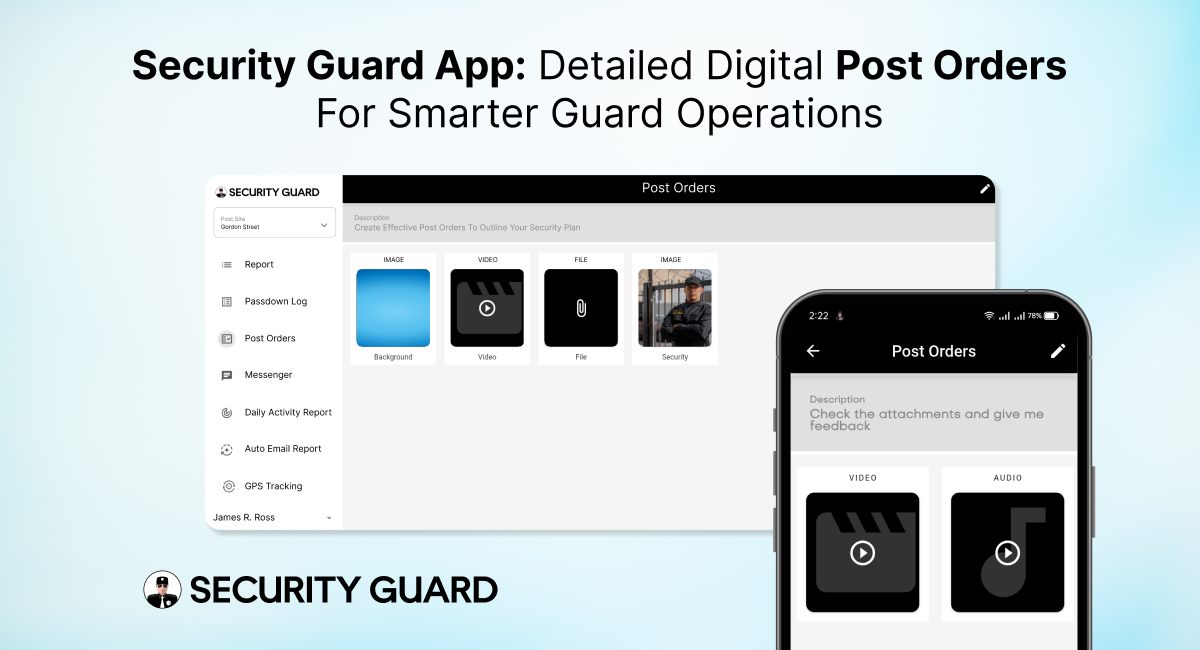
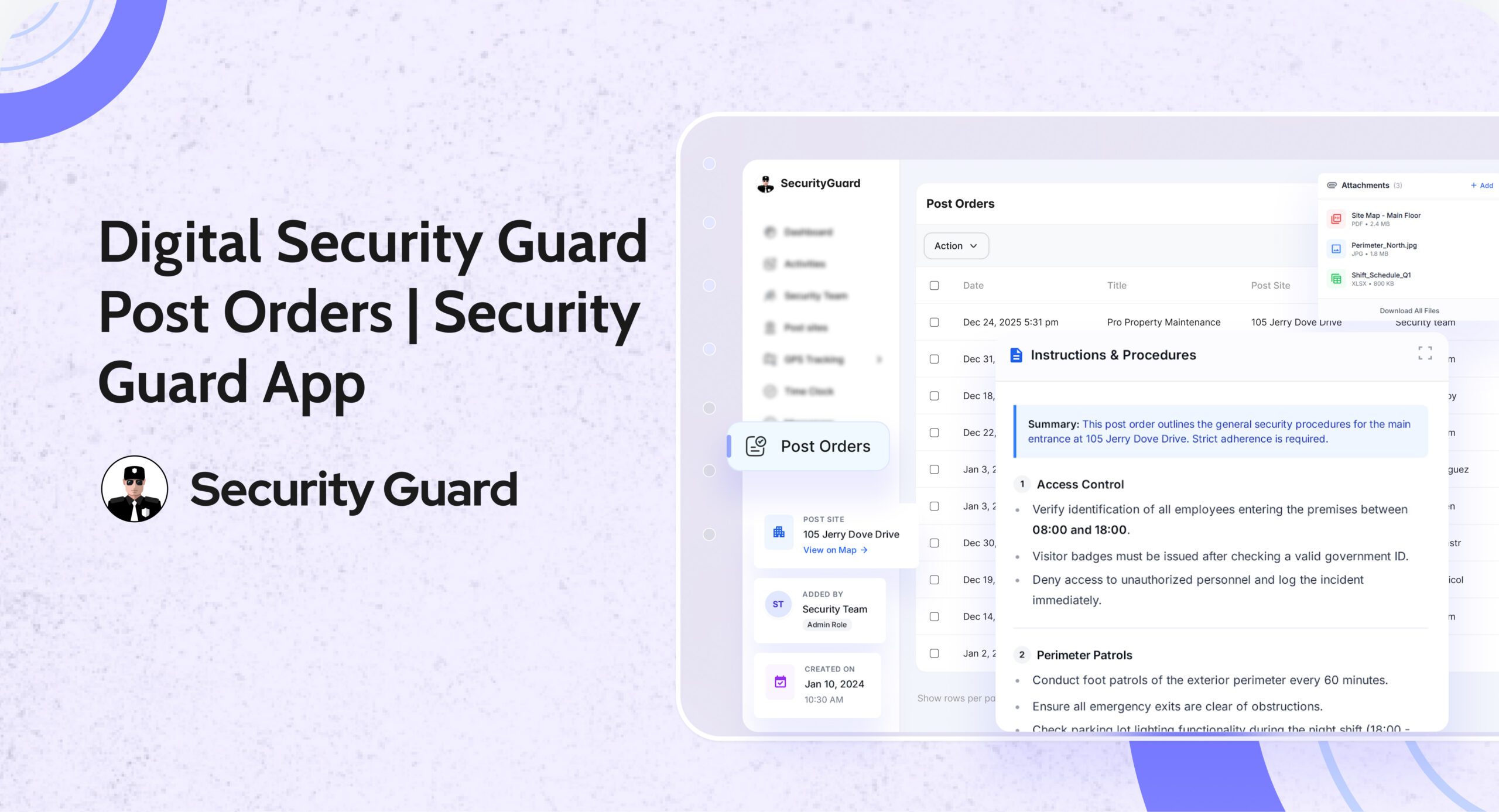
Security Guard Post Orders App for Clear Real-Time Instructions

In the security industry, clarity is everything. Guards perform better, clients trust more, and supervisors manage efficiently when expectations are clearly defined. That’s exactly why security guard post orders are essential — they outline the specific duties, responsibilities, and procedures guards must follow at every site.

But traditional post orders on paper or scattered files often lead to confusion, outdated instructions, and inconsistent performance. The Security Guard App solves this with fully digital, cloud-based Post Orders that are easy to create, share, update, and track — ensuring guards always have the right instructions at the right time.

⭐ What Are Security Guard Post Orders and Why Are They Critical?

Post orders act as the operational blueprint for guards on duty. They provide detailed guidance about:

  • Daily responsibilities
  • Patrol routes and schedules
  • Emergency response procedures
  • Communication protocols
  • Access control instructions
  • Client-specific rules
  • Escalation steps
  • Safety guidelines
  • Special instructions for high-risk or sensitive sites

In other words, they define what a guard should do, how they should do it, and what is expected during their shift.

When these instructions are delivered digitally through the Security Guard App, the entire system becomes more reliable, organized, and scalable.

🚀 Why Security Guard Post Orders Matter for Effective Operations

Whether you manage 5 guards or 500, clear post orders lead to:

✔ Consistent Guard Performance
Every guard gets the same instructions, reducing errors and ensuring professionalism across all sites.

✔ Better Compliance & Safety

When guards follow documented procedures, risk levels decrease and emergency response becomes faster.

✔ Improved Client Satisfaction

Clients appreciate knowing their sites are protected by guards who follow clear, standardized instructions.

✔ Reduced Miscommunication

No lost documents, no outdated files — everything stays accurate and accessible.

✔ Higher Accountability

Supervisors can confirm which guards reviewed the post orders and when.

These benefits directly affect service quality, compliance, and company reputation.

📱 How the Security Guard App Transforms Post Orders into a Powerful Digital Tool

The Security Guard App goes beyond simple text instructions. It makes post orders interactive, real-time, and integrated across the entire security operation.

1. Real-Time Updates for Instant Communication

When supervisors update a procedure or add new instructions, guards see it immediately. No more handing out new papers or relying on outdated files.
Real-time syncing = Zero confusion.

2. Site-Specific Post Orders for Every Location

Each site has different requirements. With the app, you can assign unique post orders based on site needs — from parking lots and malls to warehouses and corporate offices.

This ensures guards always follow the correct rules for the correct post site.

3. Organized, Easy-to-Read Digital Layout

Post orders appear neatly inside the app with clear categories, making it easy for guards to find:

  • Emergency procedures
  • Contact lists
  • Patrol instructions
  • Special notes
  • Daily tasks
  • SOPs

No scrolling through messy documents. No confusion.

4. Trackable & Transparent Instructions

Guards can mark post orders as Read, giving supervisors confidence that instructions have been understood.
This boosts accountability and reduces operational risks.

5. Accessible Anytime — Even During Patrols

Guards can open the post orders from their smartphone whenever needed. Whether they’re in the middle of a patrol or starting a shift, all information is just a tap away.

6. No More Paperwork or Manual Distribution

Traditional post orders often get lost, damaged, or outdated.
Digital post orders eliminate:

  • Printing costs
  • Manual updates
  • Distribution delays
  • Risk of outdated SOPs

Everything is stored securely in the cloud.

🔒 Boosts Safety, Compliance, and Guard Confidence

When guards know exactly what to do in any situation, they perform with more confidence and fewer mistakes. Digital post orders make sure:

  • Guards follow SOPs
  • Emergencies are handled properly
  • Procedures stay standardized
  • Operations remain compliant

This not only protects the site but also strengthens the company’s professional image.

🎯 Why Your Security Company Needs Digital Post Orders

The Security Guard App gives security companies a competitive edge by modernizing operations and improving guard performance. With digital post orders, you can:

  • Train guards faster
  • Deliver consistent service
  • Reduce liabilities
  • Improve client satisfaction
  • Operate more efficiently
  • Scale without chaos

It’s a smarter, smoother way to manage security operations in today’s fast-paced environment.

🔚 Final Thoughts

The Security Guard App Post Orders feature ensures that every guard has clear, updated, and easy-to-follow instructions. It eliminates confusion, boosts accountability, and enhances overall site safety — helping security companies deliver the high-quality service clients expect.

If you’re ready to modernize your operations and empower your guards with clarity, the Security Guard App is the right solution.


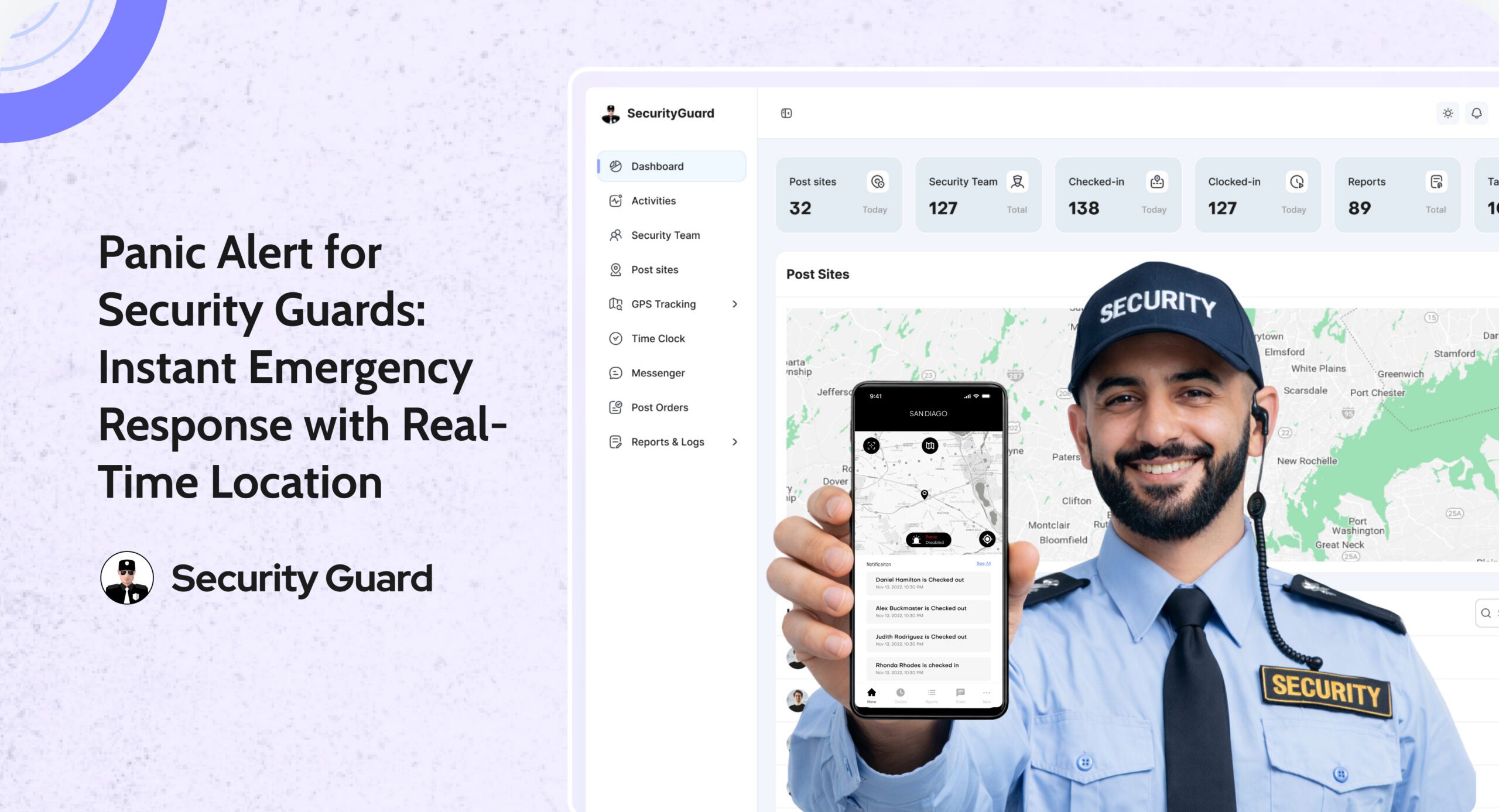
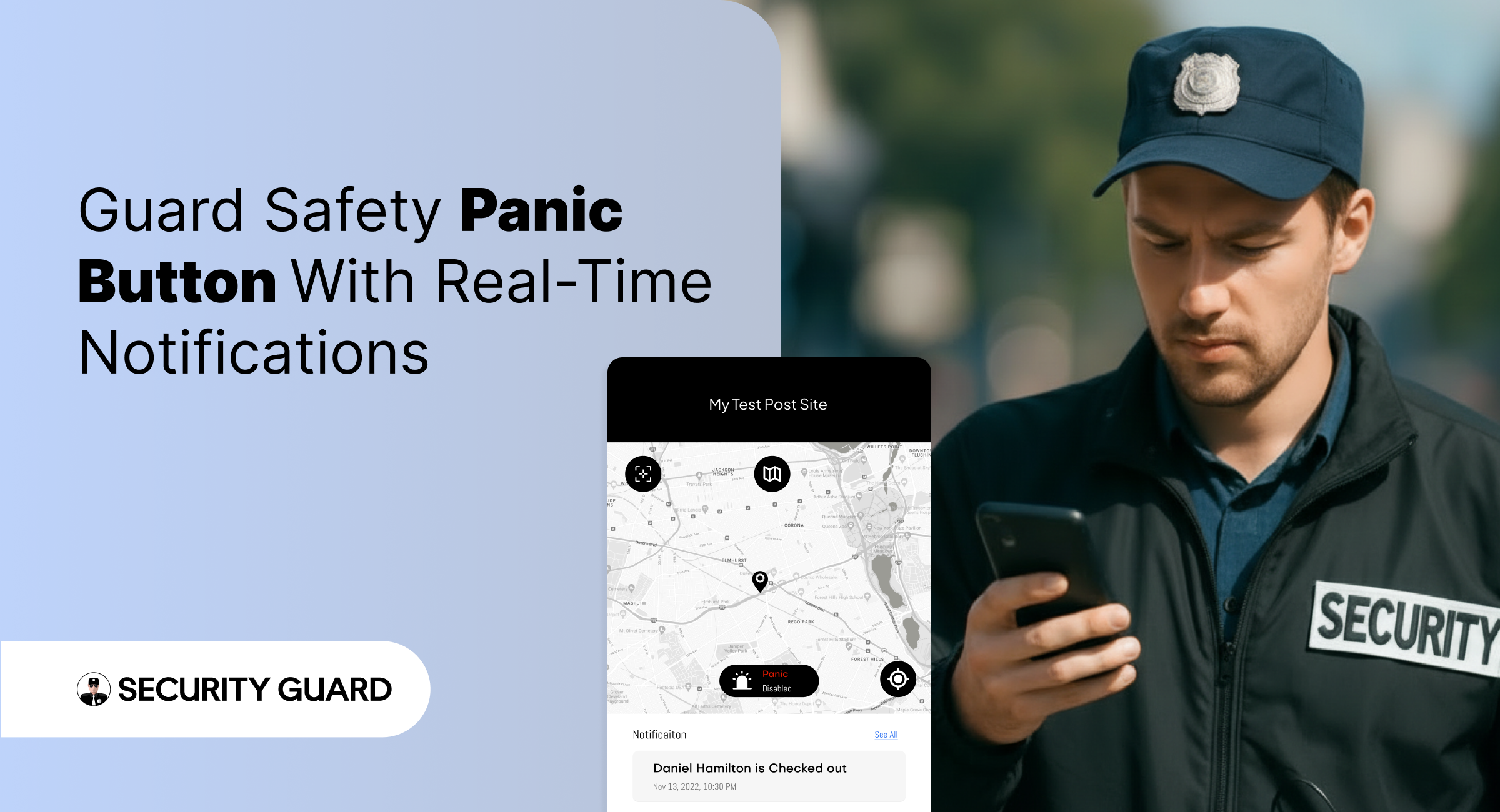
Panic Alert — Instant Emergency Response for Security Guards

In high-risk security environments, emergencies can unfold in seconds. Whether a guard encounters aggression, a medical emergency, or an unexpected threat, the difference between safety and danger often comes down to how fast help arrives.
That’s exactly why the Security Guard App includes a powerful, real-time Panic Alert feature — designed to deliver immediate support when it matters most.

With instant alert triggers, GPS-based location tracking, and supervisor notifications, the Panic Alert system ensures that no guard is ever left alone during a critical moment.

✅ What Is the Panic Alert Feature?

The Panic Alert is a one-tap emergency button built directly into the Security Guard App.
With a single tap, guards can send immediate distress signals to supervisors, site managers, or control room staff.

Each alert includes:

  • Live GPS location of the guard
  • Time-stamped emergency notification
  • Complete device and shift details
  • Instant push and dashboard alerts

This helps supervisors respond rapidly and dispatch backup to the exact location.

✅ Why Panic Alerts Are Essential for Modern Security Teams

Security guards often work alone, in isolated zones, or during late-night hours. In such situations, emergencies escalate quickly. The Panic Alert feature gives guards a reliable safety line while improving organizational response.

Key Benefits:

🔒 1. Immediate Emergency Activation

No complicated menus. No delays. One tap sends a high-priority alert that can’t be missed.

📍 2. Accurate Real-Time Location Tracking

Supervisors receive the guard’s exact GPS location, helping them reach the scene faster.

📢 3. Instant Multi-Channel Notifications

Alerts appear instantly on:Supervisor dashboard

  • Push notifications
  • Email (optional)
  • Activity logs

No emergency alert goes unnoticed.

⏱️ 4. Faster Response & Enhanced Safety

The faster supervisors respond, the safer your team remains — especially in high-risk areas.

📝 5. Automatic Logging for Incident Reports

Every Panic Alert is stored with:

  • Date
  • Time
  • Location
  • Guard information

This helps maintain transparency, accountability, and accurate reporting for clients.

✅ How Panic Alerts Work Inside Security Guard App

  1. Guard taps the Panic Alert button.
  2. The system instantly sends a distress signal to all supervisors.
  3. Supervisors see the alert and GPS location on the real-time dashboard.
  4. Support teams can contact or dispatch help immediately.
  5. The situation is recorded for reporting and review.

It’s simple, fast, and built to save lives.

✅ Seamless Integration With Other Security Guard App Features

The Panic Alert is even more powerful when combined with other modules:

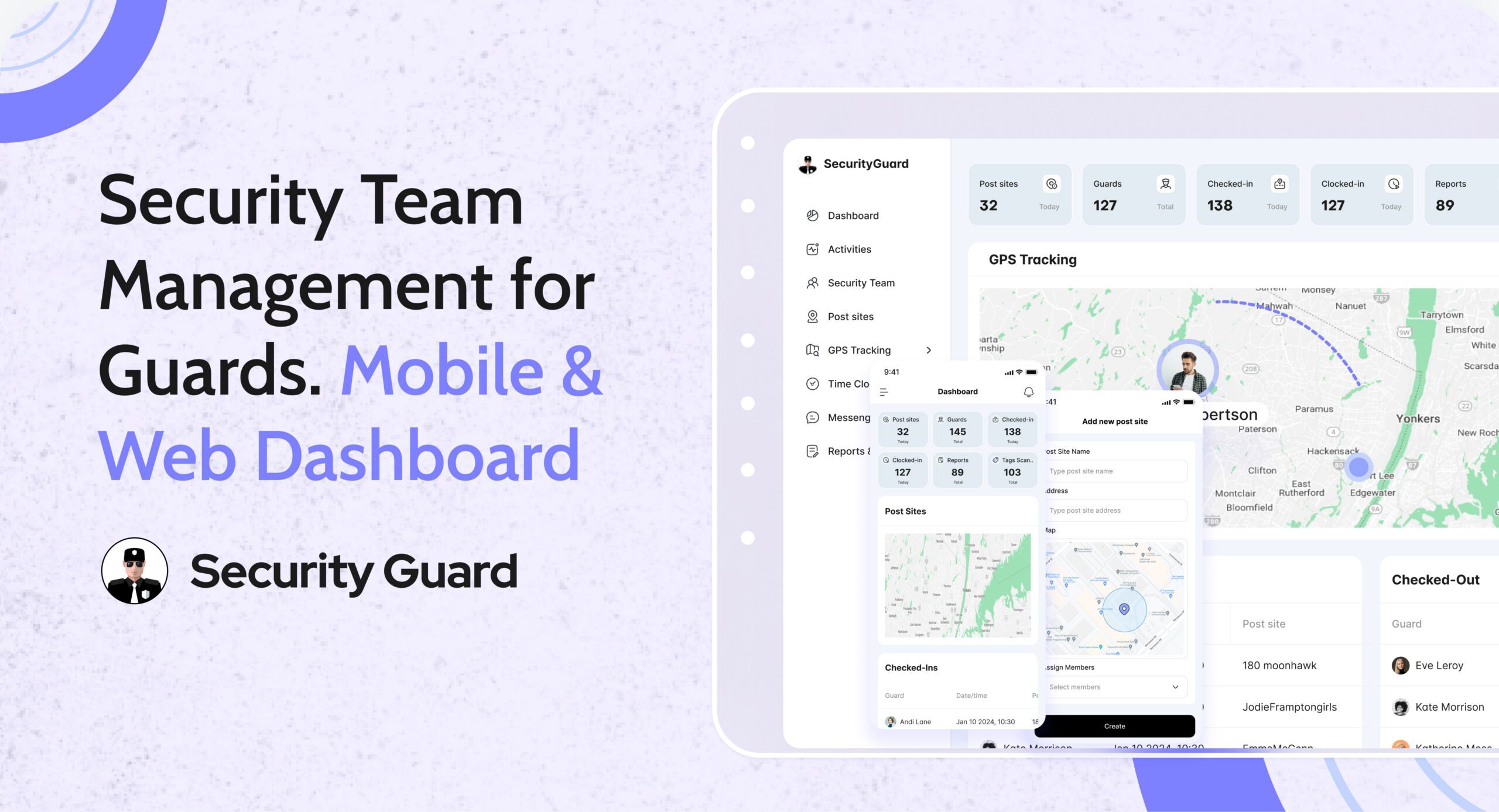
  • GPS Tracking: See exactly where the guard is during an emergency.
  • Incident Reporting: Convert the event into a documented report instantly.
  • Messaging Tool: Communicate with guards during emergencies.
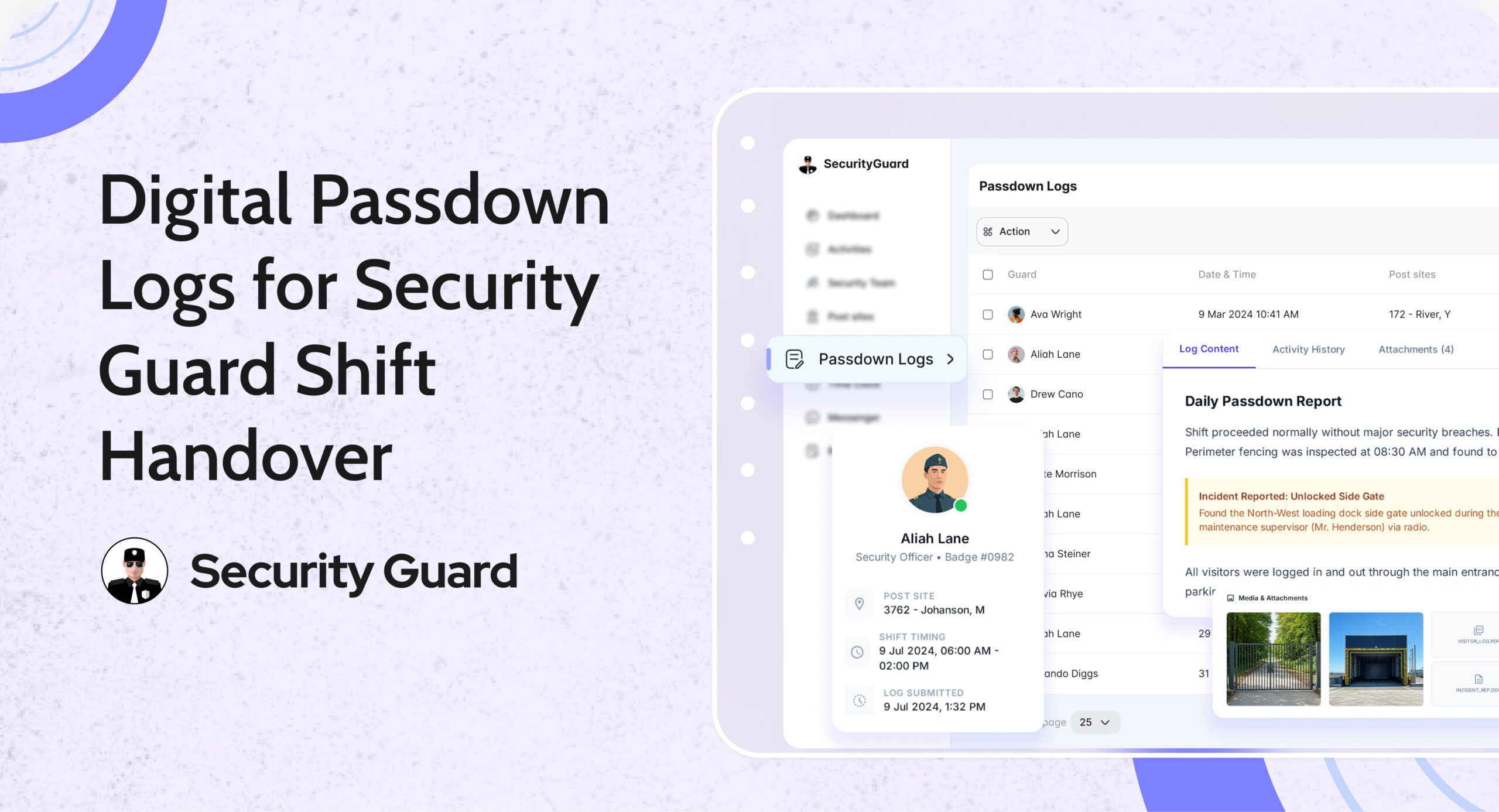
  • Shift Log & Passdown Logs: Share emergency details with the next shift.

Read more about our real-time tracking system here:
👉 GPS Tracking for Security Guards
(https://www.securityguard.app/gps-tracking)

Explore how teams stay connected using real-time messaging:
👉 Real-Time Team Messaging for Security Companies
(https://blog.securityguard.app/boost-team-coordination-with-real-time-messaging-software/)

Internal links improve SEO and navigation for readers.

✅ Who Benefits From Panic Alert?

The feature is ideal for:

  • Security guarding companies
  • Lone worker teams
  • Retail & mall security
  • Hotel & resort security
  • Corporate offices
  • Residential communities
  • Factory & warehouse environments

Wherever guards operate, the Panic Alert offers an added layer of protection.

✅ Conclusion: Stronger Safety, Faster Response

Emergencies shouldn’t turn into crises. With the Panic Alert feature, guards get immediate support, supervisors gain full visibility, and organizations operate with greater confidence and compliance.


Boost Security Team Efficiency with Time Clock

Managing a large security team comes with challenges — from ensuring guards arrive on time to verifying hours worked and managing payroll efficiently. The Security Guard Time Clock feature offered by Security Guard App is designed to solve all these problems through automation, real-time tracking, and transparency.

Why Every Security Company Needs a Digital Time Clock

Manual time tracking is outdated. Paper sheets, punch cards, or Excel logs are prone to human error and time theft. For security companies, where accountability is paramount, this can quickly become costly.

With a Time Clock App for Security Guards, you can:

  • Ensure accurate shift timing and real-time updates.
  • Eliminate buddy punching and false check-ins.
  • Automate payroll calculations.
  • Provide clients with verified attendance logs.
  • Improve guard productivity and compliance.

Key Benefits of Security Guard App’s Time Clock Feature

✅ One-Touch Clock-In/Out

Guards can clock in or out in just one tap using their smartphones, tablets, or desktops. No manual logs or paperwork needed — it’s fast, simple, and reliable.

🔗 Learn more about seamless guard tracking in Real-Time Guard Tracking.

✅ Real-Time Hour Tracking

The app automatically records each guard’s working hours and syncs it to your central dashboard. Managers can instantly see who’s on duty, who’s on break, and who’s running late.

✅ Custom Break Management

Customize break durations based on company policy or client requirements. The system tracks every break to ensure fair working conditions and accountability.

✅ Prevent Time Theft & Buddy Punching

GPS verification ensures guards clock in only when they’re physically on-site, reducing the risk of time fraud or unauthorized check-ins.

✅ Multi-Platform Access

Compatible with Windows, Mac, Android, and iOS, the Security Guard App time clock adapts to any device your guards use — ensuring smooth operations from the office or the field.

✅ Replace Spreadsheets with Centralized Logs

No more scattered spreadsheets or lost paper sheets. All time logs are stored in one secure dashboard — easy to review, export, and share with clients for transparency.

🔗 See how automation simplifies reporting in the Security Guard Reporting Feature.

🧩 Best Practices for Implementing the Time Clock Feature

Adopting a Security Guard Time Clock App is a major step toward improving accountability and streamlining payroll — but successful implementation requires more than just activating the feature.
Below are the seven proven best practices to ensure smooth deployment and maximum return on your investment.

1. Define Clear Shift Schedules and Site Assignments

Before rolling out the Time Clock App for Security Guards, clearly define your guards’ schedules and assign them to the correct sites within the system.

When every guard knows where and when they’re expected to clock in, it prevents confusion and overlapping shifts. Use the Scheduling Feature in Security Guard App to create structured rosters with precise start and end times.

2. Use Geofencing for Accurate Location-Based Clock-Ins

Integrating geofencing technology ensures guards can only clock in or out when they’re physically within the designated site boundary. This prevents buddy punching and false check-ins — two of the biggest challenges in security operations.

By setting up geofence perimeters through the Geofencing Feature, you guarantee that time logs are accurate, verifiable, and compliant with client requirements.

3. Train Supervisors and Guards Before Full Rollout

Even the most intuitive software benefits from quick onboarding. Conduct short, focused training sessions to help your guards and supervisors get comfortable with the Time Clock Feature.

Use simple demo videos, internal reels, or live sessions to show how to:

  • Clock in and out correctly.
  • Record and manage breaks.
  • Handle missed clock-ins or late entries.

Direct supervisors should also know how to review logs, approve corrections, and monitor attendance dashboards.

🔗 You can access training resources and step-by-step setup guides in the Support Center.

4. Communicate the Benefits Clearly

For any new system to succeed, your team must understand why it matters. Clearly explain the advantages of the Security Guard Time Clock App to both guards and clients:

  • Guards get accurate pay for actual hours worked.
  • Supervisors save time managing shifts and attendance.
  • Clients receive verified reports and improved transparency.

By communicating these benefits, you foster cooperation and eliminate resistance to new technology.

Internal Tip:
Create short WhatsApp updates or app notifications highlighting success stories — such as improved attendance rates or faster payroll processing.

5. Monitor Early Data and Identify Patterns

Once the time clock system goes live, monitor data closely during the first few weeks. Track:

  • Missed clock-ins or clock-outs.
  • Frequent late arrivals or early departures.
  • Excessive or unapproved breaks.
  • Time discrepancies between shifts.

Use the dashboard’s built-in analytics to identify patterns early and resolve them before they affect client satisfaction or payroll accuracy.

6. Integrate Time Clock Data with Payroll and Reporting

Connecting your guard time tracking software to your payroll or HR systems automates one of the most time-consuming processes — salary calculation.

Because the Security Guard App automatically logs every minute worked, you can generate precise payroll reports, verify overtime, and export timesheets with a single click.

Additionally, integrating the data into Guard Reporting ensures that clients receive consistent, verified information in their daily or weekly reports.

🌟 The Takeaway

Implementing the Security Guard Time Clock Feature is not just a tech upgrade — it’s a strategic move that transforms how your team manages time, attendance, and accountability.
By following these best practices, you’ll ensure that your rollout is seamless, your data is accurate, and your guards are more efficient than ever.

Ready to take control of your guard hours?
👉 Explore the Time Clock Feature today and experience real-time accuracy that builds client trust and operational efficiency.

Final Thoughts

A Security Guard Time Clock isn’t just about recording hours — it’s about boosting accountability, protecting your business from payroll disputes, and improving client trust.

With Security Guard App, you gain more than just a clock-in/out tool: you get a full-suite Security Operations Management system that simplifies scheduling, reporting, and guard tracking — all from one app.

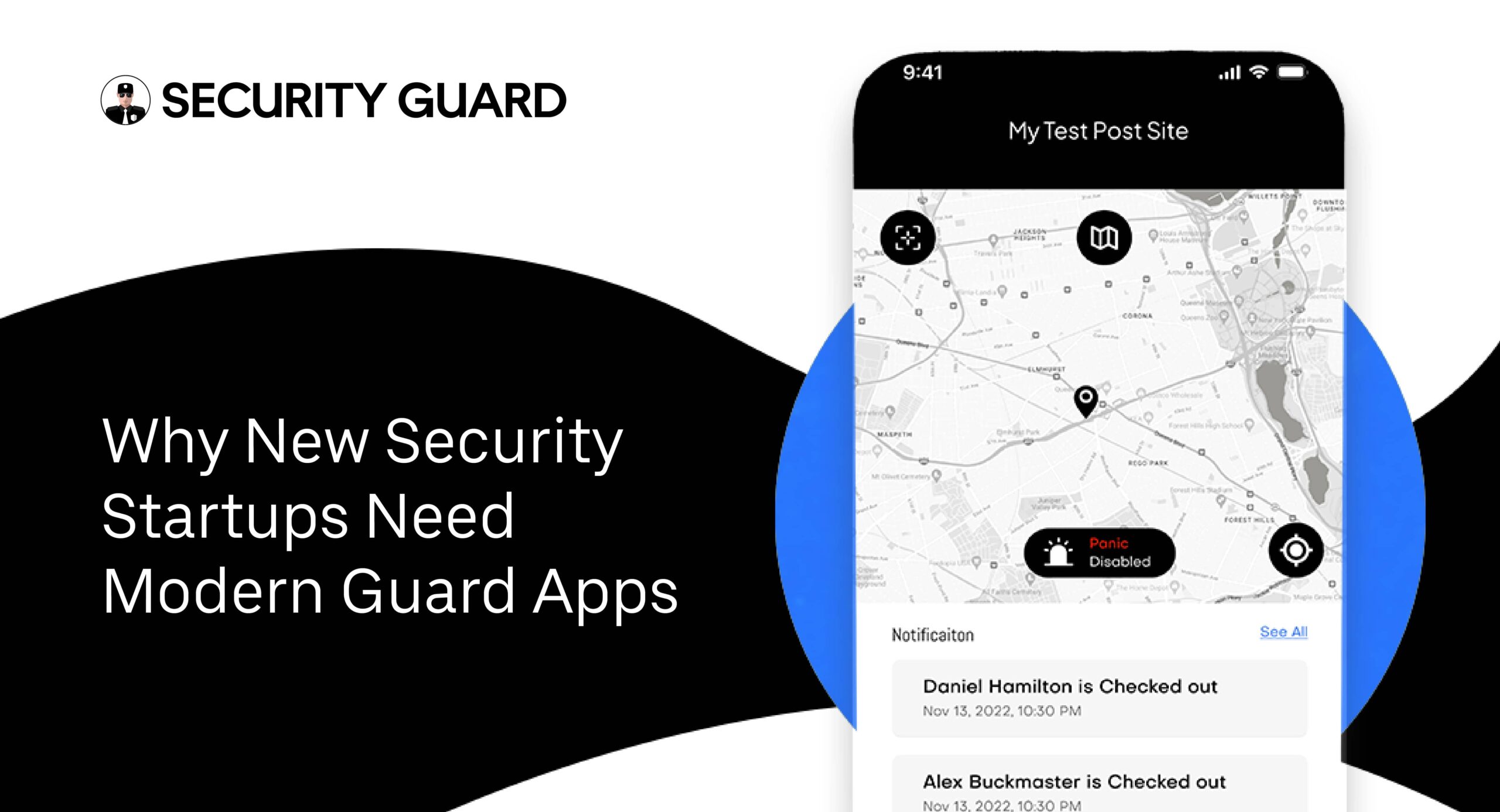
Why New Security Startups Need Modern Guard Apps

Launching a security business in today’s market is no small feat. Competition is fierce, client expectations are higher than ever, and the pressure to deliver consistent, reliable service is relentless. In the United States alone, the private security industry generates more than $50 billion a year, and it continues to expand as companies, communities, and events demand more robust safety measures.

For a new security startup, keeping up can feel overwhelming—especially if you’re relying on old-fashioned methods like paper logs, phone calls, and manual scheduling. This is where modern guard apps change the game. These tools streamline day-to-day operations, improve communication between teams, and give clients the transparency they expect. Simply put, they help new security firms stand out and stay ahead of the competition.

Why Technology Is No Longer Optional

The last decade has reshaped the security industry. These days, technology isn’t just nice to have—it’s essential. Clients want proof of service, real-time updates, and quick incident reporting. Guards want tools that make their jobs easier, not harder.

A survey from Security Magazine found that 78% of companies using digital patrol management tools reported higher client satisfaction. Even more compelling, 62% saw measurable reductions in operational costs after going digital. For a new company with tight budgets and growing pains, that’s not just helpful—it’s a lifeline.

What Makes a Guard App “Modern”?

Not all security software is created equal. A modern guard app isn’t just a digital notepad—it’s a fully integrated mobile and web platform that connects everyone involved in your operations: guards, supervisors, and clients.

Typical features include:

  • GPS tracking lets you see guards’ locations instantly.
  • In-app messaging for instant communication.
  • Guard tour and incident reporting with photo or video evidence.
  • Client access to site activity and reports.
  • Automatic time logs for payroll accuracy.

It’s the difference between managing chaos and running a smooth, transparent operation.

How Modern Guard Apps Help New Security Startups Succeed

1. Smarter Guard Team Management

When you’re building a business from the ground up, managing people efficiently is crucial. A modern guard app allows you to assign shifts, track attendance, and monitor activity without endless phone calls or paperwork. Whether your team has five guards or fifty, you can see where they are, what they’re doing, and whether they’re on schedule.

2. Clear, Transparent Client Communication

Clients don’t just want security—they want visibility. With features like live notifications, shared post orders, and client app access, your customers can see exactly what’s happening on their property. That kind of transparency builds trust and helps you win repeat contracts.

3. Faster Incident Reporting and Documentation

Instead of writing a report at the end of a shift, guards can log incidents on the spot, attach images or videos, and submit them instantly. That means fewer mistakes, faster responses, and a detailed history of events if you ever need to review them.

4. Lower Costs and Less Paperwork

Manual processes eat up time and resources. Automating scheduling, reporting, and payroll through a modern guard app reduces administrative workload and saves money—two things every startup desperately needs.

Spotlight on the Security Guard App

The security guard app is a prime example of how technology can simplify operations. This unified mobile and web platform lets you:

  • Build and oversee your security team the way that works best for you.
  • Add multiple companies and post sites.
  • Invite clients to access live site data.
  • Work across several security contracts at once.

It’s designed for flexibility and ease of use, so you can run a professional operation without expensive infrastructure

Real-World Impact: The Numbers Don’t Lie

Take the example of a small Texas-based startup that switched from paper reporting to a mobile guard tour solution. In just three months:

  • Patrol efficiency improved by 30%.
  • Client complaints dropped by nearly half.
  • Reporting time was cut by 60%.

Those aren’t marketing promises—they’re measurable results.

Why a Single Platform Beats Multiple Tools

Juggling separate apps for scheduling, messaging, and reporting can slow you down. A comprehensive security guard mobile and web app gives you everything in one place:

  • Invite and manage guards and clients.
  • Create multiple teams and post sites.
  • Share live post orders and send alerts.
  • Track guards with GPS and manage time logs.
  • Activate a panic button for emergencies.

The result? Faster communication, fewer errors, and smoother operations.

Looking Ahead: What’s Next for Guard Apps

Technology in security isn’t slowing down. In the coming years, you can anticipate:

  • AI-driven patrol scheduling that predicts high-risk times and areas.
  • Predictive analytics for spotting patterns before incidents happen.
  • More cloud-based tools for instant client access from anywhere.

Startups that adopt these tools early will have a significant edge over slower-moving competitors.

Final Thoughts: Adapting Now Means Thriving Later

For a new security startup in the United States, modern guard apps are more than a convenience—they’re the foundation of a scalable, professional business. They improve guard accountability, keep clients informed, and reduce the kind of administrative headaches that drain time and money.

If you want to compete—and win—against established firms, you need more than manpower. You need smart, connected tools that keep your operations sharp and your clients happy. The sooner you make the switch, the faster you’ll see the results.

Equip Your Security Guard Team with Powerful Reporting Tools
In the security industry, the need for accurate, timely, and accessible reporting is more important than ever. With rising client expectations, complex compliance requirements, and multiple teams working across different sites, real-time visibility into daily activities is essential. That’s why equipping your security guard team with powerful reporting tools can significantly boost productivity, improve accountability, and ultimately lead to better service outcomes.

Why Powerful Reporting Tools Matter

Security operations often face breakdowns in communication, missed incidents, and incomplete documentation when relying on paper-based or outdated digital systems. According to industry data, over 40% of guard companies still depend on manual logs, leading to inefficiencies, reporting errors, and client dissatisfaction.

Modern solutions like the security guard app provide real-time reporting features that allow guards to submit detailed, multimedia-rich incident and activity reports directly from their mobile devices. This ensures every shift is documented, every issue is tracked, and every client stays informed.

Real-Time Reporting That Keeps Your Security Team on Track and Informed

The security guard app is more than just a reporting tool—it’s a complete mobile and web-based platform designed to digitize your security guard operations instantly. This smart solution lets your team:

  • Log and send real-time reports quickly through the mobile app
  • Attach images, videos, and notes for rich documentation
  • Track GPS time-stamped events for improved accountability
  • Communicate instantly with supervisors for faster decision-making

By offering real-time access to critical data, the security guard app helps security teams unlock their full potential and allows management to gain full visibility and control of field operations—remotely and securely.

Automated Report Delivery for Streamlined Security Management

Sharing reports manually wastes time and increases the risk of mistakes and delays. The security guard app simplifies this with automated email report delivery.

Administrators can:

  • Schedule specific reports or send them instantly
  • Adjust report delivery to match user time zones
  • Send important updates quickly to the right people
  • Minimize manual reporting tasks while maintaining control

This automation helps security managers and clients stay updated without the burden of manual oversight—ensuring that reporting becomes an asset, not a bottleneck.

Customizable Daily Activity Reports (DARs) for Actionable Insights

With customizable DAR emails, the security guard app delivers concise, meaningful insights directly to your inbox. Tailor reports to specific users or locations, convert them to PDF, and track security events with precision.

Key features include:

  • Adjustable date ranges using a data scroller
  • User-specific activity summaries
  • On-demand PDF conversions for professional sharing
  • Enhanced filtering for focused, client-specific reviews

This level of customization gives you the ability to monitor performance, verify coverage, and respond to site-specific issues quickly.

Simplify Guard Tour Reporting to Strengthen Your Whole Team

Ditch the pen and paper. The security guard app turns every patrol into a digital event log that can be reviewed and acted upon in seconds.

Your team can act fast to:

  • Quickly build and distribute real-time guard tour reports
  • Attach images, videos, audio, and written notes
  • Capture GPS time-stamps for accurate route tracking
  • Log hourly checks and break-in inspections

Reports are securely stored in the cloud, ensuring 24/7 access from any device.

Fact: Companies that digitize their guard tour reporting reduce data entry errors by 65% and cut paperwork by over 80%.

Customize Guard Tour Reports to Meet Client Expectations

Clients often have specific reporting needs. The security guard app allows your team to create and manage customized report templates per site or client, helping you deliver exactly what your stakeholders need—no more, no less.

  • Build site-specific templates on the go
  • Focus only on the metrics your clients care about
  • Auto-approve routine reports to streamline review
  • Eliminate outdated formats and irrelevant data

This ensures compliance, clarity, and client satisfaction.

Keep Incident Management Sharp with Tailored Reports

Standard incident reports often fall short when trying to understand long-term security trends or liability exposures. With the security guard app, your team can create custom incident reports that capture detailed context and actionable insights.

Features include:

  • Real-time incident documentation from the field
  • Email-enabled reports for immediate review
  • Historical incident tracking for benchmarking and compliance
  • Legally sound formatting to support claims or litigation

By turning incident logs into strategic insights, security companies can make smarter operational decisions while protecting their clients and their own liability.

Increase Team Efficiency with Simplified Reporting Workflows

Efficiency is the key to scalable security operations. The security guard app increases productivity while reducing errors by:

  • Automating the report review and approval process
  • Let supervisors email reports directly from the web app
  • Minimizing manual documentation
  • Standardizing how data is captured and shared

Stat: Companies using automated reporting tools report a 30% boost in supervisor efficiency and a 50% improvement in guard accountability.

One Platform, Multiple Reporting Solutions

The Security Guard App centralizes everything your team needs:

  • Check-in & Check-out with GPS tagging
  • In-app messenger for real-time communication
  • Client and guard profile management
  • Live post order sharing
  • Instant notifications and alerts
  • Panic button for emergencies

By integrating all of these features into a single app, your security team stays connected, informed, and ready to act—no matter where they are.

Trusted by Industry Leaders

Companies across the globe, including Signal 88, rely on the security guard app to streamline their guard operations and enhance reporting capabilities. With a proven track record of delivering operational excellence, the platform helps you build trust with your clients and outperform the competition.

Conclusion: Build a Smarter, More Accountable Security Operation

In the fast-evolving security world, effective reporting tools have become essential. Equipping your security guard team with the security guard app ensures you gather the right information, respond faster, and deliver real-time transparency to your clients.

Whether you’re overseeing one building or hundreds of sites, this platform empowers your team to work smarter, not harder.

✅ Digitize your operations
✅ Customize and automate reports
✅ Enhance visibility, control, and response
✅ Get started for free today

Why Your Security Guard Team Needs a Powerful Mobile App

Security guard companies face constant pressure to deliver reliable protection, stay compliant, and improve operational efficiency — all while keeping costs low and performance high. In this digital age, one of the most effective ways to meet these expectations is by equipping your team with a powerful security guard mobile app.

Whether managing a small local team or multiple locations across regions, a security guard app helps streamline processes, reduce manual tasks, and ensure better communication between guards, supervisors, and clients. It unifies all essential tools your team requires into a single, easy-to-use platform.

Streamline Security Guard Management with a Comprehensive Mobile and Web-Based App

The security guard app offers a feature-rich, mobile and web-based solution for managing your entire workforce. You can easily add post sites, assign duties, invite clients, track activities, and manage reports — all in real time.

It’s built to improve how you operate your business, allowing you to digitize  workflows, strengthen accountability, and communicate effectively with your security staff. 

Why Your Security Guard Team Needs a Mobile App

Real-Time Team Management Without Delays

Managing security guards across multiple locations becomes much easier with real-time updates. With the security guard app, supervisors can instantly track check-ins, monitor guard activity, receive live alerts, and respond to incidents as they happen.

You’ll no longer need to rely on delayed reports or endless follow-ups — everything is visible and accessible from your mobile device or computer.

Included Features:

  • GPS tracking and live guard location updates
  • Check-in and check-out via the app
  • Time log monitoring and management
  • Emergency panic button activation
  • Instant access to reports and alerts

Stronger Communication Between Teams and Clients

Lack of clear communication often results in incomplete duties, increased vulnerability, and dissatisfied stakeholders. That’s why the app includes a built-in messenger and live update feature.

Your team can instantly share updates, post orders, and important notices. Clients can also be invited to the platform to access relevant data such as guard performance, incident history, and scheduled patrols — promoting full transparency and trust.

Improved Guard Accountability Through Automation

Accountability is key in the security industry. With every action recorded — from location check-ins to report submissions — managers get a complete picture of performance.

No more guessing who was present, what was done, or when it happened. The app provides a time-stamped, GPS-verified record for every guard’s shift and activity.

System Usage Stats:

  • Over 95,000 active users
  • More than 384,000 hours tracked
  • Over 198,000 reports submitted
  • More than 105,000 passdown logs shared

Getting Started Is Simple — No Training Required

One of the standout advantages of the security guard app is its user-friendly design. The platform is built to be intuitive, requiring little to no training for new users. From the moment you access the app, the interface guides you naturally through the setup process.

You can easily create post sites using GPS-enabled devices, onboard your team members, and grant clients secure access to monitor operations in real time. Whether you’re managing ten guards or a hundred, the system scales with your needs — without the hassle of complex setup procedures.

There’s no need for extra hardware or costly installations. Everything is accessible from your mobile phone or desktop, making it ideal for both field operations and office management.

Start your journey toward smarter security operations today — registration is fast, simple, and completely free.

Manage All Operations From One Platform

Instead of managing separate systems for reporting, tracking, and communication, combine them all in one solution. The security guard app offers:

  • Guard and client profile management
  • Multiple team creation and site assignment
  • In-app check-in and check-out
  • Customizable reports and real-time submissions
  • Post order sharing and access
  • Live alerts and push notifications
  • Passdown log management
  • Built-in chat and emergency panic button

All these tools are designed to make operations smoother and more secure — helping your team work together more efficiently.

Trusted Worldwide by Security Companies

From local firms to international agencies, the security guard app is trusted by security companies across the globe. Businesses report significant improvements in:

  • Operational transparency
  • Time and resource management
  • Guard attendance and accountability
  • Client satisfaction through faster updates

Whether you’re just starting or scaling up, having the right tools in place gives your team the ability to respond faster, work smarter, and achieve better results.

A More Effective Strategy to Enhance Your Security Operations

The security guard app isn’t just about tracking guards — it’s about empowering your entire operation. This is how it supports the growth of security companies:

  • Digitize manual work and reduce paperwork
  • Automate reporting and patrol logs
  • Improve guard visibility and location tracking
  • Enable remote supervision and quick decision-making
  • Build stronger, more transparent relationships with clients

The result? A more responsive, agile, and reliable service that builds trust and long-term business growth.

Final Thoughts

Today, security companies need to be faster, more accurate, and more connected. A traditional approach can’t keep up with growing expectations. By adopting a modern security guard mobile app, you not only upgrade your internal operations — you also create a more professional and trustworthy experience for clients.

Whether it’s time tracking, incident management, post site creation, or emergency response — everything you need is right at your fingertips.

How a Security Guard Mobile App Improves Client Satisfaction

In the competitive world of private security, client satisfaction is critical for maintaining long-term contracts and standing out from the competition. One of the most effective ways to achieve this is by adopting a modern security guard app. These powerful tools offer real-time visibility, seamless communication, and transparent reporting—creating a foundation of trust between security service providers and their clients.

With businesses and property managers demanding increased accountability and measurable results, integrating a security guard mobile app into your operations is no longer a luxury—it’s a necessity. In this article, we’ll explore how a feature-rich mobile and web-based platform can dramatically improve client satisfaction, reinforce operational transparency, and elevate the professionalism of your security service.

Real-Time Visibility Into Guard Activities

Real-time GPS tracking is one of the most powerful features a security guard mobile app brings to the table. This feature allows clients to view patrol activities live, giving them confidence that their property is being properly monitored.

Benefits to Clients:

  • See where guards are located and ensure they’re patrolling assigned areas.
  • Receive automatic updates if patrols are missed or delayed.
  • Gain insights into the routes taken and time spent on-site.

By sharing GPS data with clients, the app builds a sense of accountability, which fosters trust and improves client retention.

Enhanced Communication and Collaboration

Clear and consistent communication is vital to keeping every part of a security operation running smoothly and effectively. A security guard app equipped with an in-app messenger ensures that guards, supervisors, and clients remain connected at all times.

Key Features That Boost Client Satisfaction:

  • Real-time chat for guards and admins.
  • Secure file sharing (images, video, documents).
  • Notifications for post updates or urgent alerts.

With an integrated messaging system, miscommunication is minimized, allowing for faster decision-making and improved incident resolution.

Transparent and Accurate Reporting

Manual reports and misplaced paperwork are now a thing of the past. A mobile security guard app digitizes the entire reporting process, offering clients instant access to detailed and organized data.

Types of Reports Available:

  • Daily Activity Reports (DARs)
  • Custom Incident Reports
  • Post Orders Acknowledgement
  • Time Logs and Break Reports

Clients appreciate the ability to receive automated reports via email, schedule delivery preferences, and convert them into PDFs for documentation or audit purposes. When clients can see exactly what’s happening on the ground, it builds trust and reinforces their confidence in the security provider.

Customizable Guard Tour Reports for Site-Specific Needs

Different clients have different needs. The security guard App allows for the customization of guard tour reports to meet specific client expectations.

Client Advantages:

  • Receive only critical data relevant to their property.
  • Customize templates for different post sites.
  • Review hourly, shift-end, or emergency logs.

Tailored reporting ensures clients receive only the data they care about—reducing information overload and helping them make data-driven decisions quickly.

Panic Button & Emergency Response

Client satisfaction is directly tied to the safety of their assets and personnel. The app’s GPS-enabled panic button is a vital tool that boosts security effectiveness during emergencies.

Emergency Features:

  • Long-press panic activation to avoid false alerts.
  • Sends immediate alerts with guard’s live location.
  • Dispatch nearest available personnel quickly.

By demonstrating rapid response capabilities, the app reinforces clients’ trust in your ability to manage critical incidents.

Automated Time Tracking and Payroll Transparency

Using manual time logs often leads to discrepancies, which can erode client trust. The time clock app feature within the security guard app ensures accurate and transparent record-keeping.

Why Clients Appreciate It:

  • Guards check-in and out with GPS timestamps.
  • Time data is stored in the cloud and easy to audit.
  • Prevents time theft and buddy punching.

Clients have full visibility into the actual hours worked, giving them assurance that billing is accurate and justified.

Post Order Management and Real-Time Acknowledgements

Clear post orders ensure guards understand their responsibilities. The app lets supervisors and clients create, update, and share post orders instantly with guards.

Client-Focused Benefits:

  • Live updates on responsibilities and site instructions.
  • Guards can acknowledge receipt in real-time.
  • Multimedia attachments (PDF, image, video) for better clarity.

Clients can even access the post orders themselves, ensuring operational alignment between them and the security provider.

Passdown Logs to Keep Everyone in the Loop

Shift transitions often result in missed information. The passdown log makes it easy for guards to leave important updates for the next shift and keep clients in the loop.

How It Helps Clients:

  • Prevents lapses in security during shift handovers.
  • Ensures continuity in surveillance and reporting.
  • Access to historical logs for reference.

Clients gain insight into guard activities across shifts, which reflects professionalism and operational maturity.

Client Access Portal for Better Control

Many apps, including the security guard app, allow clients to log into a dedicated dashboard where they can manage or view:

  • Assigned guards and shifts
  • Live patrol activity and reports
  • Emergency alerts and incident tracking

Empowering clients with access gives them control and assurance—two powerful ingredients for lasting satisfaction.

Efficient Incident Management With Custom Reports

When an incident occurs, speed and clarity in documentation are essential. The incident reporting tools within the app enable guards to submit detailed reports instantly.

Client Value:

  • Receive incident notifications in real-time.
  • Easily access photos, voice notes, or video clips included in each report.
  • Generate insights for legal or operational review.

This not only boosts confidence in the security provider but also enhances the client’s preparedness and liability defense.

Seamless Onboarding and Multi-Site Management

A security guard mobile app gives clients with multiple sites the power to oversee all operations from one centralized dashboard. They can:

  • Add multiple post sites.
  • Create and assign teams per location.
  • Track performance across sites.

Clients managing retail chains, gated communities, or corporate campuses find this invaluable for centralized oversight.

Conclusion: Empowering Security Teams, Satisfying Clients

Client satisfaction hinges on professionalism, transparency, and accountability—all of which a modern security guard app delivers. By equipping your guards with digital tools for time tracking, reporting, communication, and emergency response, you’re not only streamlining operations but also building long-term trust with your clients.

Whether you’re managing one site or a hundred, the security guard app provides the infrastructure to enhance guard performance and exceed client expectations. When clients see that their concerns are proactively addressed, reports are timely, and their assets are well-guarded, satisfaction follows naturally.

The Ultimate GPS Tracking App for Corporate & Campus Security

Ensuring efficient management of security guard teams across diverse sites is difficult without real-time GPS tracking. However, with the right tools, it’s easier than ever to monitor, manage, and optimize your security operations. The security guard app is the ultimate GPS tracking app for corporate and campus security, empowering organizations with real-time oversight, automated reporting, and improved guard accountability.

Next-Gen Campus Safety Managed via Custom App Technology

Designed for campus operations, the app empowers guards through a unified web and mobile system. It helps security managers track guards across multiple campuses and ensure full visibility without constant on-site supervision.

Key Features:

  • Remote Monitoring: Reduce costs associated with physical supervision.
  • Live GPS Tracking: Monitor guard location and movements in real-time.
  • Status Updates: Instantly view if a guard is checked-in or on break.
  • Post Orders Sharing: Share instructions with guards and receive passdown logs effortlessly.

Gain Full Visibility into Guard Movements Across Campus

Built with transparency in mind, this GPS tracking app for campus security ensures you always know where your guards are and what they’re doing.

Benefits Include:

  • Live map view of all campus guard activity.
  • Historical data insights for audits or dispute resolution.
  • Safety monitoring via GPS during patrols.
  • Visual proof of guard movements and check-ins.

Hassle-Free Incident Reporting for Campus Guards

Managing incidents is easier with customizable reporting templates and real-time submission. Empower your campus security guards to submit reports backed by GPS data, photos, and time stamps.

What You Get:

  • Custom incident report templates.
  • Photo and location-tagged entries.
  • Auto-approved reports for quicker management.
  • Faster incident response and decision-making.

A Smart Time Tracking App for Security Teams

Whether it’s a university campus or a corporate office, efficient time tracking is critical. This app offers precise logging and break management to streamline labor tracking.

Highlights:

  • Automatically logs time entries.
  • Create custom break periods.
  • Multi-level time visibility for different sites.
  • Boost efficiency by analyzing time usage trends.

Share GPS Data with Clients to Boost Transparency

Elevate client trust by sharing guard data directly through the app. Let them view GPS history, real-time reports, and even generate invoices based on tracked hours.

Client Benefits:

  • Transparent guard activity.
  • Access to real-time field reports.
  • Ability to comment on incidents.
  • Easy access to billable hours.

The Ultimate Corporate Security Guard App

From check-ins to communication, the app simplifies every aspect of corporate security management. A single app handles GPS tracking, time logging, and incident reporting.

All-in-One Features:

  • Accurate GPS tracking.
  • Effortless guard check-in/check-out.
  • Multimedia messenger.
  • Custom reporting capabilities.

Accurate Time Logs for Corporate Security Teams

Say goodbye to manual timesheets. This GPS tracking app for corporate security ensures accurate, automated timekeeping.

Advantages:

  • Instant notifications on check-in/out.
  • Reliable labor cost control.
  • Detailed, downloadable time logs.
  • Simplifies payroll and invoicing.

Fast & Flexible Guard Reporting in Real Time

Guards can report incidents, threats, and trends in real time—allowing security managers to take immediate action.

Features:

  • Site-specific custom reports.
  • In-app tools for photos and notes.
  • Real-time threat detection and response.
  • Actionable insights into daily operations.

Seamless Team Collaboration With In-App Messenger

Communication breakdowns lead to delays and errors. The security guard app solves this with an integrated messenger for real-time collaboration.

Messenger Perks:

  • Live chat to coordinate operations.
  • Group chats for site-specific tasks.
  • Shared views of ongoing activities.
  • Faster decision-making on the go.

No Training Required — Get Started in Minutes

One of the standout benefits of this GPS tracking app for corporate and campus security is how easy it is to deploy. Guards can download the app and start using it immediately—no complex onboarding needed.

Conclusion

If you’re managing security across corporate buildings or educational campuses, the security guard app is the GPS tracking app for corporate and campus security you’ve been waiting for. From time tracking to incident reporting and real-time GPS monitoring, it’s designed to simplify operations, reduce costs, and enhance accountability.

Signup for free today and bring your security operations into the future.