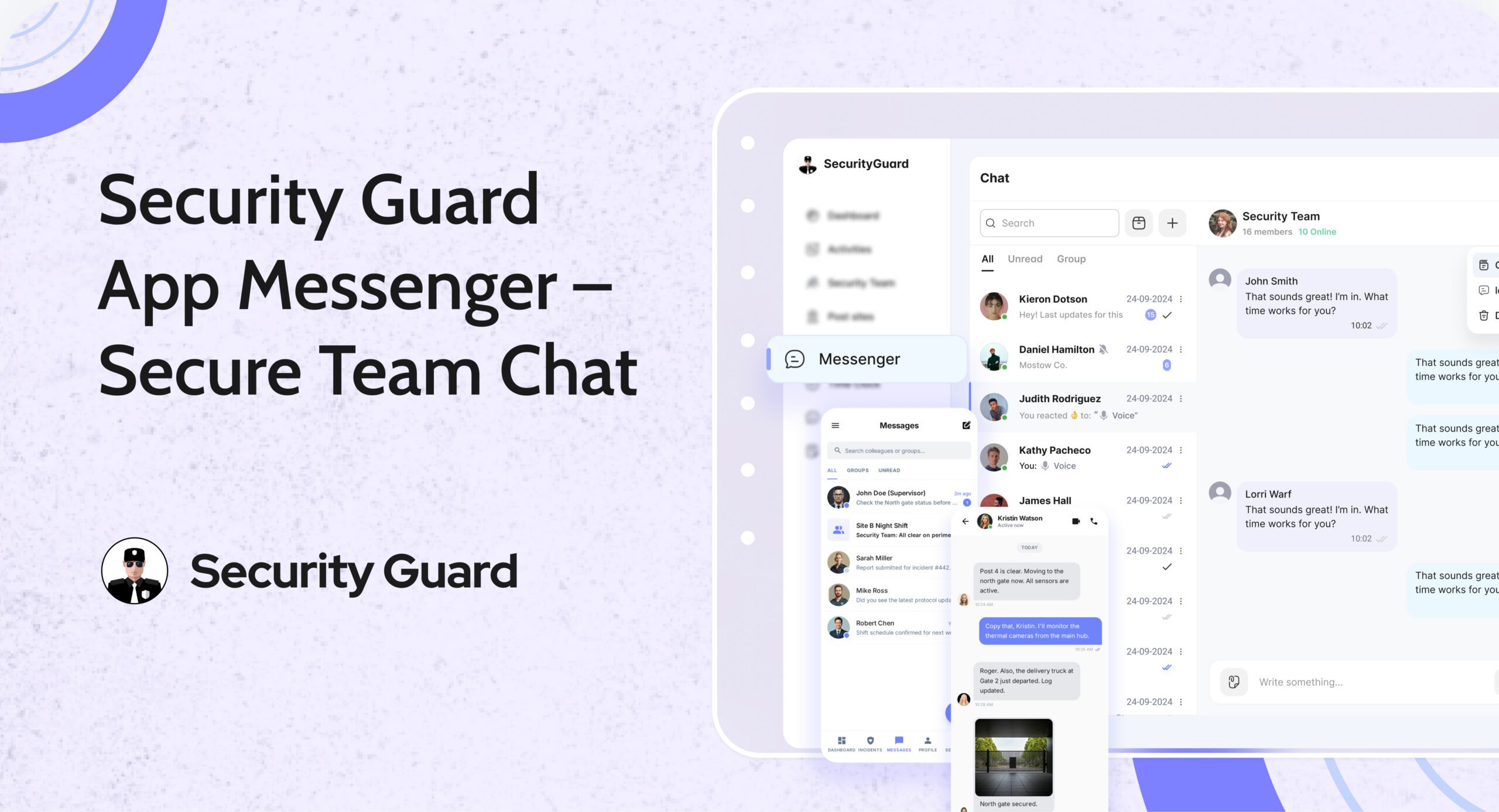
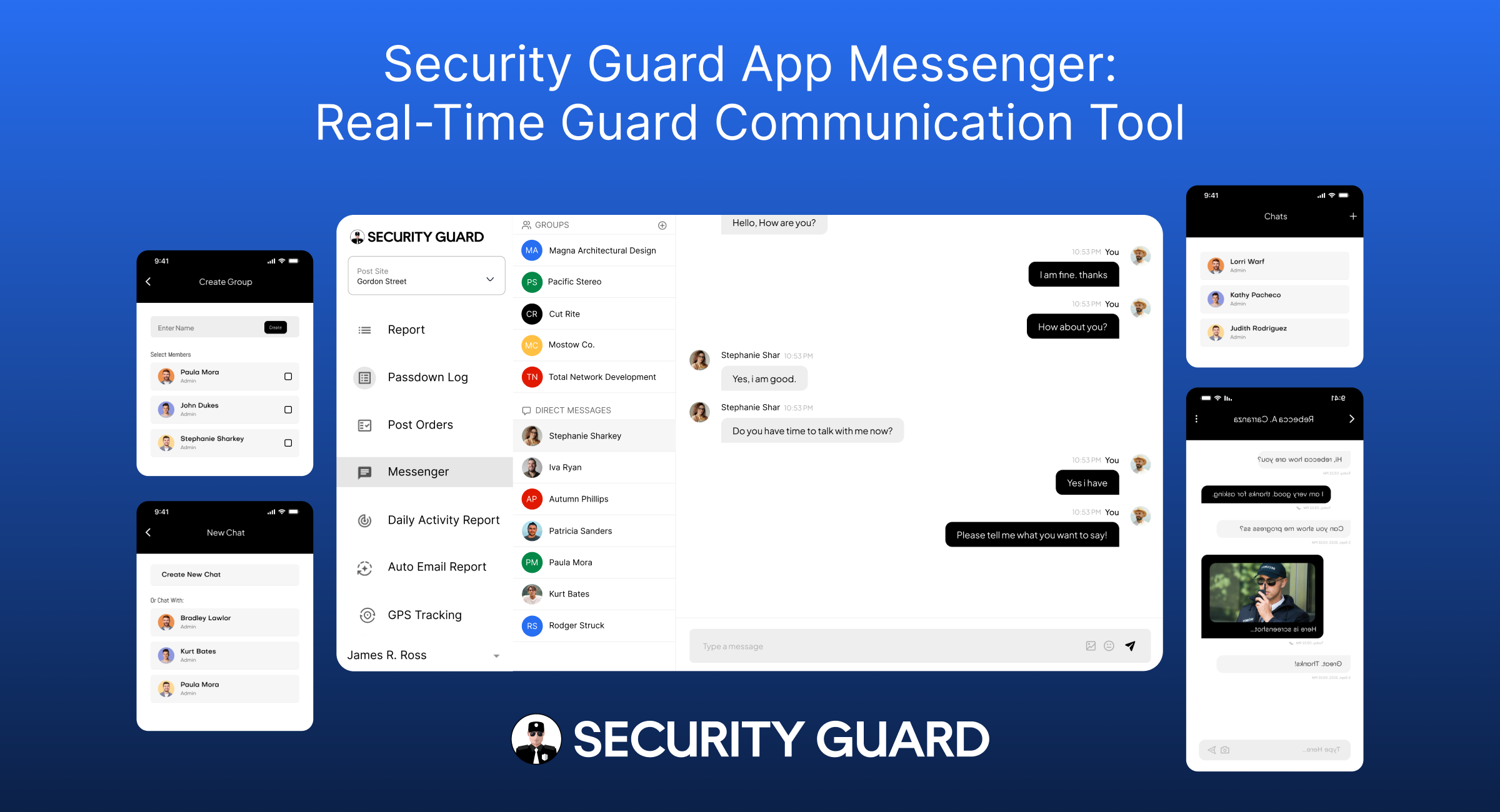
Security Guard App Messenger – Real-time communication to improve security response and operations.

Communication is the backbone of every strong security operation. When guards, supervisors, and clients are not aligned, small issues can turn into major incidents. Missed messages, unclear instructions, and scattered communication channels can break accountability and reduce efficiency.

To solve this, the Security Guard App Messenger provides a centralized, secure, and real-time communication system built specifically for security operations. It removes the need for WhatsApp, SMS, or personal messaging apps — giving companies a professional and trackable way to stay connected.

🔍 What Is the Security Guard App Messenger?

The Messenger is a built-in chat system inside the Security Guard App that connects guards, supervisors, clients, and management through instant messages, media sharing, and real-time alerts.

It is designed for:

  • Faster decision-making
  • Clear communication
  • Centralized record keeping
  • Seamless coordination across multiple guard posts

👉 Learn about more operational tools inside the app:
Explore the Security Team Management Feature

⭐ Key Features of the Security Guard App Messenger

1. Real-Time One-to-One & Group Messaging

Communication is instant — no delays.
Guards can message supervisors directly, or send updates to group channels for specific post sites.

Benefits:

  • Faster issue escalation
  • Better coordination between shifts
  • No need for external messaging apps

2. Create Custom Groups for Specific Sites or Teams

The app allows managers to create chat groups such as:

  • “Night Shift – Mall Security”
  • “Warehouse Patrol Team”
  • “Event Security Team – Gate A”

Each team only sees messages relevant to them.

👉 Want to learn how guards are tracked during shifts?
Check out the GPS Tracking Feature

3. Share Photos, Videos, Documents & Voice Notes

The Messenger supports multimedia for clearer reporting:

  • Incident photos
  • Video proof
  • Shift instructions
  • Voice updates
  • Documents or PDFs

This ensures nothing gets misunderstood.

4. Secure, Encrypted & Professional Communication

Unlike WhatsApp or personal chat platforms:

  • Messages are stored securely
  • Chats are tied to work accounts, not personal numbers
  • All conversations remain confidential
  • Compliance and accountability are built-in
    👉 Related Feature:
    Learn About the Reporting Module
    Perfect for incident reports, daily logs, and more.

5. Message Notifications & Instant Alerts

Guards receive:

  • Push notifications for new messages
  • Alerts for urgent updates
  • Instructions for upcoming tasks or emergencies

Supervisors can also send broadcast messages during critical situations.

6. Centralized Chat History for Accountability

Every message is logged with:

  • Time
  • Sender identity
  • Multimedia attachments

This is extremely helpful for:

  • Incident investigations
  • Shift handovers
  • Client transparency
  • Internal audits

This ensures all communication is traceable and professional.

👉 See how passdowns enhance shift transitions:
Visit the Passdown Logs Feature

🎯 Who Needs the Security Guard App Messenger?

This feature benefits a wide range of security operations:

✔ Security Guard Companies

Managing guards across multiple sites becomes easier with centralized communication.

✔ Corporate Security Teams

Large office buildings, hospitals, and campuses can keep guards connected 24/7.

✔ Event Security Firms

Instant messaging allows quick decisions during crowd management.

✔ Logistics, Warehousing & Manufacturing

Guards can report vehicle arrivals, departures, and security checks instantly.

✔ Residential Communities & Gated Societies

Supervisors and guards stay aligned on visitor alerts, incidents, and emergencies.

👉 To learn how companies assign guards to sites:
Explore the Sites & Post Assignments Feature

⚙️ How the Messenger Works (Step-by-Step Workflow)

Step 1: Manager Sets Up Teams & Assigns Guards

  • Guards join automatically based on site assignments
  • Supervisors gain admin control over groups

Step 2: Guards Exchange Real-Time Messages

They can:

  • Raise alerts
  • Ask questions
  • Send photos/videos of incidents
  • Receive instructions

Step 3: Managers Monitor Everything

From the dashboard, managers can:

  • View active chats
  • Respond to guards
  • Track communication history

Step 4: All Messages Are Logged for Accountability

This helps with:

  • Incident verification
  • Performance analysis
  • Client proof of work

👉 Learn how the Time Clock ensures accurate guard hours:
Visit the Time Clock Feature

🚀 Why Security Companies Trust This Communication System

1. Professional & Trackable Communication

No more using personal apps that mix work with private messages.

2. Better Guard Accountability

Every message is locked into your security management ecosystem.

3. Faster Incident Response

Supervisors act immediately based on real-time updates.

4. Enhanced Client Transparency

Clients appreciate organized communication records.

5. No More Miscommunication

Clear, time-stamped messages reduce mistakes during shifts.

👉 See how panic alerts improve emergency response:
Explore Panic Alert Feature

📌 Conclusion

The Security Guard App Messenger is more than a chat tool — it’s a powerful communication system crafted specifically for the security industry. By centralizing communication, improving response times, and adding accountability, it becomes an essential tool for any modern security team.

If your security operation wants to improve productivity, reduce confusion, and enhance client trust, the Messenger feature is a game changer.


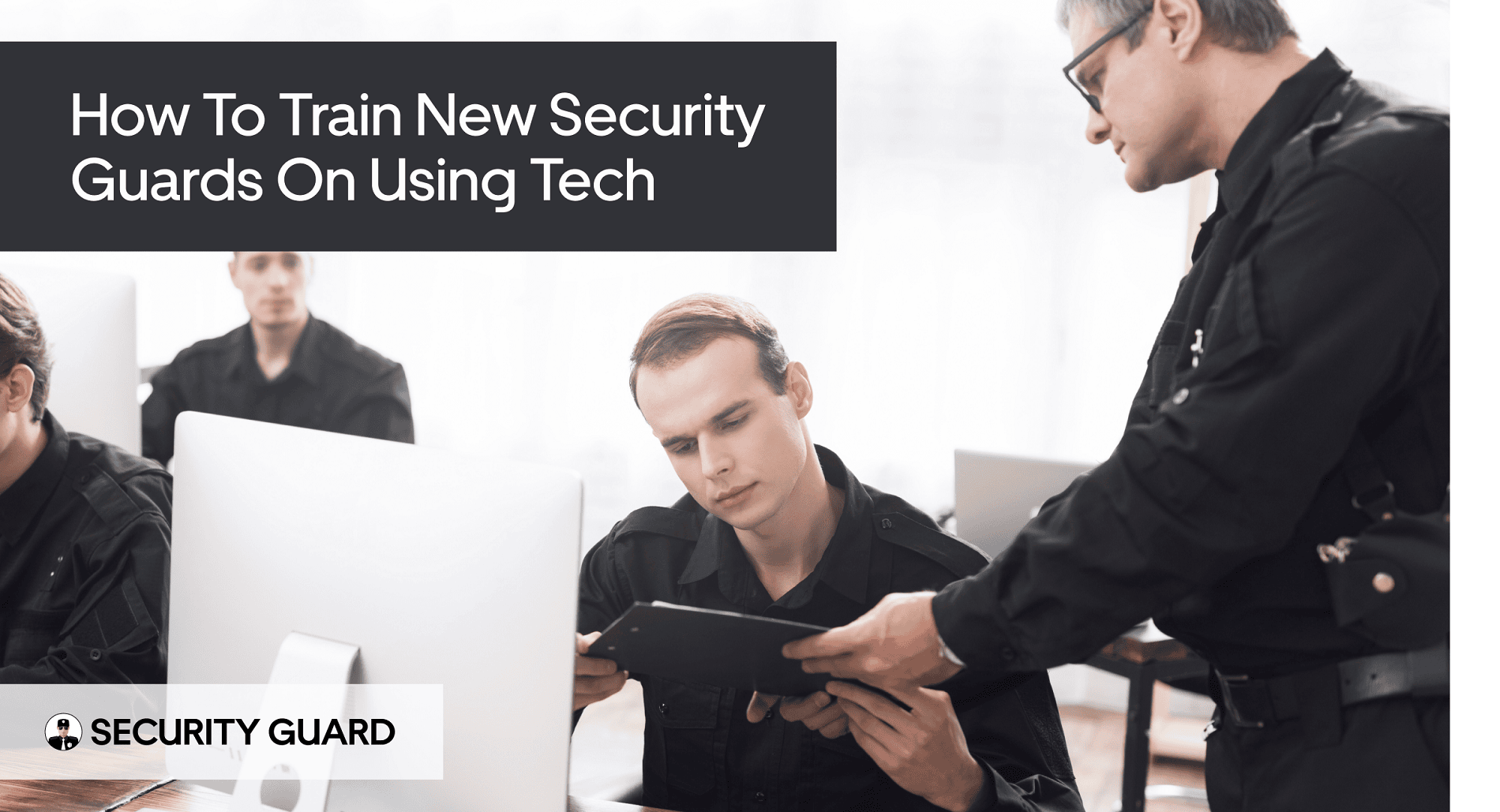
How to Train New Security Guards on Using Tech

Did you know that modern security operations rely heavily on technology to enhance efficiency and effectiveness? As the need for capable security professionals grows, it’s essential to equip new recruits with hands-on knowledge of modern security technology.

The security guard app is designed to simplify team management, allowing you to easily invite users, add client sites, and grow your team. Properly training your team on the app plays a vital role in boosting their overall efficiency and effectiveness on the job.

By the end of this article, you’ll understand how to train your new recruits on using the latest technology, ensuring your security guards are equipped to handle modern security challenges.

The Evolution of Technology in Modern Security Operations

Bringing technology into security work has transformed how the industry operates today. With the advent of advanced tools and platforms, security services have become more efficient, reliable, and responsive to client needs.

Why Technology Matters for Today’s Security Teams

Technology plays a crucial role in enhancing the capabilities of security teams. By leveraging the security guard mobile & web app, teams can streamline their operations, improve communication, and reduce response times.

Enhancing Efficiency and Effectiveness

The use of technology, such as guard tour web reporting, enables security guards to document their activities accurately and in real-time. This not only improves the efficiency of security operations but also provides valuable data for analysis and improvement.

Meeting Client Expectations in the Digital Age

In today’s digital landscape, clients expect a high level of transparency and accountability from security service providers. By utilizing technology, security companies can meet these expectations by providing regular updates and insights into their operations, thereby enhancing client satisfaction and trust.

Common Technology Challenges for New Security Guards

Despite the benefits, new security guards may face challenges in adapting to new technology. Common issues include unfamiliarity with the security guard app and difficulties in navigating its features. To address these challenges, comprehensive training programs are essential to ensure that security guards can effectively utilize technology to enhance their performance.

By understanding the challenges and implementing appropriate training, security companies can ensure that their teams are well-equipped to leverage technology for improved security operations, ultimately making collaboration with security teams effortless using the security guard app.

Understanding the Security Guard App Platform

The security guard app Platform is revolutionizing the way security operations are managed. By integrating advanced technology into daily tasks, security teams can enhance their efficiency and effectiveness.

Core Features and Functionality Overview

The security guard app is designed with a comprehensive set of features that cater to the diverse needs of security operations. These include:

Mobile and Web Application Components

The app offers both mobile and web application components, allowing security teams to access critical information and perform tasks from anywhere, at any time.

Guard Tour and Reporting Capabilities

With the Guard Tour feature, security guards can efficiently conduct their rounds, while the reporting capabilities enable them to document incidents and observations in real-time.

How the App Transforms Security Operations

The security guard app is not just a tool; it’s a transformative solution for security operations. It enables:

Centralized Management and Communication

The app provides a centralized platform for managing security personnel and communicating with security teams in real-time, enhancing coordination and response.

Real-time Reporting and Documentation

By allowing security guards to report incidents and document their activities in real-time, the app ensures that records are accurate and up-to-date, facilitating smoother audits and compliance checks.

Smoothly adding and editing guard and client profiles using the security guard app streamlines the management process, making it easier to keep records current and ensuring that all stakeholders have access to the information they need.

Developing a Tech Training Program for Security Guards

Developing a comprehensive tech training program is crucial for security guards to effectively utilize modern security technology. A well-structured training program enables security guards to master the technology used in their daily operations, enhancing their overall performance and the security of the premises they protect.

Assessing Technology Proficiency Levels

Before creating a training program, it’s essential to assess the technology proficiency levels of your security guards. This assessment helps identify areas where they need improvement, allowing for a more focused training approach.

Conducting Skills Assessments

Conducting skills assessments involves evaluating the current level of tech proficiency among your security guards. This can be done through quizzes, practical tests, or observations of their ability to use security technology tools.

Identifying Training Priorities

Once the skills assessments are complete, the next step is to identify training priorities. It starts with identifying the most critical areas for improvement and building a training strategy that directly targets those gaps.

Creating Customized Training Modules

Tailoring training programs to match the unique duties of your security team is essential. Each module should reflect varying skill levels and learning preferences to ensure every guard gets the support they need.

Basic, Intermediate, and Advanced Training Tracks

Developing basic, intermediate, and advanced training tracks allows security guards to progress at their own pace. The security guard app can be utilized to support these training tracks, providing a comprehensive learning experience.

A balanced training program should include both hands-on and theoretical learning approaches. Hands-on training allows security guards to practice using the technology, while theoretical learning provides a foundational understanding of how the technology works.

By incorporating these elements, a tech training program for security guards can be highly effective, enabling them to build multiple security guard teams quickly and efficiently using the security guard app.

Onboarding New Security Guards to the Platform

To maximize the potential of the security guard app, a comprehensive onboarding process for new security guards is essential. This process not only ensures that new guards are proficient in using the app but also that they understand their roles and responsibilities within the security team.

User Registration and Account Setup Process

The first step in onboarding new security guards is the user registration and account setup process. This involves inviting team members to join the platform via a code or phone number.

Inviting Team Members via Code or Phone Number

Admin users can invite new security guards to join the security guard app by sending them an invitation code or by directly adding their phone number to the system. This streamlined process ensures that new guards can quickly gain access to the platform.

Setting Up User Profiles and Credentials

Once invited, new security guards need to set up their user profiles and credentials. This includes providing basic information and creating a secure login. Proper credential setup is crucial for maintaining the security and integrity of the platform.

Configuring Permissions and Access Levels

After setting up their accounts, it’s essential to configure permissions and access levels for each security guard. This ensures that guards have access to the features and information they need while maintaining the security of sensitive data.

Role-Based Access Control

The security Guard App utilizes role-based access control, allowing administrators to assign specific roles to security guards based on their responsibilities. This ensures that each guard has the appropriate level of access to perform their duties effectively.

Security and Privacy Considerations

When configuring permissions, it’s crucial to consider security and privacy implications. It’s the responsibility of administrators to safeguard confidential data and restrict access strictly to those with proper authorization.

By following these steps, organizations can ensure that new security guards are properly onboarded to the security guard app, enhancing the overall efficiency and effectiveness of their security operations.

  • Streamlined user registration process
  • Role-based access control for enhanced security
  • Customizable permissions for different security guard roles

Effective onboarding is key to maximizing the benefits of the security guard app and improving guard tour web reporting. By ensuring that new security guards are well-integrated into the system, security teams can operate more cohesively and respond to incidents more effectively.

Building and Managing Multiple Security Guard Teams

As security companies expand, they face the challenge of building and managing multiple security guard teams. This task requires effective team structuring and management to ensure that all teams operate efficiently and meet client expectations. The security guard app can be a valuable tool in this process, offering features that support team management and scalability.

Structuring Teams for Different Client Sites

Structuring teams for different client sites involves several key considerations. It is essential to assess the specific needs of each client and tailor the team accordingly.

Team Organization Strategies

Effective team organization strategies include:

  • Defining clear roles and responsibilities
  • Establishing communication protocols
  • Implementing a robust scheduling system

Assigning Team Leaders and Responsibilities

Assigning team leaders and defining their responsibilities is critical for the smooth operation of security guard teams. Team leaders should be experienced and capable of making quick decisions.

Scaling Your Security Operation

Expanding your security operations successfully requires thoughtful planning paired with the right technological support. The security guard app allows you to easily add new teams as your business grows.

Adding New Teams as Your Business Grows

With the security guard app, you can quickly onboard new teams and integrate them into your existing operation. This flexibility is crucial for businesses looking to expand their client base.

Managing Team Transitions and Changes

Managing transitions and changes within your security guard teams is vital to maintaining operational continuity. The app helps you track changes and ensure that all team members are informed and up-to-date.

By leveraging the security guard app and implementing effective team management strategies, security companies can successfully build and manage multiple security guard teams. This boosts how smoothly your team operates while also strengthening client confidence and satisfaction.

Training Security Guards on Mobile Patrol Functions

As security operations become increasingly reliant on technology, training security guards on mobile patrol functions is more important than ever. Effective mobile patrols are crucial for maintaining security across various sites, and the use of advanced technology enhances this capability.

Setting Up and Managing Post-Sites

To start using the mobile patrol functions, security guards must first be trained on setting up and managing post-sites. This involves:

  • Creating detailed site profiles
  • Setting up checkpoints within these profiles
  • Establishing efficient patrol routes
  • Scheduling patrols to ensure comprehensive coverage

Creating Site Profiles and Checkpoints

Creating accurate site profiles is the foundation of effective mobile patrols. This includes adding relevant details such as site maps, potential security risks, and emergency contact information. Checkpoints are then established within these profiles to ensure that guards cover all necessary areas during their patrols.

Establishing Patrol Routes and Schedules

Once site profiles and checkpoints are set up, the next step is to establish efficient patrol routes and schedules. This ensures that security guards cover all required areas within the designated time frames, maximizing the effectiveness of the patrols.

Conducting and Documenting Patrol Activities

After setting up post-sites, security guards need training on how to conduct and document their patrol activities effectively. This includes:

  • Using the mobile app to log patrol activities in real-time
  • Documenting incidents or security breaches
  • Following emergency procedures when necessary

Using the Mobile App During Patrols

The security guard mobile & web app is a critical tool for security guards during patrols. It allows them to log their activities, report incidents, and access important information on the go. Training on the effective use of this app is essential for maximizing its benefits.

Incident Reporting and Emergency Procedures

In addition to conducting patrols, security guards must be trained on incident reporting and emergency procedures. This includes knowing how to use the guard tour web reporting feature to document incidents and how to respond to emergencies effectively.

By focusing on these key areas, security operations can ensure that their guards are well-trained on mobile patrol functions, enhancing overall security effectiveness.

Facilitating Collaboration Between Security Teams and Clients

Collaboration is at the heart of effective security operations, and leveraging technology can make this process more efficient. The security guard web app is designed to facilitate seamless collaboration between security teams and their clients, enhancing the overall security posture.

Adding and Managing Client Profiles

To begin, it’s essential to understand how to add and manage client profiles within the security guard web app. This process involves:

  • Client Information Management: Ensuring that client data is accurate and up-to-date.
  • Setting Client-Specific Security Protocols: Tailoring security measures to meet the unique needs of each client.

Client Information Management

Effective client information management is critical for maintaining strong relationships and ensuring that security operations are aligned with client needs. The security guard web app allows for easy updating of client information, ensuring that security teams have access to the most current data.

Setting Client-Specific Security Protocols

Different clients have different security requirements. The app enables security teams to set client-specific security protocols, ensuring that security measures are tailored to each client’s unique needs.

Enabling Client Access to the Platform

Enabling clients to access the security guard web app can significantly enhance collaboration. This involves:

  • Client Portal Features and Limitations: Understanding what clients can and cannot do within the platform.
  • Training Clients on Platform Usage: Ensuring that clients are comfortable using the app.

Client Portal Features and Limitations

The client portal within the security guard web app is designed to provide clients with relevant information and tools. Understanding the features and limitations of this portal is crucial for effective collaboration.

Training Clients on Platform Usage

To ensure that clients can effectively use the security guard web app, comprehensive training is provided. This training covers all aspects of the client portal, ensuring that clients are comfortable and confident in using the platform.

By facilitating collaboration between security teams and clients, the security guard web app makes it possible to achieve a higher level of security and operational efficiency. This not only enhances the security posture but also strengthens client relationships.

Measuring and Improving Security Guard Tech Proficiency

Tech proficiency among security guards is not just a necessity but a cornerstone of modern security operations. Ensuring that security personnel are adept at using technology is crucial for effective security management.

Establishing Performance Metrics

To measure tech proficiency, it’s essential to establish clear performance metrics. This involves assessing how well security guards can utilize the security guard app and other technological tools.

Technology Adoption Indicators

One key metric is the rate of technology adoption among security guards. This can be measured by tracking how frequently they use the app and other digital tools.

Efficiency and Accuracy Measurements

Another important metric is the efficiency and accuracy with which security guards complete tasks using technology. This can be evaluated through regular performance assessments.

Implementing Continuous Learning Strategies

Continuous learning is vital to maintain and improve tech proficiency. This can be achieved through various strategies, including refresher training sessions and addressing common technical issues.

Refresher Training Sessions

Regular refresher training sessions can help security guards stay updated with the latest features of the security guard app and other technologies.

Addressing Common Technical Issues

Identifying and resolving common technical issues promptly is crucial to minimize downtime and ensure that security guards can continue to use technology effectively.

By implementing these strategies, security operations can be significantly enhanced. Signup For Free to start using the security guard app and take the first step towards improving tech proficiency among your security guards.

Conclusion: Empowering Your Security Operation Through Technology

Training new security guards on using tech is crucial for modern security operations. The security guard app is a comprehensive platform designed to support security operations, enabling security teams to manage their tasks more efficiently. By following the guidelines outlined in this article, you can easily build and manage your security guard teams with the security guard app.

Effective security guard teams rely on technology to streamline their operations, enhance collaboration, and improve overall performance. With the security guard app, you can empower your security team to perform at their best, ensuring a safer and more secure environment for everyone.

By leveraging the features and functionality of the security guard app, you can take your security operation to the next level, driving efficiency, productivity, and success. As you continue to optimize your security guard team’s performance, you can rely on the security guard app to support your efforts and help you achieve your goals.

10 Ways a Security Guard App Can Improve On-Site Operations

Managing security personnel effectively is crucial for maintaining smooth on-site operations. With the advent of technology, a security guard app has become an indispensable tool for enhancing communication, improving operations, and increasing profitability.

By utilizing an all-in-one security solution, businesses can streamline their security processes, reduce costs, and improve overall efficiency. This app is designed to manage security guard teams more effectively, providing a clear understanding of their capabilities and how they can enhance security operations.

Enhancing on-site operations requires a comprehensive approach, and a security guard app is a significant step in this direction. It offers various features that improve communication, reduce response times, and increase the overall effectiveness of security personnel.

Key Takeaways

  • Improved communication among security personnel
  • Streamlined security processes
  • Reduced costs and increased profitability
  • Enhanced on-site operations
  • More effective management of security guard teams

How Digital Innovation Is Shaping the Future of Security

The security landscape is rapidly evolving, driven by technological advancements and the need for more efficient management of security guard teams. As a result, traditional security operations are being redefined to incorporate modern tools and technologies.

This shift is largely driven by the challenges faced by traditional security operations, including inefficient communication, lack of real-time monitoring, and cumbersome reporting processes.

Traditional Security Operations Challenges

Traditional security operations often rely on manual processes, such as paper-based reporting and radio communications, which can be slow and prone to errors. This can lead to delays in responding to incidents and a lack of transparency in security operations.

Moreover, managing security guards becomes increasingly complex as the size of the security team grows, making it difficult to ensure that all guards are properly coordinated and deployed.

The Need for Mobile Solutions in Modern Security

The adoption of mobile solutions is becoming increasingly important in modern security management. Mobile technology enables real-time communication, streamlined reporting, and enhanced monitoring capabilities, making it easier to manage security operations effectively.

By leveraging mobile solutions, security managers can improve the efficiency and effectiveness of their security guard teams, enhancing overall security operations.

Unlocking the Full Potential of the Security Guard App

Designed to streamline communication and data flow, this smart security guard app empowers your team with powerful, easy-to-use tools. This comprehensive tool is designed to simplify security operations, making it easier for guards and managers to perform their duties efficiently.

The app’s robust functionality is a key factor in its ability to streamline security operations. By incorporating a range of innovative features, the Security Guard App provides a holistic solution for modern security needs.

Core Features and Functionality Overview

The Security Guard App boasts an array of core features that enhance its functionality. Some of these features include:

  • Real-time messaging and alerts
  • Centralized data management
  • Streamlined reporting channels
  • Automated time and attendance tracking

These features work together to provide a seamless experience for both guards and managers, ensuring that security operations are carried out with precision and ease.

Mobile and Web Integration Benefits

One of the standout features of the security guard app is its ability to integrate seamlessly across mobile and web platforms. This allows for greater flexibility and accessibility, enabling users to manage security operations from anywhere.

Key benefits of this integration include:

  • Enhanced mobility for security personnel
  • Improved data accessibility for managers
  • Increased flexibility in managing security operations

User-Friendly Interface for Guards and Managers

The security guard App is designed with a user-friendly interface that makes it easy for both guards and managers to navigate and utilize its features. The user-friendly design helps your team get up to speed fast, cutting training time and boosting efficiency.

Enhancing Team Communication and Data Sharing

This app transforms on-site security by streamlining communication and real-time data access for your team. This modern messaging software ensures that security personnel can respond promptly to incidents and maintain a safe environment.

One of the key features of the Security Guard App is its ability to facilitate real-time messaging between team members. This allows security guards to quickly report incidents, receive updates, and coordinate their responses.

Real-Time Messaging Between Team Members

The app’s real-time messaging feature enables security teams to stay connected and informed. Guards can send messages, share updates, and receive instructions in real-time, ensuring a swift response to any security incidents.

This feature is particularly useful during emergency situations, where timely communication is crucial. By using the app, security teams can reduce response times and improve overall security.

Centralized Information Access

The security guard app provides centralized information access, allowing security personnel to access important information, such as site maps, emergency contact details, and incident reports, from a single platform.

This centralized approach to information management streamlines security operations and reduces the risk of miscommunication or data loss.

Streamlined Reporting Channels

The app also features streamlined reporting channels, making it easier for security guards to submit guard tour reports and other incident reports. This ensures that all relevant information is captured and stored in a single, easily accessible location.

The app simplifies reporting, enabling teams to keep precise records, spot patterns, and strengthen their security strategy.

Building and Managing Security Teams on Your Terms

With the security guard app, you can build and manage your security guard team on your terms, enhancing overall security operations. The ability to adjust quickly is vital for staying effective in modern security operations.

The app simplifies the process of integrating new guards into your team. Through a simplified guard onboarding process, you can quickly assign tasks, provide necessary training materials, and ensure that all guards are aware of their responsibilities and the protocols they need to follow.

Simplified Guard Onboarding Process

The onboarding process is streamlined, allowing new guards to become operational quickly. This includes assigning tasks, providing access to relevant information, and ensuring compliance with company policies.

Customizable Team Structures

You can create customizable team structures that fit your specific security needs. This flexibility allows you to organize your security personnel more effectively, ensuring that you’re prepared for any situation that may arise.

Performance Monitoring and Feedback Tools

The app also provides performance monitoring and feedback tools, enabling you to assess the performance of your security guards, identify areas for improvement, and provide constructive feedback. This ensures that your security team is always improving and adapting to new challenges.

By utilizing these features, you can build a more efficient, responsive, and effective security guard team that meets your specific needs and enhances overall security operations.

Multi-Site Management and Post Creation Capabilities

The app’s post creation capabilities enable security personnel to efficiently manage multiple sites, enhancing overall security patrol and guard tour solution. This functionality is crucial for large-scale operations where multiple sites need to be monitored and managed simultaneously.

As organizations expand their security operations, the need to manage multiple post sites becomes increasingly complex. The security guard app simplifies this process by providing a centralized platform for creating and managing multiple sites.

Creating and Managing Multiple Post Sites

The app allows users to add new companies and create multiple post sites with ease. This feature is particularly useful for security agencies that manage a large number of sites across different geographic locations.

  • Create new post sites with specific details and requirements.
  • Assign security personnel to specific sites and manage their duties.
  • Monitor and manage the activities across multiple sites from a unified dashboard.

Site-Specific Instructions and Requirements

Each post site can have its own set of instructions and requirements, tailored to the specific needs of that site. This ensures that security personnel are aware of their duties and responsibilities at each location.

“The ability to customize instructions for each site has streamlined our operations and reduced misunderstandings among our security personnel.”

Geographic Coverage Optimization

By optimizing geographic coverage, security agencies can ensure that their security patrol and guard tour solution services are effectively deployed across different locations. The app helps in allocating resources more efficiently, ensuring comprehensive coverage.

In conclusion, the security guard app’s multi-site management and post creation capabilities provide a robust solution for security agencies and organizations with multiple locations. By leveraging these features, security operations can be streamlined, and overall efficiency can be improved.

Working with Multiple Security Companies Simultaneously

In the modern security landscape, being able to manage multiple security companies through a single platform is a significant advantage. The security guard mobile app is designed to provide this capability, making it easier for businesses to oversee various security operations.

Managing Different Client Accounts

The app allows for the management of different client accounts through a single interface. This means that security managers can easily switch between accounts, monitor operations, and receive notifications without needing to log in and out of different systems. This streamlined approach reduces administrative burdens and minimizes the risk of errors.

Separating Operations by Company

One of the key features of the security guard mobile app is its ability to separate operations by company. This ensures that each client’s security operations are kept distinct and are easily accessible. By compartmentalizing data in this way, the app enhances data security and simplifies reporting.

Unified Dashboard for All Security Operations

A unified dashboard provides a comprehensive overview of all security operations across multiple companies. It empowers security managers to spot patterns early, resolve problems swiftly, and act with confidence. The security guard mobile app consolidates data from various sources into a single, easy-to-use interface, making it an indispensable tool for complex security operations.

By utilizing the security guard mobile app, businesses can efficiently manage multiple security companies, improve operational oversight, and enhance overall security.

Client Access and Transparency Features

Client access and transparency are crucial elements in modern security operations, and the security guard app delivers on both fronts. By providing a dedicated client portal, the app ensures that clients have easy access to critical information and can monitor security operations in real-time.

Client Portal and Permission Settings

The client portal is a key feature of the security guard app, allowing clients to view reports, access incident logs, and monitor guard activities. Permission settings enable administrators to control the level of access each client has, ensuring that sensitive information is only available to authorized personnel.

As David Smith, a security expert, notes, “Transparency is essential in building trust with clients. The Security Guard App’s client portal provides a transparent view of security operations, giving clients peace of mind.” A quote that supports this statement is:

“The level of transparency provided by the Security Guard App is unparalleled. We can see exactly what’s happening on our sites, and this has greatly improved our relationship with the security team.”

Sharing Critical On-Site Data with Stakeholders

The Security Guard App enables the sharing of critical on-site data with stakeholders through the client portal. This includes incident reports, security logs, and other relevant information. By providing access to this data, the app helps to build trust and improve communication between security teams and clients.

Building Client Trust Through Visibility

By providing a transparent view of security operations, the security guard app helps to build trust with clients. The app’s reporting features and real-time monitoring capabilities ensure that clients are always informed about what’s happening on their sites. As a result, clients can have confidence in the security measures being taken, and security teams can work more effectively to prevent incidents.

Some of the key benefits of the client access and transparency features include:

  • Improved client trust through visibility
  • Enhanced communication between security teams and clients
  • Real-time monitoring and reporting capabilities
  • Customizable permission settings for controlled access

Time Tracking and Guard Activity Monitoring

To improve security operations, it’s essential to have a robust system for tracking guard activities and ensuring accountability. The security guard app provides a comprehensive solution through its time tracking and guard activity monitoring features.

The app’s automated time and attendance systems eliminate manual errors and provide a reliable record of guard hours. It simplifies payroll tasks while giving clear insight into guard schedules, making it easier to manage coverage efficiently.

Automated Time and Attendance Systems

The automated system ensures that guard hours are accurately recorded, reducing the likelihood of errors associated with manual time tracking. This function plays a key role in ensuring clarity and accuracy throughout the payroll workflow.

Guard Tour Verification

Guard tour verification is a critical component of the app, allowing managers to verify that guards are completing their assigned rounds. This is achieved through guard tour reports, which provide detailed insights into guard activities and help identify any irregularities.

Activity Logs and Accountability Measures

The app maintains detailed activity logs, providing a comprehensive record of all guard activities. This not only enhances accountability but also serves as a valuable resource for reviewing security operations and identifying areas for improvement.

By leveraging these features, security companies can improve the overall effectiveness of their operations, ensuring that guards are focused on their tasks and that security protocols are adhered to.

Boosting Security Business Profitability Through the Use of a Guard Management App

Maximizing profitability is a key goal for any security business, and the security guard app is designed to help achieve this. By reducing administrative costs, optimizing resource allocation, and scaling operations without proportional cost increases, the app provides a comprehensive solution for security companies to enhance their bottom line.

Reducing Administrative Costs

One of the primary ways the security guard app helps security businesses run more profitably is by reducing administrative costs. Automating tasks such as time tracking, reporting, and data management minimizes the need for manual intervention, thereby reducing labor costs and decreasing the likelihood of human error. As a result, security companies can allocate resources more efficiently, focusing on high-value tasks that drive business growth.

“Automating daily operations allows security firms to focus more on service enhancement and growing their customer base.”

Optimizing Resource Allocation

Effective resource allocation is crucial for the profitability of security businesses. The security guard app enables companies to optimize their resource allocation by providing real-time data on guard activities, site conditions, and other critical factors. This information allows managers to make informed decisions about staffing, equipment deployment, and other resources, ensuring that they are utilized in the most efficient manner possible.

Scaling Operations Without Proportional Cost Increases

As security businesses grow, their operations become more complex, and costs can escalate if not managed properly. The Security Guard App is designed to help companies scale their operations without experiencing proportional increases in costs. By streamlining processes, automating tasks, and providing real-time insights, the app enables security businesses to expand their services and client base while maintaining a lean and efficient operation.

  • Streamlined processes reduce operational costs.
  • Automated tasks minimize labor expenses.
  • Real-time insights enable efficient resource allocation.

By leveraging the Security Guard App, security companies can achieve a more profitable business model, characterized by reduced costs, optimized resource allocation, and the ability to scale operations efficiently.

Conclusion: Transforming Security Operations Through Technology

The security guard app is a complete platform for time tracking and guard management, revolutionizing the way security operations are managed. By integrating key features such as real-time messaging, automated time tracking, and customizable team structures, this app streamlines security management and improves overall efficiency.

Through its user-friendly interface and multi-site management capabilities, the security guard app enables security companies to scale their operations without proportional cost increases, reducing administrative costs and optimizing resource allocation.

As the security industry continues to evolve, adopting modern technology like the security guard app is crucial for staying ahead. By leveraging this app, security companies can enhance their services, improve client satisfaction, and maintain a competitive edge in the market.

Building a Strong Security Guard Team with Mobile Technology

Security demands are continuously evolving, and with the rapid advancement of technology, security teams must adapt to stay ahead. Mobile technology is one of the most effective tools available, enabling security guard teams to perform their duties more efficiently, stay connected, and improve overall safety. In this article, we will explore how mobile technology is shaping the future of security guard operations and how it can build a stronger, more effective security team.

1. Why Mobile Technology is Essential for Modern Security Operations

Gone are the days when security guards only relied on radios and handwritten logs. Today’s security professionals are equipped with mobile devices that allow them to access critical information in real time, manage incidents efficiently, and communicate directly with their team. By providing mobile apps that enable real-time reporting, tracking, and alerts, security operations are more responsive than ever before.

Mobile technology also helps enhance situational awareness, which is crucial in security operations. A security guard who can access security feeds, floor plans, or emergency protocols instantly can react faster to a situation, improving the team’s overall efficiency and reducing response times.

2. Fostering Seamless Communication and Team Coordination

One of the biggest challenges for security teams is ensuring constant communication. Whether it’s during a routine patrol or an emergency, keeping everyone on the same page can make all the difference. Mobile technology facilitates real-time communication, allowing guards to share updates, report incidents, and seek assistance without delays.

For example, if a guard spots suspicious activity, they can immediately notify their team through a secure messaging app or even send a video or photo. Supervisors can quickly assess the situation and allocate resources as needed. This instant communication fosters a collaborative approach and improves the overall effectiveness of the team.

3. Simplifying Incident Reporting and Data Collection

Imagine the old method of handwritten incident reports—slow, prone to errors, and hard to store. Mobile technology solves these issues by providing easy-to-use apps that allow guards to document incidents in real time. Whether it’s a minor security breach or a serious emergency, guards can quickly upload photos, videos, and detailed descriptions, all stored securely for later use.

The digital nature of mobile reporting ensures that incidents are documented consistently, reducing human error and providing valuable data for future analysis. The ability to access incident records on-the-go also helps security teams learn from past events and improve their response strategies over time.

4. Boosting Security Guard Team Patrol Efficiency and Accountability

Patrol management is one of the most important tasks for security teams, and mobile technology plays a crucial role in enhancing patrol efficiency. GPS tracking and real-time location monitoring help supervisors ensure that guards are following their assigned routes and completing their tasks on schedule.

With mobile devices, guards can “check-in” at specific locations during their patrols, providing a real-time log that verifies each area has been inspected. If a guard misses a check-in or fails to complete a patrol route, an alert can be triggered, prompting immediate corrective action. This added layer of accountability ensures that every part of the facility or site is properly secured.

5. Making Data-Driven Decisions for Continuous Improvement

Mobile technology doesn’t just streamline operations—it also generates valuable data that can be used to optimize security strategies. By collecting real-time data from patrols, incident reports, and even team performance, managers can make data-driven decisions that improve security outcomes.

For instance, if certain areas of a property consistently experience more incidents, managers can adjust patrol routes, add more personnel during high-risk times, or implement additional security measures. This approach allows security teams to adapt and evolve based on actual data rather than assumptions, improving both security outcomes and team efficiency.

6. Streamlining Training and Onboarding for Security Guards

Training and onboarding new security guards can be time-consuming and expensive. Fortunately, mobile technology makes the process faster and more efficient. With mobile apps, new recruits can access training materials, watch instructional videos, and take assessments right from their smartphones. This flexibility allows guards to learn at their own pace and revisit the material as needed.

Furthermore, mobile solutions allow experienced security personnel to stay up to date with the latest security protocols, refresh their skills, and even participate in virtual simulations that mirror real-life emergency situations. This keeps the entire team sharp and prepared for any challenge.

Sign Up Today to Transform Your Security Operations

Ready to take your security operations to the next level? Sign up today and experience the benefits of mobile technology in streamlining your team’s communication, improving patrol efficiency, and making data-driven decisions that enhance overall security. Our platform offers cutting-edge mobile solutions designed to help security teams operate more effectively, stay connected, and respond faster to incidents. Don’t miss out—join us today and start building a stronger, more efficient security guard team.

Conclusion

Building a strong, efficient, and well-coordinated security guard team is no easy feat, but mobile technology is making it much more manageable. By streamlining communication, improving patrol efficiency, simplifying incident reporting, and providing data-driven insights, security teams can enhance their performance and be better prepared for any situation. As mobile technology continues to evolve, its impact on security guard operations will only grow, offering new ways to strengthen teams and increase safety. Teams that embrace these innovations will be better equipped to face the challenges of today’s security landscape.

Guarding The Tomorrow With Security Guard App’s Robust Campus Security Management

Securing educational institutions goes beyond traditional methods, and the Security Guard App emerges as the avant-garde solution for robust Campus Security Management. In this blog, we unravel the layers of the Security Guard App’s capabilities, from empowering remote monitoring to revolutionizing incident reporting. Join us as we explore the essential features, such as GPS-based tracking, customizable incident reporting, and efficient time tracking, all seamlessly integrated into this app. Let’s delve into how the Security Guard App not only streamlines security operations but also enhances client satisfaction through transparent, real-time reporting.

Overview Of Security Guard App Campus Security

Explore the multifaceted capabilities of the Security Guard App designed explicitly for managing and tracking guards across diverse educational campuses. Delve into how this dynamic tool ensures top-notch security through real-time insights into guard locations, historical data, and live safety mapping.

Remote Monitoring

Discover the transformative impact of the Security Guard App in eliminating the need for on-site supervision costs. Understand how this feature not only saves resources but also amplifies the overall efficiency of campus security management through advanced remote monitoring.

GPS Mastery: Beyond Just Tracking

Delve deep into the advanced GPS-based security guard tracking capabilities offered by the Security Guard App. Understand how this cutting-edge technology provides precise location data, enabling real-time oversight and the ability to offer irrefutable proof of a guard’s work—a crucial aspect in dispute resolution.

Hassle-Free Reporting

Navigate through the streamlined incident reporting system facilitated by the Security Guard App. Learn how it empowers security personnel to make strategic decisions based on detailed reports supported by photos, GPS location, and time stamps, ensuring efficient incident management.

Efficient Time Tracking Across Campuses

Uncover the comprehensive work management capabilities of the Security Guard App’s time tracking app. Explore how it not only accurately tracks work hours but also offers detailed insights and custom break intervals, contributing significantly to enhanced organizational efficiency.

Transparency Through Real-Time Reporting

Discover how the Security Guard App becomes a game-changer in client management by providing seamless client access to post-site data. Learn how real-time reports, GPS tracking history, and easy access to billable work hours contribute to heightened client satisfaction, ensuring transparency at every step.


Efficiency soars with customizable time tracking, enhancing organizational productivity. The app’s transparency fosters stronger partnerships between security providers and clients.

In essence, the Security Guard App is more than a tool; it’s a guardian of safety, an efficient architect, and a catalyst for client satisfaction. Embrace the future of security management with the precision and innovation offered by the Security Guard App.